Introduction
What Does the Users Metric Measure in Google Analytics?
When you first open Google Analytics, you may wonder, what does the users metric measure? The users metric is one of the key numbers shown. It tells you how many unique visitors have come to your website. But, what does metric mean in this case? In Google Analytics, a metric is a number that helps you understand how your website is doing. The users metric is special because it does more than just count visitors. It helps you see how many different people use your site, not just how many times your site was visited.
The users metric in GA4 (Google Analytics 4) works a bit differently than older versions. You may see terms like active users Google Analytics, google analytics users vs new users, and wonder what those mean. In GA4, the users metric tells you the number of people who had at least one session on your site during a certain time. It can help answer questions like, what does users metric measure in GA4? This is key for website owners who want to use metrics to inform your strategy.
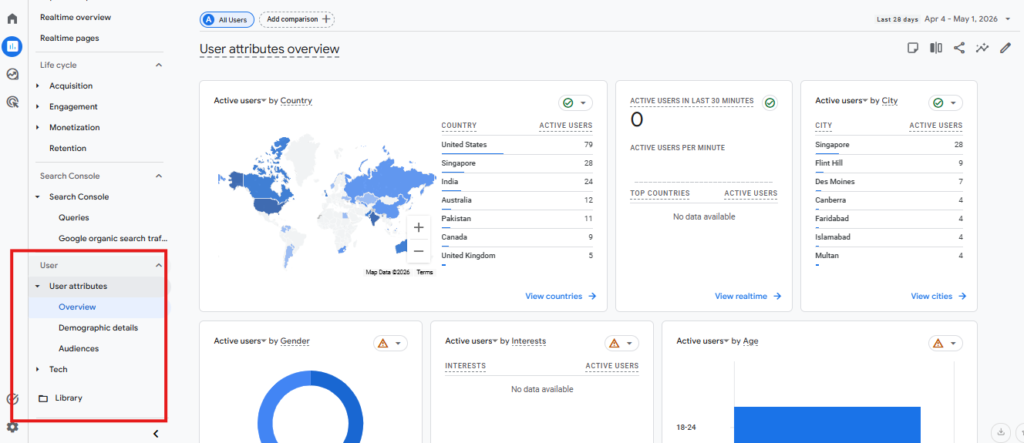
Types of User Metrics in Google Analytics
There are different ways Google Analytics counts users. Here are the main types you will see:
- Users: The total number of unique people (or devices) visiting your site.
- New Users: People visiting your site for the first time.
- Active Users: People who did something on your site, like clicking or spending time on a page.
When you look at google analytics users vs new users, you can see how many visitors are coming back versus how many are new. These numbers help you understand if your site is growing and if people are coming back for more.
Why Understanding Users is Important
Knowing what does the users metric measure helps you make better decisions. If you have lots of new users, your marketing is working. If you have more returning users, your site is interesting or useful. When you use metrics to inform your strategy, you can see what works and what needs fixing. You can also compare active users Google Analytics across different periods to spot trends. This knowledge helps you build a website people want to visit again and again.
Defining the Users Metric
What Does the Users Metric Measure?
The users metric in Google Analytics shows how many unique people visit your website. It does not count every single visit. Instead, it counts each person only once during the time you set. This helps answer questions like “What does the users metric measure in GA4?”
Google Analytics uses a special code to track visitors. Each device or browser gets its own code, called a Client ID. So, if someone visits your site from a phone and a computer, they count as two users. This means the users metric is not simply a count of people, but of unique Client IDs. Knowing this helps you use metrics to inform your strategy.
Types of User Metrics
There are several ways Google Analytics tracks users. The main types are Total Users, New Users, and Active Users. Here’s a simple table to show the differences:
| Metric Name | What It Means |
|---|---|
| Total Users | All unique Client IDs in your data |
| New Users | First-time visitors to your site |
| Active Users | Visitors who engage with your content |
Active users in Google Analytics are people who spend time on your site or click around. This helps you learn how engaging your site is. Comparing Google Analytics users vs new users shows how many people come back vs those who visit for the first time. This information helps you improve your website.
Why User Metrics Matter
It is important to understand what does metric mean in Google Analytics. Metrics like users, new users, and active users Google Analytics give you clues about your site’s health. If your number of users grows, your site is reaching more people. If you see more returning users, it means your site is helpful or interesting.
Tracking these numbers helps you make better choices. You can use metrics to inform your strategy, like deciding where to spend money on ads or what pages to update. Understanding what does the users metric measure helps you grow your business and meet your goals.
Using the ‘Users’ Metric for Actionable Insights
Understanding What the Users Metric Measures
To use metrics to inform your strategy, you need to know: what does the users metric measure in GA4? In Google Analytics, the users metric shows how many unique people visit your website. This is done by counting unique devices or browsers. If one person visits your site from a laptop and then from a phone, Google Analytics counts two users. This helps you see the real reach of your site.
The users metric covers several types. Total users represent all unique visitors. New users are people who visit for the first time. Returning users are those who come back. The difference between Google Analytics users vs new users shows how well you keep visitors coming back. Active users Google Analytics tracks are those who interact more, like by clicking or staying a while.
Analyzing Users for Growth and Retention
You can use these insights to see which marketing ideas work. Track changes in user numbers to see if your site is growing. If you have more users each month, your efforts are working. If the number drops, you may need to change your plan. Use metrics to inform your strategy by comparing new users and returning users. If many people come back, your content is useful to them.
It also helps to look at active users Google Analytics reports. These are visitors who engage with your site. If active users rise, your site is getting more attention. If the number is low, try to improve content or make your site easier to use.
Segmenting and Using Metrics in Decision-Making
Segment your users to learn more about their behavior. For example, you can group users by location, device, or how they found your site. This can show what content different groups like best. You can also look at what actions users take after arriving. This helps answer: what does metric mean for your business goals?
Below is a table showing how to compare metrics:
| Metric Type | What It Shows |
|---|---|
| Total Users | All unique visitors |
| New Users | First-time visitors |
| Returning Users | Visitors who come back |
| Active Users | Engaged visitors |
Use this table to see what does users metric measure in GA4. Understanding these numbers makes it easier to plan site improvements and reach your goals.
How Does Google Analytics Count Users? A Closer Look
What Does the Users Metric Measure?
Google Analytics does not just count every visit as a new person. Instead, it keeps track of unique users by using special IDs. When someone visits a site, Google Analytics gives their browser a Client ID stored in a cookie. This way, when the same person returns on the same browser and device, they are counted as the same user. If someone uses a different browser or device, however, they get a new Client ID. That means one person can be counted as more than one user if they use many devices or browsers.
The users metric measures the total number of unique users who have at least one session during the selected time. In GA4, this is called the “Users” metric. It helps answer the question: what does the users metric measure in GA4? It looks at how many unique people (or Client IDs) interact with the site.
Methods Used for Counting Users
Google Analytics uses different tools to find out who is visiting. The main way is the Client ID method. Each device/browser combo gets its own Client ID. If cookies are cleared or if someone uses incognito mode, the system thinks they are a new user.
There is also a User-ID feature. Sites using User-ID can track logged-in users even if they switch devices. This gives a more accurate count. Google Signals is another method, using data from people signed into their Google accounts. This helps track people across devices more easily.
Here is a simple table to show the methods:
| Method | What It Tracks |
|---|---|
| Client ID | Device or browser sessions |
| User-ID | Logged-in users |
| Google Signals | Google account users |
Understanding Active Users and Other Metrics
Active users Google Analytics tracks are those who stay on the site for more than 10 seconds or complete certain actions. This metric shows real engagement. It is important for understanding if users are interested in the content. Using metrics to inform your strategy helps spot trends and make better choices.
Google Analytics users vs new users is another helpful comparison. “New Users” are counted when the Client ID appears for the first time. “Users” is the total count, including both new and returning. By looking at both, you can see if your site attracts new visitors or keeps regular ones. Knowing what does metric mean helps you use this data for business growth.
Types of Users in Google Analytics
What Does the Users Metric Measure in Google Analytics?
When people ask, “What does the users metric measure in GA4?” they want to know how Google Analytics counts people visiting a website. The users metric helps website owners see how many unique people, or devices, visit the site. But what does metric mean? A metric is a way to measure something. In this case, it tells us how many different users have come to the website during a specific time.
This metric is not just about counting everyone who comes to the site. Instead, Google Analytics uses special tools, like Client ID or User-ID, to track visits. This helps give a more accurate count. Still, one person using different devices, like a phone and a laptop, may be counted as two users. This is important to remember when you use metrics to inform your strategy.
Google Analytics Users vs New Users
There are several types of users in Google Analytics. The main ones are Total Users, New Users, and Returning Users. Total Users is the count of all unique users in the chosen time period. New Users are people who visit the website for the first time, according to Google Analytics. Returning Users have visited before and are coming back.
Here’s a table to show the differences:
| User Type | What It Means |
|---|---|
| Total Users | All unique users in a time range |
| New Users | Users visiting for the first time |
| Returning Users | Users who have visited more than once |
Knowing the difference between these types helps answer, “What does the users metric measure?” It also helps website owners see if more people are discovering the site or if current users are coming back again and again.
Active Users Google Analytics
Active users Google Analytics tracks are users who interact with the website in a meaningful way. For example, this includes users who spend more than 10 seconds on the site, click on links, or view more than one page. The Active Users metric is important because it tells you how many users are really engaging. It is not just about visits but about people taking action.
Paying attention to active users helps you use metrics to inform your strategy. For example, if the number of active users is low, you might need to make your website more interesting. By looking at all these different types of users, you can better understand how people use your site and what you can do to keep them coming back.
Common Scenarios That Inflate Your User Count
Multiple Devices and Browsers
A big reason user numbers can go up quickly is when people visit your site from more than one device. The users metric in Google Analytics counts each device as a separate user. If someone checks your website on their phone, then later on a laptop, Google Analytics will see this as two users. The same thing happens if one person uses different browsers. For example, checking your site on Chrome and later on Firefox counts as two users. This makes it important to understand what does metric mean in this context: it shows unique Client IDs, not unique people.
This is why it is key to know what does the users metric measure in GA4. Metrics like active users Google Analytics show may not always reflect real people. Marketers who want to use metrics to inform your strategy should consider how device switching may inflate user counts. Comparing google analytics users vs new users can also highlight these differences.
Cookie Deletion, Private Browsing, and Time Gaps
Cookies help Google Analytics track users by storing a Client ID in your browser. If someone clears cookies or uses private browsing, a new Client ID is created. This means Google Analytics thinks it’s a brand new user every time. Even the same person will be counted as multiple users if they clear cookies often or use incognito mode. This can make user numbers look bigger than they really are.
Another thing that can affect the data is large gaps between visits. If a user does not visit for a long time and their cookie expires, they will be counted as a new user next time. This is important when asking what does users metric measure in GA4. It shows how event-based tracking can sometimes lead to inflated numbers if users return after long breaks.
Table: How User Counts Can Increase
| Scenario | User Count Effect |
|---|---|
| Using two devices | +1 user |
| Using two browsers | +1 user |
| Clearing cookies | +1 user |
| Private/incognito browsing | +1 user |
| Long gap (cookie expires) | +1 user |
Knowing what does the users metric measure is important. Being aware of these scenarios helps you use metrics to inform your strategy and avoid mistakes. Understanding how Google Analytics users vs new users works will give you a clearer picture of your real audience.
How to Access Users Metric in GA4
Navigating to the Users Metric in GA4
To answer the question, “what does the users metric measure?” it helps to see the data first. In Google Analytics 4 (GA4), finding the users metric is easy. Start by signing into your Google Analytics account. From the main dashboard, look for the Reports section on the left-hand menu. Click on “Life cycle,” then choose “Acquisition.”
Inside the Acquisition report, you will see both “Users” and “New Users.” This is where you explore what does metric mean in the context of your website. You can also compare google analytics users vs new users. The “Users” column shows the number of unique visitors. The “New Users” column shows first-time visitors to your site.
Exploring Active Users and Other User Metrics
GA4 gives you more than just total users. It also shows “Active Users”—a key part of active users google analytics. Active users are those who have interacted with your site within a chosen period. This helps you understand what does users metric measure in ga4. It measures unique visitors who are actually engaged. You can find this in reports by checking the “Active Users” metric for different time ranges—daily, weekly, or monthly.
The Users metric helps use metrics to inform your strategy. See how many users come through different channels. For example, compare social media, email, or search traffic by the number of users. This helps you learn which channels bring more loyal visitors, and which draw in new people.
Customizing and Segmenting Users Data
You can dig deeper by using segments in GA4. Segments help split data into groups, such as new vs. returning users. This way, you see more than just totals. You learn how each group acts on your site. It becomes easier to answer questions like what does users metric measure in ga4 for each type of visitor.
Try changing the date range to spot trends. Use filters to focus on certain pages or campaigns. These actions make the users metric more powerful. The users metric in Google Analytics is not just a number. It is a tool to help you make better choices for your website.
Using User Metrics to Inform Your Strategy
Understanding What the Users Metric Measures
When asking what does the users metric measure in Google Analytics, it is important to know how it works. The users metric counts unique visitors to your site. In Google Analytics, a user is a browser or device that loads your website. This is done by giving each device a unique Client ID. If someone visits your site from their phone and computer, they count as two users.
GA4 also tracks users with extra tools. For example, it can use a User-ID if someone logs in on different devices. The question, what does users metric measure in ga4, means figuring out how many unique people interact with your site. This helps you know if your site is reaching new people or bringing back returning visitors.
Comparing Active Users, New Users, and Returning Users
Google Analytics splits users into different types. You may wonder, what does metric mean for these groups? The main groups are active users, new users, and returning users. Active users Google Analytics tracks are people who take action, like clicking links or staying on a page for a while.
Google Analytics users vs new users is also important. New users have never visited your site before, while returning users have. This split shows if your site gets repeat visitors. By looking at these numbers, you can start to use metrics to inform your strategy. For example, if you see many new users but few returning users, you may need to work on keeping people engaged.
Using Metrics to Guide Website Decisions
What does the users metric measure can help you improve your website. If you want to grow, track both total and active users Google Analytics counts. If you see user numbers drop, it may be time to update your content or try new marketing.
Use metrics to inform your strategy by checking:
- The balance between new and returning users
- How engaged users are (time on site, pages per visit)
- Which channels bring in the most users
Here is a simple table to show what these metrics help you decide:
| Metric | What It Tells You |
|---|---|
| Total Users | Site reach and growth |
| New Users | Ability to attract new people |
| Returning Users | Site loyalty and retention |
| Active Users | Level of engagement |
By understanding what does users metric measure in GA4, you can make better choices for your site. You can check if your marketing efforts work. You can also see if your changes keep users coming back and staying longer.
Common Misconceptions About User Metrics
Users Metric: More Than Just Counting People
Many people think the users metric in Google Analytics simply counts every person who visits a website. However, answering “what does the users metric measure” is more complex. Google Analytics uses Client IDs stored in cookies to count users, not real people. If someone visits your site on their phone and later on their laptop, each device is counted as a separate user. Clearing cookies or using private browsing can create new user counts for the same person.
When looking at what the users metric measures in GA4, it’s important to remember that the number can be higher than your actual number of visitors. This happens because the system counts unique browsers or devices, not unique people. Using metrics to inform your strategy means understanding these limits.
Confusing Active Users, New Users, and Returning Users
The question “what does metric mean” in analytics often leads to confusion among site owners. Many mix up active users in Google Analytics with total users. Active users are those who engage with the site for more than 10 seconds or perform a certain action. This is different from just counting visits.
Another common mix-up is between Google Analytics users vs new users. Users refers to all unique visitors over a time period, while new users are those visiting for the first time. Returning users are calculated by subtracting new from total users. When you use metrics to inform your strategy, it’s important to know these differences. This helps you get a true picture of site performance.
Misreading Data and Overlooking Metric Limits
It’s easy to misread what the users metric measures in GA4. For example, if you see a jump in users, it may be from the same people using different devices. Long gaps between visits or cookie deletion can also inflate user counts. This table shows how different actions can affect user counts:
| Action | User Count Effect |
|---|---|
| Visits on two devices | Counted as two users |
| Clears browser cookies | New user counted |
| Private/incognito session | New user counted |
| Uses same device/browser | Counted as one user |
Understanding these misconceptions is key. Knowing what the users metric measures helps you use your data more wisely in Google Analytics.
Conclusion
Understanding What the Users Metric Measures
When asking, “what does the users metric measure in Google Analytics?” it is important to know this metric counts unique visitors to your website. This does not simply mean people. Instead, it counts unique browsers or devices. For example, if someone visits your site on their phone and computer, Google Analytics counts two users. That is because the system uses a special ID to tell devices apart.
The difference between Google Analytics users vs new users helps you find both total visitors and those coming for the first time. In GA4, you can see how many active users Google Analytics tracks. Active users are those who interact with your site, not just visit quickly. This helps you see real engagement. If you are wondering, “what does metric mean?” in this context, it is a way to measure specific things, like how many people really use your site.
Why Metrics Matter for Your Strategy
The users metric in GA4 does more than count people. It shows how your website is doing over time. If you want to use metrics to inform your strategy, watch how your users change after you change your website or launch a new ad. If the number of returning users grows, your site is giving value.
You should also track other metrics, like time on site or bounce rate. Together, these give a clear picture. For example, a rise in new users means your marketing works. More active users mean visitors enjoy your site. By watching these numbers, you can adjust your site to keep it popular and useful.
Key Takeaways for Website Owners
Here are the main points to remember:
- The “users” metric in Google Analytics counts unique browsers or devices.
- “Active users” in Google Analytics shows who is really engaging with your site.
- Google Analytics users vs new users lets you track both loyalty and growth.
- Use metrics to inform your strategy and improve your site over time.
- The users metric in GA4 is helpful for seeing both total and active users.
Keeping an eye on these numbers helps you make smart choices for your website. You can see what works, what needs fixing, and how your audience changes. These insights help your business or project grow.
FAQ
What does the users metric measure in Google Analytics?
The users metric measures the number of unique visitors (or devices) that have at least one session on your website during a selected time period. It counts unique Client IDs, not every visit, so one person using multiple devices or browsers may be counted as multiple users.
What is a metric in Google Analytics?
A metric is a number that helps you understand how your website is performing by measuring specific actions or counts, such as the number of users, sessions, or pageviews.
How does the users metric differ in GA4 compared to older versions?
In GA4, the users metric counts the number of people who had at least one session during a specified time frame, using Client IDs or User-IDs, and includes metrics like total users, new users, and active users to show engagement more clearly.
What are the different types of user metrics in Google Analytics?
- Total Users: The total number of unique devices or browsers visiting your site.
- New Users: Visitors who are on your site for the first time.
- Active Users: Visitors who engage with your site, such as clicking or spending time on pages.
What is the difference between users and new users?
Users count all unique visitors during a time period, while new users count only those visiting your site for the first time in that period.
What are active users in Google Analytics?
Active users are visitors who interact with your website in meaningful ways, such as staying more than 10 seconds, clicking links, or viewing multiple pages, indicating engagement rather than just visits.
Why is understanding the users metric important?
Knowing what the users metric measures helps you make informed decisions about marketing effectiveness, site engagement, and user retention, guiding strategies to grow and improve your website.
How does Google Analytics count users across multiple devices or browsers?
Each device or browser combination receives a unique Client ID. If a person visits from multiple devices or browsers, they are counted as multiple users.
What impact do cookie deletion and private browsing have on user counts?
Clearing cookies or using private/incognito mode causes Google Analytics to assign new Client IDs, making returning visitors count as new users and inflating user numbers.
What methods does Google Analytics use to track users?
- Client ID: Tracks device/browser sessions via cookies.
- User-ID: Tracks logged-in users across devices for more accurate counts.
- Google Signals: Uses data from signed-in Google account users to track across devices.
How can I find the users metric in Google Analytics 4 (GA4)?
Sign into GA4, go to the Reports section, select “Life cycle,” then “Acquisition.” Here, you will see both “Users” and “New Users” metrics.
How can segmenting user data help?
Segmenting allows you to group users by behavior, location, device, or source, helping you understand how different user types engage with your site and tailor strategies accordingly.
What should I consider when comparing users vs new users?
Comparing these metrics shows whether your site attracts new visitors or retains returning ones, which is key to assessing growth and loyalty.
How do active users differ from total users?
Active users represent those who engage with your content, while total users include everyone who visits, regardless of interaction level.
What scenarios can artificially increase user counts?
Using multiple devices or browsers, clearing cookies, private browsing sessions, and long gaps between visits (causing cookie expiration) can all increase user counts.
How can user metrics inform website strategy?
By tracking total, new, returning, and active users, you can evaluate marketing effectiveness, user engagement, retention, and decide where to focus improvements or advertising spend.
Why might the users metric not represent actual people?
Because Google Analytics counts unique Client IDs per device/browser, one person using several devices or clearing cookies can be counted multiple times.
What is the difference between returning users and new users?
Returning users have visited your site before, while new users are visiting for the first time within the selected time frame.
How does Google Analytics define a user?
A user is identified by a unique Client ID assigned to a browser/device combo or by a User-ID if logged in, representing a unique visitor for tracking purposes.
What does the users metric in GA4 reveal about website performance?
It shows the real reach and engagement by counting unique visitors and helps identify trends in user acquisition and retention.
How can monitoring active users help improve a website?
Increasing active users indicates more engagement, suggesting your content or site design is appealing, while low active users signal the need for improvements.
What does the users metric tell you about marketing efforts?
A rise in new users suggests successful marketing to attract visitors, while growth in returning or active users indicates good retention and engagement.
How does Google Analytics handle users who switch devices frequently?
Each device/browser is tracked separately, so switching devices results in multiple user counts for the same person.
What role do cookies play in user tracking?
Cookies store the Client ID in a visitor’s browser, allowing Google Analytics to recognize returning users; clearing cookies resets this ID, causing new user counts.
Can user metrics be customized or filtered in GA4?
Yes, you can use segments, date ranges, and filters to focus on specific user groups, behaviors, or campaigns for deeper analysis.
What common misconceptions exist about the users metric?
Many think it counts individual people, but it actually counts unique devices/browsers. Also, active users are often confused with total users, though they represent engagement rather than simple visits.
How can long gaps between visits affect user counts?
If a user doesn’t visit for a long time and their cookie expires, they will be counted as a new user upon return, inflating user numbers.
What is the difference between Client ID and User-ID tracking?
Client ID tracks individual device/browser sessions, while User-ID tracks logged-in users across multiple devices for a more accurate user count.
How do Google Signals improve user tracking?
Google Signals use data from users signed into Google accounts to better track users across devices and browsers.
What key metrics should website owners monitor alongside users?
New users, returning users, active users, time on site, and bounce rate provide a fuller picture of user behavior and site performance.
How can understanding user metrics help meet business goals?
By interpreting these metrics correctly, you can optimize marketing, improve user experience, increase retention, and grow your audience effectively.