Yes, is Google Analytics case sensitive is one of those questions where the short answer is simple, but the useful answer needs more care.
Google Analytics 4 treats many collected values as exact strings. That means uppercase and lowercase versions of the same word can appear as separate values in your reports. If one campaign uses utm_source=facebook and another uses utm_source=Facebook, GA4 can report them as different sources. Google’s own campaign URL guidance says parameter values are case sensitive and gives the same type of example with lowercase and capitalized values.
That does not mean every GA4 feature behaves the same way. Event names are case sensitive. User property names are case sensitive. Regex matching is case sensitive by default. URLs can be case sensitive. At the same time, default channel group definitions are not case sensitive. This is why the answer to is GA4 case sensitive should not stop at “yes.” It should explain where case matters, where it does not, and how to stop inconsistent naming from damaging your reports.
This guide gives you that full answer. It covers UTM parameters, source and medium, campaign names, page paths, URLs, event names, user properties, regex, channel grouping, Google Tag Manager fixes, Looker Studio cleanup, and a practical naming system your team can follow.
Quick Answer: Is Google Analytics Case Sensitive in GA4?
Google Analytics case sensitivity matters because GA4 stores many text values exactly as they arrive. In plain English, email, Email, and EMAIL can become three different values when they are collected as campaign, event, page, or custom dimension data.
The most common place this shows up is acquisition reporting. A marketing team might tag one newsletter link as utm_medium=email, another as utm_medium=Email, and a third as utm_medium=EMAIL. To a person, those all mean the same thing. To GA4, they can be separate dimension values. That creates messy reports and extra work.
The same principle applies to several other parts of GA4. Google’s official event naming rules state that event names are case sensitive, so my_event and My_Event are distinct events. The same rules say event names must start with a letter and should use only letters, numbers, and underscores.
What GA4 Treats as Different: facebook, Facebook, and FACEBOOK
If your traffic source appears as facebook, Facebook, and FACEBOOK, GA4 can show those as separate values in source reports. The same issue can happen with medium, campaign, content, term, landing page paths, event names, and custom dimension values.
This is why GA4 case sensitivity is not a small formatting issue. It changes how data is grouped. If your team runs a campaign on Meta and tags links with both meta and Meta, performance can split across two rows. If you export data to a spreadsheet, dashboard, or warehouse, those rows may need to be manually merged before anyone sees the true total.
The Important Nuance: Case-Sensitive Values vs Case-Insensitive Channel Definitions
There is one important exception many articles skip. GA4’s default channel group definitions are not case sensitive. Google says default channel definitions are not case sensitive and cannot be edited.
That does not solve the whole problem. A medium value like Email may still be recognized as Email for channel grouping, but the raw source/medium row can still look messy elsewhere. Channel grouping and raw dimension reporting are not the same thing.
This distinction is the key to understanding GA4 channel grouping case sensitive questions. The channel definition may ignore case, but your source, medium, and campaign values still need consistent casing if you want clean acquisition reports, dashboards, exports, and campaign analysis.
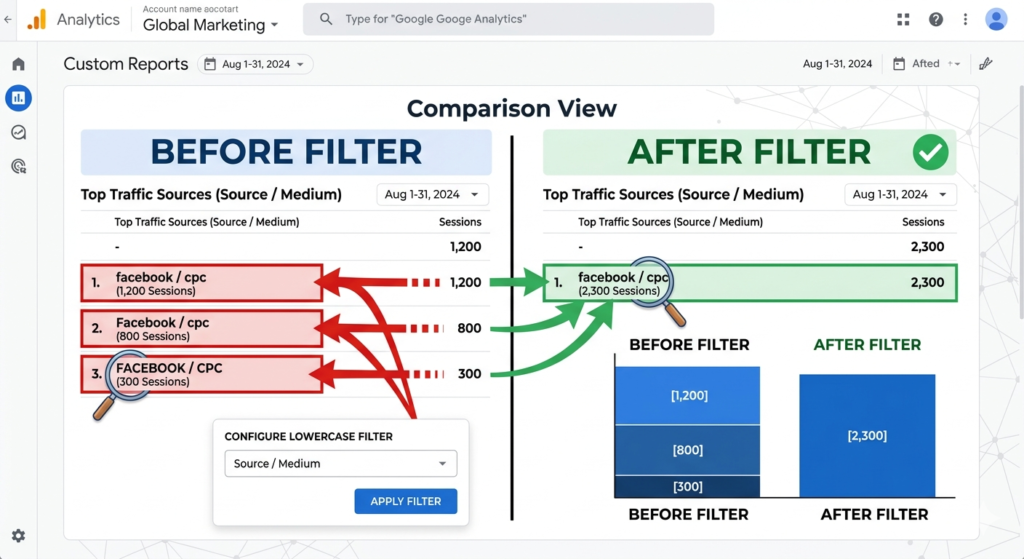
Why Case Sensitivity Matters for GA4 Data Accuracy
Case sensitivity matters because analytics is only useful when similar things are grouped together. If GA4 receives five versions of the same campaign name, the data becomes harder to trust.
Say your spring sale campaign generates 10,000 sessions. If your email team uses spring_sale, your paid social agency uses Spring_Sale, and your affiliate partner uses SPRING_SALE, GA4 may show three campaign rows. Nothing is technically missing. The problem is grouping. The story of performance is scattered.
This is a classic GA4 data fragmentation problem. It does not always change the total number of sessions in the property, but it can change the numbers people use to make decisions. A campaign may look weaker than it is. A channel may appear less efficient. A report may show duplicate rows that confuse stakeholders.
How Mixed Case Creates Duplicate Rows in Acquisition Reports
The clearest symptom is Google Analytics source medium duplicate rows. You open Traffic acquisition or User acquisition and see rows such as:
facebook / paid_socialFacebook / paid_socialfacebook / Paid_Social
Those rows may represent the same channel activity, but GA4 reads the text values differently because the values were sent differently. Google’s campaign URL guidance says values with different capitalization are treated as different values and recommends lowercase as a standard practice.
The issue is not limited to social. It can happen with:
email,Email, andeMailcpc,CPC, andpaid_searchnewsletter_july,Newsletter_July, andnewsletter-July
That is the first of three useful lists in this article. It matters because these are the exact patterns analysts see when campaign governance is weak.
How Fragmented Data Distorts Campaign Performance
When casing fragments a report, people can draw the wrong conclusion. A campaign might look like it delivered 300 conversions under one row, 120 under another, and 40 under another. A manager scanning the first row may think the campaign performed below target. The actual total might be 460 conversions.
The risk gets worse when teams use calculated metrics. Conversion rate, cost per lead, return on ad spend, and revenue per session can all become harder to read when campaign values split. If ad spend is joined to only one version of a campaign name, the performance model can become even more misleading.
The main point is simple: capitalization mistakes do not only make reports ugly. They can influence budget decisions.
Common Warning Signs of Case Problems in GA4
You probably have a case issue if you see duplicate campaign names, repeated source/medium combinations, or page paths that differ only by capitalization. You may also notice custom events that look almost identical, such as form_submit and Form_Submit.
The warning signs usually appear in acquisition reports, pages and screens reports, event reports, and Looker Studio dashboards. If the same business concept appears more than once because of capitalization, your reporting taxonomy needs attention.
UTM Parameters Are the Biggest Case-Sensitivity Risk
The most common question is whether UTM parameters case sensitive behavior still applies in GA4. Yes, it does. Google says campaign URL parameter values are case sensitive. In practice, that means utm_source=google and utm_source=Google are not the same value.
This is why GA4 UTM case sensitive problems are so common. UTMs are often created by many people across many tools. Paid media teams, email teams, agencies, social media managers, CRM platforms, affiliate partners, and automation tools may all create links. Without one shared rule, inconsistent casing is almost guaranteed.
utm_source Case Sensitivity: facebook vs Facebook
The question utm_source case sensitive is important because source tells GA4 where traffic came from. If one person uses facebook, another uses Facebook, and another uses fb, your traffic source data becomes fragmented.
The best rule is to use one lowercase value per source. Choose facebook or meta, then document it. Do not let each campaign owner decide their own version. If you use both facebook and Facebook, you are not adding detail. You are adding cleanup work.
Source values should answer one question: who sent the traffic? Good values are readable, stable, and predictable. For example, use google, bing, facebook, instagram, linkedin, newsletter, or the exact partner name in lowercase.
utm_medium Case Sensitivity and Acquisition Reporting
The question utm_medium case sensitive matters because medium describes the type of traffic. It often influences channel reporting and analysis. For example, email, Email, and newsletter may all be used by different teams, even when they mean the same activity.
A clean medium taxonomy should be short and controlled. Use values such as email, cpc, paid_social, organic_social, affiliate, referral, and display. Avoid letting people create new medium values casually.
The phrase source medium case sensitive GA4 captures a real reporting pain. Source and medium are often read together, so inconsistency in either field creates messy combinations. facebook / paid_social and Facebook / Paid_Social may represent the same work, but the report does not look clean.
utm_campaign, utm_content, utm_term, and utm_id Case Consistency
The question utm_campaign case sensitive matters because campaign names are used to group marketing effort. If campaign naming is messy, campaign reporting becomes unreliable.
Campaign names should be lowercase and structured. For example, spring_sale_2026, black_friday_2026, or lead_gen_webinar_july_2026 are clearer than Spring Sale, springSale, or SPRING-SALE.
The same rule should apply to utm_content, utm_term, and utm_id. These fields often carry ad creative, keyword, placement, audience, or campaign identifier data. If you use them, treat them with the same discipline as source, medium, and campaign.
Page Path, Page Location, and URL Case Sensitivity in GA4
Case sensitivity is not only a campaign problem. It can also affect page reporting. If your site allows both /blog/ and /Blog/, GA4 can receive those as different page paths or page locations. Google Search documentation also warns that URLs are case sensitive and that Google can treat /APPLE and /apple as distinct URLs. It recommends converting text to the same case when the server treats upper and lower case as the same page.
This is where GA4 page path case sensitive questions become important. A content report may show the same article under two or more URL variants. A landing page report may split sessions. A conversion path may look more complex than it is.
Page Path and Screen Class: Why Same Pages Can Split
The phrase page path and screen class case sensitive sounds technical, but the idea is simple. GA4 reports page and screen data based on collected values. If the collected path differs by case, your reports can separate those variants.
For a website, this might mean /pricing, /Pricing, and /PRICING. For an app, screen class naming can run into similar naming discipline problems when developers do not follow one convention.
This is not always GA4’s fault. Sometimes the site itself serves different URLs. Sometimes it redirects uppercase to lowercase. Sometimes it accepts both. Before you normalize analytics data, check how the website behaves.
Page Location, Query Strings, and Parameter Case
The full page URL can include scheme, domain, path, and query string. Query parameters can include UTMs, click IDs, search parameters, filters, and internal tracking values. That makes page location more sensitive than page path alone.
This is why page location lowercase GA4 fixes need care. Lowercasing the full page location can clean up /Blog/ versus /blog/, but it can also alter query string values that should remain untouched. Google Tag Manager’s documentation shows that a custom JavaScript variable can return a lowercase version of a URL, but implementation should be tested before use.
A safer approach is often to lowercase only the path you control, not every query parameter. This is especially important when ad click IDs or platform-generated identifiers are present.
SEO vs Analytics: URL Case Sensitivity Is Not Just a GA4 Issue
URL case also affects SEO hygiene. If a server returns the same content for uppercase and lowercase paths, crawlers may see multiple URL versions. If the server treats them as different resources, uppercase paths may create 404 errors or separate pages.
For analytics, the goal is clean reporting. For SEO, the goal is clean crawling, indexing, and canonicalization. Lowercase URLs are usually easier to manage across both areas. The main rule is to make the server, canonical tags, internal links, redirects, sitemap URLs, and GA4 tracking all agree.
GA4 Event Names Are Case Sensitive
One of the most overlooked facts is that GA4 event names case sensitive behavior is official. Google says event names are case sensitive, so my_event and My_Event are distinct events.
This matters because events are the backbone of GA4. Page views, clicks, scrolls, form submissions, purchases, signups, video plays, file downloads, and lead actions are all events. If naming is inconsistent, your event reports split.
Official GA4 Event Naming Rules
Google’s GA4 event naming rules are not complicated, but teams often ignore them. Event names must start with a letter. They can use letters, numbers, and underscores. They should not use spaces. They should not use reserved prefixes or reserved event names. Event names are case sensitive.
A clean event name should be readable and predictable. generate_lead is better than Lead Generated, leadGenerated, or lead generated. It follows the naming style GA4 users expect and is easier to query later.
Custom Events: Why Lead_Submit and lead_submit Should Not Coexist
The phrase custom event names GA4 often appears when teams are setting up form tracking, lead tracking, ecommerce events, or engagement events. The problem starts when multiple people create events without a shared naming standard.
If one developer sends lead_submit, another sends Lead_Submit, and a GTM container sends form_submit, the business may end up with three event names for one action. That makes conversion setup harder. It also confuses reporting and testing.
Pick one event name before implementation. Document it. Test it in DebugView. Then reuse it everywhere.
Recommended Event Naming Convention: Lowercase Snake Case
Lowercase snake case is the safest convention for GA4 events. It uses lowercase words separated by underscores. Examples include form_submit, newsletter_signup, video_start, file_download, and pricing_click.
This convention is easy for marketers to read and easy for analysts to query. It also matches Google’s rule that event names may use letters, numbers, and underscores.
Event Parameters, User Properties, and Custom Dimensions
Case sensitivity also affects the data attached to events. Event parameters, user properties, and custom dimensions all need a naming convention. If your event names are clean but your parameters are messy, the reporting problem is only half solved.
Google’s documentation says user property names case sensitive GA4 behavior is real. If two user properties differ only in case, they are treated as two distinct user properties.
User Property Names: A Hidden Case-Sensitivity Risk
User properties describe users. They might include values like customer type, plan tier, language preference, login status, or account role. If your team sends both customer_type and Customer_Type, GA4 can treat them as different user properties.
This is a hidden problem because user properties are usually configured less often than UTMs, but they can affect audiences, segments, personalization, and analysis. Bad naming here can create long-term measurement debt.
Event Parameters and Custom Dimensions: Standardize Before Registration
Event parameters should also use lowercase snake case. Examples include form_id, button_text, content_type, plan_name, and video_title.
The value side needs standards too. For example, if plan_name can be Pro, pro, or PRO, reports may fragment. If the parameter value comes from a CMS, CRM, or product database, standardize it upstream when possible.
Custom dimensions make this more important. Once a parameter is registered and used in reports, inconsistent values become visible to everyone. Fixing naming before registration is easier than explaining messy reports later.
GA4 Data API Filters and Case-Sensitive Matching
Developers should also know how the GA4 Data API handles filters. The Data API’s string filters include a caseSensitive boolean. If it is set to true, the string value is case sensitive. This gives developers control when building reports, automation, or dashboards from GA4 data.
That does not remove the need for clean naming. API filters can help retrieve or transform data, but they do not fix the original collection quality. Good data collection still starts with consistent names.
Regex, Comparisons, Audiences, and Filters: How Matching Works
Regex can be powerful in GA4, but it can also expose casing mistakes. The phrase GA4 regex case sensitive matters because Google says GA regex is full regex and case sensitive by default.
If you write a regex rule for email, it may not match Email unless you use the right pattern or an ignore-case option where available. This affects comparisons, event rules, audiences, content groups, and reporting filters.
GA4 Regex Is Case Sensitive by Default
Regex is often used when exact matches are too narrow. For example, you might use regex to match a group of landing pages, campaigns, or event parameters. If your values are inconsistently capitalized, your regex may miss part of the data.
That creates silent reporting errors. A filter may look correct, but it only captures lowercase values. A dashboard may exclude uppercase campaign names. An audience rule may include fewer users than expected.
Exact Match vs “Ignore Case” Operators
GA4 event creation and modification conditions include operators that can be case sensitive or ignore case. Google’s documentation says that to define a case-sensitive condition, use an operator that does not include “ignore case,” such as equals instead of equals (ignore case).
This means you need to choose matching logic with intent. If you want strict naming control, use exact case-sensitive matches. If you are cleaning inconsistent incoming values, an ignore-case match may be more practical.
Regex Mistakes That Cause Missing or Incomplete Data
The most common regex mistake is assuming the match is case insensitive. Another is assuming a partial match when the tool expects a full match. Google’s regex guidance says Analytics regex is full regex by default, so partial regex needs metacharacters.
Good regex work starts with sample data. Export the values you want to match. Check uppercase and lowercase variants. Test the rule. Then publish it.
Channel Grouping: What Case Does and Does Not Break
The phrase GA4 channel grouping case sensitive deserves its own section because this is where people get confused.
Default channel definitions are not case sensitive. That means a value does not always need exact lowercase to fit a channel definition. Google states that channel definitions are not case sensitive and cannot be edited.
Still, that does not mean you can ignore casing. Channel grouping is only one layer of reporting. Raw source, medium, campaign, content, term, page, and event dimensions can still show inconsistent values.
Default Channel Group Definitions Are Not Case Sensitive
Default channel group rules are controlled by Google. You can use them for high-level channel reporting, but you cannot edit the default definitions. If you need custom logic, GA4 also supports custom channel groups. Google notes that custom channel definitions are evaluated in order and that channel definitions are not case sensitive.
The takeaway is not “case does not matter.” The takeaway is “case may not break the channel bucket, but it can still break clean analysis.”
Source/Medium Rows Can Still Fragment Even When Channels Classify Correctly
A campaign can appear under the right default channel while source/medium rows still look messy. For example, Email, email, and EMAIL may all end up in Email channel reporting, while still appearing as separate values in source/medium or campaign reports.
That is why lowercase UTMs remain the best practice. Channel grouping can help classification, but it is not a substitute for campaign naming governance.
Custom Channel Groups and Rule Order
Custom channel groups are useful when your business has channels that default GA4 rules do not capture well. For example, you might want to separate paid social prospecting, paid social retargeting, partner traffic, influencer traffic, and lifecycle email.
Even when channel definitions are not case sensitive, consistent input values make custom rules easier to maintain. Rule order also matters. A broad rule placed too early can catch traffic that should have gone into a more specific channel.
How to Audit Case-Sensitivity Problems in GA4
The fastest way to find case problems is to look for repeated business meanings with different capitalization. Do not start by changing tags. Start by auditing the current state.
You need to check acquisition, pages, events, and any custom dimensions that matter to your reporting. This audit can be manual for a small site, but larger accounts should export the data into a spreadsheet, Looker Studio, or BigQuery.
Audit Traffic Acquisition for Source/Medium Variations
Open acquisition reporting and review source, medium, source/medium, campaign, and default channel group. Sort by sessions, conversions, or revenue. Look for values that differ only by case.
A quick audit flow looks like this:
- Review source and medium values for uppercase variants.
- Check campaign names for title case, mixed case, spaces, and duplicate meanings.
- Compare raw source/medium values against default channel group to spot classification gaps.
That is the second list in this article. It is short because the real work is in the review, not the checklist.
Audit Pages and Screens for Uppercase URL Variants
Next, check Pages and screens. Look for page paths that differ only by capital letters. Pay close attention to landing pages, high-traffic blog posts, pricing pages, lead pages, and checkout pages.
If uppercase URL variants exist, check your website behavior. Does the uppercase path redirect? Does it return a valid page? Does it show the same content? Does the canonical URL use lowercase? The analytics fix should not hide a technical SEO issue.
Audit Events, Parameters, and DebugView
Review your Events report. Look for similar event names with different casing or wording. Then test important events in DebugView.
DebugView is useful because it shows incoming events during testing. If a form submission fires form_submit on one page and Form_Submit on another, you can catch it before the mistake becomes weeks of messy data.
Prevention: Build a Lowercase Naming Convention Before Data Reaches GA4
The best fix is prevention. Once GA4 stores mixed-case data, cleaning it later is extra work. The smarter approach is to use lowercase UTM parameters, clean event names, and a documented taxonomy before traffic arrives.
A good UTM naming convention GA4 system should define allowed values for source, medium, campaign, content, term, and ID. It should also define event naming rules, parameter naming rules, and page URL rules.
Create a Controlled UTM Dictionary
A controlled UTM dictionary is a simple document that tells everyone which values are allowed. It does not need to be complex. It just needs to be followed.
For example, decide whether the source should be facebook, meta, or instagram for each use case. Decide whether paid social medium should be paid_social or cpc. Decide whether email medium should always be email.
Without a dictionary, every campaign becomes a naming experiment.
Use Lowercase, Hyphens or Underscores, and No Spaces
Use lowercase for values you control. Avoid spaces. Use one separator style. For GA4 event names and parameters, underscores are a natural fit because Google’s event naming rules allow underscores. For campaign values, underscores or hyphens can both work, but do not mix them randomly.
Google’s campaign URL guidance recommends maintaining a strict case-sensitive naming convention for fields such as source, medium, and campaign, and it recommends lowercase as standard practice.
Assign Ownership for Campaign Tagging Quality
Naming rules fail when nobody owns them. Give one person or team authority over campaign taxonomy. That could be analytics, marketing operations, performance marketing, or SEO, depending on the organization.
The owner should maintain the UTM dictionary, review new campaign values, and audit reports monthly. Agencies and freelancers should use the same rules as internal teams.
Fixing Future GA4 Data With Google Tag Manager
A common search is Google Analytics lowercase filter. This comes from the Universal Analytics era, when view filters were often used to lowercase campaign, request URI, or hostname fields. GA4 does not use the same view filter model. In GA4, future cleanup is usually handled before data is sent, inside Google Tag Manager, the website, the app, or the platform creating the links.
That is why people now search for GA4 lowercase filter solutions and often end up using GTM variables, event modification rules, or reporting-layer transformations.
Create a Lowercase URL Variable in GTM
A Google Tag Manager lowercase URL variable can be created with custom JavaScript. Google’s Tag Manager documentation gives an example of a custom JavaScript variable returning the predefined URL variable in lowercase.
This can help when page URL casing is inconsistent. But do not publish a lowercasing rule blindly. If the full URL contains query parameters with case-sensitive values, changing them can create tracking issues.
Send a Lowercase page_location Value to GA4
The page location lowercase GA4 method usually means modifying what your GA4 tag sends as the page_location parameter. Instead of sending the raw browser URL, you send a normalized version.
This should be tested carefully. Use Tag Assistant, DebugView, and Realtime reports. Confirm that page views still arrive, page titles still make sense, and campaign parameters are not damaged.
Protect gclid and Other Case-Sensitive Query Parameters
Do not lowercase values you do not control. Ad click identifiers, platform IDs, CRM tokens, product IDs, and authentication-related parameters can be case sensitive. A broad lowercasing rule can damage data if it changes values that another system expects to read exactly.
A safer method is to normalize only the path or only known marketing parameters. If your team is not technical, ask a developer or analytics specialist to review the transformation before publishing.
Fixing Historical Mixed-Case Data Without Changing GA4
Once mixed-case values have already been collected, you cannot simply rewrite the past inside standard GA4 reports. That is where historical GA4 data cleanup comes in.
The goal is to make past reporting useful without pretending the original data was collected differently. You can clean reporting layers, dashboards, exports, and warehouse queries. You can also document known mapping rules.
Use Looker Studio Calculated Fields for Dashboard Cleanup
A common reporting workaround is Looker Studio lowercase GA4 cleanup. Looker Studio supports a LOWER(X) function that converts text to lowercase in calculated fields. It also includes text functions where some matching functions are case sensitive, such as CONTAINS_TEXT, ENDS_WITH, and STARTS_WITH.
This means you can create a calculated field that lowercases source, medium, campaign, or page path for dashboard grouping. It does not change GA4 data. It only changes how the data appears in that report.
Use BigQuery LOWER() and Mapping Tables for Reliable Analysis
For larger properties, BigQuery is often a better place to clean historical data. You can use SQL to lowercase values, group mixed-case variants, and join mapping tables.
A mapping table is useful when lowercase alone is not enough. For example, fb, facebook, and meta may all need to map to one reporting source. Lowercasing helps with case. Mapping helps with synonyms.
Avoid Manual Spreadsheet Cleanup as a Long-Term Process
Manual cleanup works once or twice. It fails when reports are recurring. If someone has to export data every week and combine uppercase and lowercase rows manually, the measurement system is too fragile.
Use spreadsheets for diagnosis. Use Looker Studio, BigQuery, GTM, or source-platform governance for repeatable cleanup.
Parameter Names vs Parameter Values: What Actually Needs Lowercase?
UTM discussions often blur parameter names and parameter values. Both matter, but in different ways.
Parameter names are the fixed keys, such as utm_source, utm_medium, and utm_campaign. Parameter values are the data you enter, such as google, email, or spring_sale_2026.
Keep UTM Parameter Names Standard and Lowercase
Use standard lowercase parameter names. Do not invent names like UTM_Source, utmSource, or source_utm. GA4 expects recognized campaign parameters when collecting campaign data. Google’s campaign URL guidance lists UTM parameters such as utm_source, utm_medium, utm_campaign, utm_id, utm_source_platform, utm_term, utm_content, utm_creative_format, and utm_marketing_tactic.
The safest habit is simple. Keep the parameter names exactly standard and lowercase.
Treat UTM Values as Strictly Case-Sensitive
The values need the most governance because humans create them. A source value of LinkedIn and linkedin may look harmless, but it can split reporting. A campaign value of SpringSale and spring_sale may look close, but it is not the same string.
This is where UTM builders help. The Google Campaign URL Builder GA4 workflow is useful because it encourages structured inputs. But a builder alone is not enough. The person filling it out still needs a naming standard.
Internal Links, Redirects, Shorteners, and Other Edge Cases
Case issues often start outside GA4. They can come from email platforms, ad platforms, redirect chains, short links, CMS templates, or internal links. Your tracking system is only as clean as the links that feed it.
Do Not Use UTMs on Internal Links
UTMs are designed to identify external campaign traffic. Using UTMs on internal links can overwrite or confuse attribution. For internal promotions, use event tracking, internal campaign parameters that do not replace acquisition data, or content grouping.
For example, do not tag a homepage banner link to your pricing page with utm_source=homepage. That can make the visit look like a new campaign source when the user is already on your site.
Check Redirects, Email Click Tracking, and Short URLs
Redirects can strip, rewrite, encode, or duplicate parameters. Email platforms may append their own tracking parameters. Shorteners may preserve UTMs, but the only safe method is to test the final landing URL after clicking.
Before a major campaign launches, click every final link. Check the browser address bar. Confirm UTMs are present, lowercase, and complete. Then confirm the data appears correctly in GA4 DebugView or Realtime.
Watch Auto-Tagging and Third-Party Integrations
Google Ads auto-tagging uses click identifiers. Do not lowercase or rewrite those values. CRM systems, affiliate platforms, social schedulers, and email tools may also generate tracking links.
The best process is to let platform-generated identifiers remain untouched while controlling the UTM values your team defines.
Recommended GA4 Case Standards With Examples
A clean analytics setup needs clear rules. The rules should be easy enough for a campaign manager to follow and strict enough for an analyst to trust.
| GA4 area | Recommended case standard | Good example | Avoid |
|---|---|---|---|
| UTM parameter names | Lowercase official names | utm_source | UTM_Source |
| UTM source values | Lowercase controlled values | linkedin | LinkedIn, linkedIn |
| UTM medium values | Lowercase controlled values | paid_social | PaidSocial, Paid_Social |
| UTM campaign values | Lowercase structured names | spring_sale_2026 | Spring Sale 2026 |
| GA4 event names | Lowercase snake case | form_submit | Form Submit |
| Event parameters | Lowercase snake case | button_text | ButtonText |
| User properties | Lowercase snake case | customer_type | Customer_Type |
| Page paths | Lowercase where the site allows | /pricing/ | /Pricing/ |
This table should become the standard for anyone creating tags, links, dashboards, or documentation.
Recommended Standard: Lowercase Everything You Control
Lowercase everything your team controls. That includes UTM values, campaign names, event names, event parameters, user property names, and most page URL paths.
Do not lowercase values generated by other systems unless you know it is safe. Click IDs, tokens, product IDs, and some query string values may be case sensitive.
Example UTM Naming Table by Channel
Here is a practical campaign naming table you can adapt.
| Channel activity | Source | Medium | Campaign example |
|---|---|---|---|
| Google paid search | google | cpc | brand_search_q3_2026 |
| Meta paid social | facebook or instagram | paid_social | summer_sale_2026 |
| LinkedIn paid social | linkedin | paid_social | b2b_demo_q3_2026 |
| Email newsletter | newsletter | email | weekly_digest_2026_07_10 |
| Affiliate partner | partner name in lowercase | affiliate | partner_launch_2026 |
| Influencer campaign | influencer handle in lowercase | influencer | creator_drop_2026 |
| Display campaign | ad platform in lowercase | display | remarketing_q3_2026 |
This is the second and final table in the article. It gives teams a repeatable naming pattern without padding the content.
Example Event Naming Table for GA4
Event names should describe the action. Use verbs and nouns that make sense to marketers and analysts. Good examples include form_submit, lead_generate, pricing_view, file_download, video_complete, demo_request, and checkout_start.
Keep names stable. Do not rename the same action every quarter. If the meaning changes, document the change.
Case-Sensitivity Cleanup Checklist
Case cleanup should happen in three stages: find the mess, stop new messy data, then repair reporting.
First 30 Minutes: Find the Problem
Start with GA4 reports. Look at source, medium, campaign, page path, event name, and important custom dimensions. Export the values if needed. Sort alphabetically to spot capitalization variants.
Your first goal is not to fix everything. It is to identify where inconsistent case is hurting decisions.
First 24 Hours: Stop New Dirty Data
Update campaign templates, UTM builders, agency instructions, GTM rules, and event documentation. If a current campaign is using mixed-case values, fix the live links where possible.
Use this short action list:
- Freeze new campaign values until they match the naming dictionary.
- Update GTM or site tracking only after testing in DebugView.
- Tell every campaign owner which lowercase values to use going forward.
That is the third and final list in this article.
First 30 Days: Clean Reporting and Governance
Build a recurring monthly audit. Review acquisition values, event names, and page path variants. Create Looker Studio calculated fields or BigQuery cleanup views for historical analysis. Assign ownership so naming rules stay alive after the first cleanup.
The goal is not perfection for one week. The goal is a measurement system that remains clean while campaigns, people, and platforms change.
FAQ: Google Analytics Case Sensitivity
Is Google Analytics case sensitive?
Yes. Many Google Analytics 4 values are case sensitive, including UTM parameter values, event names, user property names, regex matches by default, and URL-related values. The safest rule is to use lowercase for all values your team controls.
Are UTM parameters case sensitive in GA4?
Yes. Google says URL parameter values are case sensitive. For example, lowercase and capitalized versions of the same source can be treated as different values in reporting.
Are GA4 event names case sensitive?
Yes. Google’s event naming rules state that event names are case sensitive, so my_event and My_Event are distinct events.
Is GA4 regex case sensitive?
Yes, by default. Google’s Analytics regex documentation says regex is full regex and case sensitive by default. Use the right pattern or an ignore-case option where the interface supports it.
Is page path case sensitive in GA4?
GA4 can report page paths as they are collected. If your site allows uppercase and lowercase URL paths, reports may split those variants. Google Search also treats URLs as case sensitive, so lowercase URL consistency is a good analytics and SEO habit.
Can I make GA4 case insensitive?
You cannot make all of GA4 case insensitive with one setting. You can prevent problems by standardizing naming before collection. You can also use GTM, event modification rules, Looker Studio calculated fields, API filters, or BigQuery transformations depending on the use case.
Can I fix historical mixed-case GA4 data?
You usually cannot rewrite historical standard GA4 report data. You can clean past reporting in Looker Studio, BigQuery, spreadsheets, or other reporting tools. Use lowercase calculated fields or mapping tables to group old variants.
Should I lowercase all UTM parameters?
Use lowercase official parameter names and lowercase values for everything your team controls. Do not blindly lowercase platform-generated IDs or query values that may be case sensitive.
Does case sensitivity affect channel grouping?
Default channel definitions are not case sensitive, but source, medium, campaign, and other raw report values can still fragment. Clean UTM casing is still worth enforcing.
Should I use lowercase or title case for campaign names?
Use lowercase. Title case looks nice in a spreadsheet, but lowercase is safer for repeatable reporting. Use spring_sale_2026, not Spring Sale 2026.
Can Google Tag Manager fix case sensitivity?
GTM can help prevent future issues by transforming certain values before they are sent to GA4. For example, a custom JavaScript variable can return a lowercase version of a URL. Test carefully so you do not change case-sensitive query values.
Can Looker Studio combine uppercase and lowercase GA4 values?
Yes, for reporting. Looker Studio has a LOWER(X) function that can convert a dimension value to lowercase in a calculated field. That helps dashboards group mixed-case values, but it does not change the original GA4 data.
Final Takeaway
Google Analytics 4 is case sensitive in the places that matter most for data quality. UTM values, source and medium, campaign names, event names, user properties, regex rules, and URL paths all need consistent naming.
The fix is not complicated, but it must be intentional. Use lowercase for everything you control. Create a UTM dictionary. Follow lowercase snake case for events and parameters. Test GTM changes before publishing. Use Looker Studio or BigQuery to clean historical reporting. Do not rely on channel grouping to hide messy source and campaign values.
The best analytics setups do not wait for reports to become messy. They prevent messy data from entering GA4 in the first place.