Mobile search is no longer a side channel. It is the default way many people discover businesses, compare products, read reviews, ask questions, get directions, and make buying decisions. Mobile usage continues to dominate many search journeys, which makes mobile visibility a core search asset rather than a design preference.
Google’s own systems make this even clearer. Google uses the mobile version of a site’s content, crawled with the smartphone agent, for indexing and ranking. That process is called mobile-first indexing, and it means the version of your page that matters most is the one users see on a phone.
This article explains why mobile SEO in 2026 matters, how it affects rankings and revenue, and what businesses should fix first as search becomes faster, more local, more visual, and more AI-assisted.
What Mobile SEO Means in 2026–27: Beyond “Mobile-Friendly”
Mobile search engine optimization is the practice of making a website easy for mobile users and search engines to access, understand, load, navigate, and trust. A few years ago, many teams treated mobile SEO as a responsive design task. That view is too narrow now.
A strong mobile strategy covers crawling, rendering, indexing, page speed, content structure, internal links, structured data, local discovery, product data, visual assets, and conversion flow. It also has to support AI-shaped search results, because modern search systems can process broader user intent, related questions, and multiple content formats before presenting an answer.
A mobile-friendly website does not only fit a small screen. It gives the same useful content, clear navigation, fast interaction, stable layout, accessible media, and trustworthy signals that users expect on desktop. Strong mobile SEO also requires parity between mobile and desktop content, including structured data, headings, images, videos, titles, and meta descriptions.
Mobile SEO vs desktop SEO: what actually changes on smartphones
Desktop visitors often browse with a larger screen, keyboard, mouse, stronger connection, and more patience. Mobile visitors are different. They scan faster. They tap with thumbs. They may be standing in a store, sitting in a car, comparing prices, looking for directions, or trying to complete a form before the page refreshes.
That changes the SEO job. On mobile, the page must answer intent quickly, but it cannot become thin. The navigation must be compact, but it cannot hide important internal links from Google. The design must feel clean, but it cannot remove important trust signals, review content, or schema markup.
This is why mobile optimization sits between SEO, UX, development, analytics, and conversion rate optimization.
Mobile-first does not mean mobile-only
Mobile-first indexing does not mean desktop users no longer matter. Desktop can still drive high-value leads, especially in B2B, SaaS, finance, software, and research-heavy markets. The point is simpler: Google mainly evaluates the mobile version for indexing and ranking, so weak mobile pages can damage overall organic performance.
A business can have a beautiful desktop site and still lose search visibility if its mobile version has missing text, broken images, blocked resources, poor JavaScript rendering, or slow interactions. Mobile-first means your mobile page is the source of truth.
Why Mobile SEO Is Business-Critical in 2026–27
The importance of mobile SEO comes from user behavior and search engine behavior working together. Users rely on phones for search. Google relies on mobile content for indexing. AI search experiences are expanding across mobile search surfaces. These forces make mobile SEO a business growth issue.
A poor mobile page creates friction before the user even judges your offer. Slow load time, cramped text, jumpy layout, small buttons, intrusive popups, hidden reviews, or a long checkout can turn qualified visitors into exits. Research around mobile web behavior has repeatedly shown that users abandon slow mobile pages quickly, especially when pages take several seconds to load.
Mobile is where users discover, compare, and convert
Mobile search often sits close to action. A user may search for “best dentist near me,” “emergency AC repair,” “running shoes size 9,” “coffee shop open now,” or “compare CRM pricing” with a clear next step in mind. That next step could be a call, map direction, cart addition, booking, download, or inquiry.
Good mobile SEO reduces the distance between question and action. The user finds the answer, trusts the page, and knows what to do next. That is why mobile SEO cannot stop at rankings. It must include conversion elements such as clear CTAs, visible contact details, readable reviews, short forms, and fast checkout.
Mobile SEO protects rankings across devices
Because Google uses the mobile version for indexing and ranking, your mobile page must carry the full value of the desktop page. If the desktop version has detailed content, author information, product specs, FAQs, reviews, and schema, but the mobile version removes half of it, Google may have less to evaluate.
This makes mobile SEO defensive as well as offensive. It helps you gain rankings, but it also protects existing rankings from technical mistakes during redesigns, theme changes, migrations, and mobile template updates.
Mobile-First Indexing: The Foundation of Modern Mobile SEO
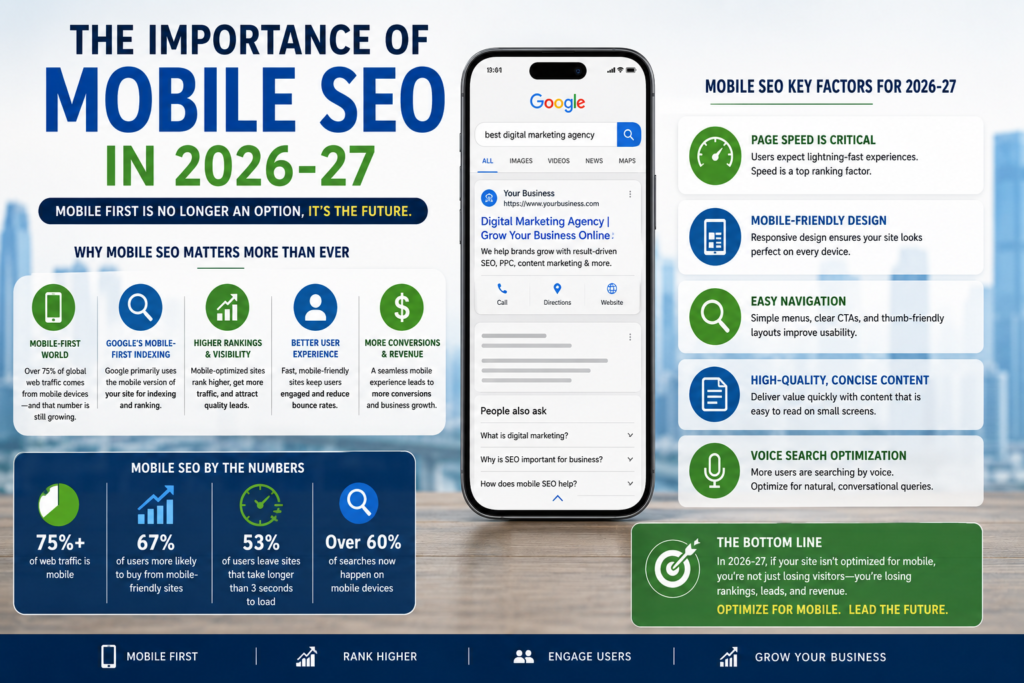
Mobile-first indexing is one of the most important SEO concepts for 2026–27. Google uses the mobile version of a site’s content for indexing and ranking. A mobile version is not always required to appear in Search, but it is strongly recommended.
The mistake many site owners make is thinking mobile-first indexing is already “handled” because their site resizes on a phone. That is not enough. Google needs to access the mobile page, render it, read its content, follow links, understand its structured data, process images and videos, and see the same meaningful signals that exist on desktop.
Mobile content parity: the hidden ranking risk
Mobile content parity means the mobile page and desktop page provide equivalent primary content and important supporting information. The content does not have to look identical, but it should not lose meaning, depth, internal links, headings, or structured data on mobile.
Accordions, tabs, and collapsible sections are fine when they improve mobile readability. The issue is not hiding content for layout. The issue is removing content from the mobile HTML or making it unavailable to Google. A product page that hides reviews, specifications, shipping details, FAQs, and comparison content on mobile becomes weaker.
Mobile metadata, headings, and structured data parity
Mobile metadata should match the intent and meaning of the desktop page. Title elements and meta descriptions should stay equivalent across mobile and desktop versions. Clear headings should also remain consistent.
Mobile structured data matters for the same reason. If your desktop page includes Product, LocalBusiness, Breadcrumb, VideoObject, or Article schema, the mobile version should also include valid structured data. Structured data helps search engines understand the page and can make pages eligible for rich results when guidelines are met.
Mobile rendering, robots tags, and lazy-loaded content
Mobile pages often depend on JavaScript, lazy-loaded images, client-side rendering, cookie banners, personalization, and app-like interfaces. Google can process JavaScript, but blocked files, blocked resources, or poorly rendered content can still create indexing problems.
Developers should not block CSS, JavaScript, image files, or API resources needed to render important mobile content. Lazy-loaded content should load when it enters the viewport or be discoverable in rendered HTML. Infinite scroll should have crawlable URLs or pagination patterns. A mobile page that looks fine to users after interaction can still be weak for search if Google cannot access the content.
Responsive Web Design and Mobile Site Architecture
Responsive web design is the safest setup for most websites because one URL serves the same HTML and adjusts layout with CSS. Google recommends responsive design because it is easier to implement and maintain than separate mobile URLs or dynamic serving.
That does not mean every responsive site is well optimized. A responsive layout can still ship huge desktop images to phones, hide important links, create poor tap targets, load too much JavaScript, or push content below intrusive elements.
Responsive design as the safest SEO configuration
Responsive design reduces common SEO risks. There is no separate m-dot URL to canonicalize. There is no need to manage alternate tags between desktop and mobile URLs. Link equity stays on one URL. Analytics and reporting are cleaner. Content parity is easier because the same content source is usually used for both layouts.
For most businesses, this is the best foundation. It keeps the technical setup simple while leaving room to optimize speed, UX, schema, and conversion flow.
Separate mobile URLs and canonical problems
Some older sites still use separate mobile URLs such as m.example.com. This setup can work, but it carries more risk. The desktop page needs to point to the mobile version with the correct alternate relationship, and the mobile version needs to point back with a canonical tag. Redirects must send users and crawlers to the matching page, not the homepage.
Common mistakes include broken alternates, missing canonicals, mobile pages with thinner content, inconsistent schema, and redirect chains. These issues can dilute signals and create indexing confusion.
Mobile navigation, internal links, and crawl paths
Mobile navigation is often reduced to a hamburger menu. That is fine for users if the menu is clear, but it can hurt SEO if important links disappear. Google discovers and evaluates pages through links. If category links, service links, breadcrumbs, related articles, and footer links vanish on mobile, crawl paths become weaker.
A good mobile architecture keeps the main crawl routes intact. It uses breadcrumbs, related links, HTML links, and accessible menus. It also makes high-value pages easy to reach within a few taps.
Core Web Vitals for Mobile: LCP, INP, and CLS
Core Web Vitals for mobile measure real-world user experience across loading performance, responsiveness, and visual stability. The current Core Web Vitals are Largest Contentful Paint, Interaction to Next Paint, and Cumulative Layout Shift. The commonly recommended targets are LCP within 2.5 seconds, INP under 200 milliseconds, and CLS below 0.1 for good user experience.
| Core Web Vital | What it measures on mobile | Good threshold | Common mobile causes of poor scores |
|---|---|---|---|
| Largest Contentful Paint mobile | How quickly the main visible content loads | 2.5 seconds or less | Heavy hero images, slow server response, render-blocking CSS, late font loading |
| Interaction to Next Paint mobile | How quickly the page responds after taps, clicks, or keyboard input | 200 ms or less | Large JavaScript bundles, long tasks, third-party scripts, slow hydration |
| Cumulative Layout Shift mobile | How stable the layout stays while loading | 0.1 or less | Ads without reserved space, images without dimensions, late banners, web fonts |
Search Console’s Core Web Vitals report uses real-world usage data, also called field data, and groups similar URLs when there is enough data.
LCP on mobile: making the main content load fast
LCP is often about the hero section. On a service page, the LCP element may be the main heading or hero image. On ecommerce pages, it may be the product image. On a blog post, it may be the article title or featured image.
To improve mobile LCP, reduce server response time, serve properly sized images, preload the true hero image, remove render-blocking assets, and avoid pushing critical content behind slow scripts. A common mistake is optimizing desktop images while leaving mobile images oversized.
INP on mobile: fixing slow taps and interactions
Interaction to Next Paint mobile is especially important for pages that feel loaded but respond slowly. A user taps a menu, filter, accordion, quantity selector, or checkout button, and nothing happens for a moment. That delay creates frustration.
INP problems often come from JavaScript. Large bundles, unused scripts, tag managers, personalization tools, chat widgets, tracking scripts, and heavy frameworks can block the main thread. INP matters on mobile because phones have smaller CPUs and users interact through touch.
CLS on mobile: preventing layout shifts on small screens
Cumulative Layout Shift mobile gets worse when a small screen has limited room and elements move unexpectedly. A banner loads late. A font swaps. An ad appears. A product image changes height. The user tries to tap a button and taps the wrong thing.
CLS fixes are practical. Reserve space for ads and embeds. Set image and video dimensions. Avoid inserting banners above existing content after load. Use font-display rules carefully. Keep sticky elements stable.
Mobile Page Speed Optimization That Actually Moves Rankings and Conversions
Mobile page speed is a ranking-adjacent quality signal and a conversion issue. Good Core Web Vitals support stronger user experience and better search performance.
Speed work should be prioritized by real impact, not by chasing a perfect lab score. A page can score poorly because of one third-party script that barely affects users, or it can pass a lab test while real users struggle on slower phones. Use both lab and field data, then fix the templates that drive traffic and revenue.
Reduce JavaScript weight before chasing design tweaks
Many slow mobile pages are not slow because of images alone. They are slow because the browser is busy parsing, compiling, and executing JavaScript. Reducing non-critical JavaScript can improve performance scores and reduce load time, especially on low-end phones.
Start with the scripts users do not need right away: chat widgets, heatmaps, A/B testing tools, review widgets, social embeds, sliders, unused libraries, and duplicate analytics tags. Delay what can wait. Remove what does not prove value.
Serve adaptive images for real mobile screens
Mobile pages should not download desktop-sized images and shrink them with CSS. Use responsive image markup, modern formats, compression, correct dimensions, and lazy loading for below-the-fold media. For ecommerce, the main product image must remain high quality, but it should still be delivered at the right size.
Image optimization also supports visual search optimization. Descriptive filenames, relevant alt text, clean product photography, and image availability on mobile help both users and search systems understand what the page offers.
Improve hosting, caching, CDN, and server response
Speed starts before the browser renders anything. Slow hosting, heavy database queries, missing caching, and distant servers can hurt mobile users before the page appears. A CDN, server-side caching, optimized database queries, and compressed assets can reduce the delay.
PageSpeed Insights reports on user experience for both mobile and desktop and provides suggestions for improvement. It is a useful starting point, especially when paired with Search Console field data.
Mobile User Experience: Readability, Tap Targets, and Conversion Flow
Mobile user experience is the part of SEO that users feel most clearly. They may not know what LCP or INP means, but they know when text is hard to read, menus are confusing, filters are annoying, and forms ask for too much.
Mobile usability also affects business outcomes. A page that ranks well but frustrates visitors wastes search traffic. A page that loads fast but hides pricing, contact details, reviews, or product options will still underperform.
Mobile readability and scannable content design
Mobile readers scan before they commit. They look at headings, opening lines, short paragraphs, comparison tables, images, reviews, and visible answers. Good mobile content uses clear subheadings and keeps paragraphs tight.
That does not mean mobile content should be shallow. Long-form pages can work well on phones when they are structured properly. The key is to make the answer visible while still offering depth for users who want it.
Thumb-friendly navigation and tap target spacing
Mobile navigation should respect how people hold phones. Buttons and links need enough spacing. Menus should open quickly. Filters should be easy to apply and clear. Sticky headers should not consume too much screen space.
A common SEO mistake is treating mobile navigation as a design-only issue. If users cannot find deeper pages, Google may also see weaker internal linking. Navigation should serve both people and crawlers.
Forms, CTAs, and checkout flows on mobile
Mobile forms should ask for the minimum needed information. Use correct input types for email, phone, number, date, and address fields. Support autofill. Keep error messages visible. Do not erase user input after a failed submission.
For ecommerce, mobile checkout should feel safe and short. Show payment methods, shipping costs, return policy, reviews, and delivery estimates before the user reaches the final step. Mobile SEO brings the visitor in. Mobile UX helps the visitor finish.
Mobile Content Strategy for 2026–27 Search Intent
Mobile content strategy should answer quickly without becoming generic. Search engines reward content that is useful, accessible, original, and clearly structured for people.
The strongest mobile pages respect search intent. A user asking “what is mobile SEO” needs a simple definition. A user asking “mobile SEO audit checklist” wants steps. A user asking “best mobile SEO tools” wants comparisons. A user asking “hire mobile SEO expert” wants proof, pricing clues, process, and trust.
Short screens, deep answers: how to balance UX and topical depth
Mobile screens are short, but user intent can be deep. Do not cut important content just because the screen is small. Use summary paragraphs, jump links, collapsible sections, tables, and clear H2s to organize the page.
The first screen should confirm that the user is in the right place. The rest of the page should answer the full set of related questions. This balance helps human readers and supports semantic coverage.
Answer-first formatting for mobile snippets and AI results
Mobile pages should answer direct questions near the top of relevant sections. Use natural question-style headings when they match search behavior. Define key terms in plain language. Add examples. Explain trade-offs.
This format also helps AI search systems identify useful passages. Search experiences that process related subtopics reward content that covers a subject with enough depth and clarity.
E-E-A-T signals for mobile-first content
Expertise and trust should not disappear on mobile. Author bios, reviewer information, dates, sources, company details, contact information, policies, testimonials, certifications, and case examples should remain visible or easily accessible.
For sensitive topics such as health, finance, law, or technical purchasing, mobile pages need extra trust. Users should know who wrote the content, why they should trust it, and how recently it was updated.
Local Mobile SEO: Winning “Near Me,” Map, and High-Intent Searches
Mobile local SEO is critical because many local searches happen close to a decision. A user may want a phone number, route, opening hours, menu, appointment slot, service area, or price estimate.
Near me searches are high intent. The user is not always browsing. They may be ready to visit, call, book, or compare the nearest strong option. Local mobile SEO helps businesses appear where those decisions happen.
Google Business Profile and mobile discovery
Google Business Profile supports mobile visibility across Search and Maps. The website should reinforce the same facts: name, address, phone number, hours, services, products, service areas, photos, reviews, and location details.
LocalBusiness structured data can tell search engines about business hours, departments, and other business details. Local search results may show a knowledge panel or carousel for business-type searches, and structured data can help communicate details.
Click-to-call, directions, and local conversion actions
Local mobile pages should make action easy. Phone number, map link, appointment CTA, quote request, WhatsApp button where relevant, and opening hours should be easy to find.
Use event tracking for calls, direction clicks, form submissions, and booking clicks. Without tracking, local SEO teams may focus only on rankings and miss the actions that create revenue.
Local landing pages built for mobile intent
Location pages should not be thin doorway pages. A strong local page includes unique service details, local proof, reviews, photos, FAQs, directions, parking or service-area notes, nearby landmarks, and clear contact options.
For multi-location brands, each location page needs its own useful content. Copy-pasted city pages with swapped names rarely build trust.
Mobile Ecommerce SEO: Product Discovery, Speed, and Checkout
Mobile ecommerce SEO connects product visibility with product experience. Shoppers use phones to discover, compare, save, share, and buy. Product pages must work for search engines and shoppers at the same time.
Ecommerce mobile SEO includes category structure, faceted navigation, product data, product schema, reviews, image SEO, availability, pricing, delivery details, internal linking, and checkout speed.
Mobile product pages that rank and convert
A mobile product page should show the product name, price, images, reviews, availability, variants, shipping details, returns, product specs, and trust cues without forcing the user to hunt.
Many ecommerce templates hide details in tabs. That can be fine if the content remains accessible and crawlable. The issue is removing product details, reviews, or FAQs from mobile entirely.
Product structured data, feeds, and rich results
Product structured data helps search engines understand product names, prices, availability, brands, reviews, images, offers, shipping details, and return policies. Product feeds can also support stronger product discovery when the data is accurate and consistent.
For ecommerce, product data consistency matters. The price, availability, brand, SKU, image, shipping, return policy, and review data should match across the page, structured data, and feed. Inconsistent data can create missing rich results, poor shopping visibility, or weak user trust.
Faceted navigation and mobile crawl control
Mobile filters are useful for shoppers, but faceted navigation can create thousands of low-value URLs. Color, size, price, brand, rating, and sorting filters can generate duplicate or near-duplicate pages.
The SEO solution is not to remove filters. It is to control indexing. Valuable filtered pages can be indexable when they match real search demand. Thin combinations should usually be canonicalized, blocked from crawling where appropriate, or kept out of the index.
Voice, Visual, and Multimodal Search on Mobile
Mobile search is increasingly multimodal. Users type, speak, upload images, scan objects, and ask follow-up questions. This changes how content should be structured.
Voice search optimization works best when content answers natural questions clearly. Visual search optimization works best when images are original, clear, descriptive, and supported by relevant page content.
Voice search and conversational mobile queries
Voice queries often sound like full questions. A typed query might be “mobile SEO checklist.” A spoken query might be “How do I know if my website is optimized for mobile SEO?”
To serve voice-style intent, use natural language headings, concise definitions, local details, and direct answers. This is useful for standard search too, because many mobile queries now look conversational even when typed.
Visual search, image SEO, and mobile product discovery
Visual search matters for ecommerce, travel, food, fashion, home decor, local businesses, and how-to content. Users may search from a product photo, menu item, landmark, plant, outfit, or tool.
Mobile pages should include high-quality images, descriptive alt text, surrounding explanatory copy, structured data where relevant, and filenames that describe the subject. High-quality images and video can also create more opportunities beyond classic web page links.
Video placement and mobile-first indexing
Video can improve mobile engagement when it helps the user understand the page. But video should not block the main answer, slow the page heavily, or replace crawlable text.
Place videos near relevant content. Use descriptive titles and transcripts where useful. Add VideoObject schema when appropriate. Make sure the video is visible and accessible on mobile.
AI Overviews, AI Mode, and the Future of Mobile SEO
AI Overviews mobile SEO and AI Mode SEO will matter more during 2026–27 because AI search features are becoming more visible in Google Search. AI search experiences can process related subtopics, compare multiple sources, and answer more complex queries.
This does not replace SEO fundamentals. It raises the bar. Pages still need crawlable content, clear structure, helpful answers, trustworthy sources, and strong technical performance.
Query fan-out and why broad topical coverage matters
Query fan-out means one user query can lead search systems to examine related subtopics. A page about mobile SEO may need to answer mobile-first indexing, page speed, UX, structured data, ecommerce, local search, and AI visibility to be considered broadly helpful.
This favors content that covers the topic naturally and deeply. Thin content that repeats the same keyword without answering related questions is less useful.
Non-commodity content as a mobile SEO advantage
Generic content is easy to produce and easy to ignore. Strong 2026–27 content needs original experience: real audit examples, screenshots, test results, template-level issues, before-and-after data, customer behavior notes, technical trade-offs, and expert judgment.
For mobile SEO, that might include showing how a product page failed content parity, how a JavaScript menu hid internal links, how a slow filter affected INP, or how local landing pages improved calls.
AI visibility measurement in Search Console
Search Console remains a key measurement tool. It provides crawl, index, serving, query, click, impression, and experience data. Its URL Inspection tool gives information from the indexed version of a page and can test whether a URL may be indexable.
AI visibility measurement is still evolving, so teams should watch more than rankings. Track queries, impressions, CTR shifts, brand mentions, cited pages where available, mobile traffic quality, assisted conversions, and changes in long-tail query patterns.
Structured Data, Media, and Rich Results for Mobile Search
Structured data helps search engines understand entities, relationships, products, reviews, videos, local businesses, breadcrumbs, articles, and events. It does not guarantee rankings, but it can improve eligibility for rich search features when implemented correctly.
For mobile SEO, schema must not be desktop-only. If search engines evaluate the mobile version and the structured data is missing there, the page sends weaker signals.
Breadcrumb, Product, LocalBusiness, FAQ, and VideoObject schema
Different sites need different schema. A local business may need LocalBusiness, Breadcrumb, Review where allowed, and Service-related markup. Ecommerce sites often need Product, Offer, AggregateRating, Breadcrumb, and shipping or return details where supported. Publishers may need Article, Breadcrumb, Organization, Person, and VideoObject.
Structured data should follow technical and quality guidelines. Use accurate data that matches the visible content on the page.
Image and video parity between mobile and desktop
Mobile and desktop pages should use high-quality images, supported formats, consistent alt text, and equivalent videos. This matters because images and videos are part of content quality.
A recipe without photos, a product page without product images, a clinic page without location photos, or a tutorial without the same video on mobile can feel incomplete.
Rich results and mobile SERP visibility
Mobile search results have limited screen space. Rich results can help pages stand out, especially product snippets, local panels, video results, breadcrumbs, and review-related features where eligible.
The goal is not to trick rich results. The goal is to provide accurate, visible, verifiable information in a format search engines can understand.
Mobile Technical SEO Audits: Tools, Tests, and Workflow
A mobile SEO audit should test what search engines see and what users feel. It should not rely on one score. It should combine crawling, rendering, field data, lab tests, structured data validation, content parity checks, internal link review, and conversion testing.
A solid mobile technical SEO process starts with templates, not random URLs. Audit homepage, category pages, product pages, service pages, blog posts, local pages, checkout pages, and lead forms separately.
Crawl and render like Googlebot Smartphone
Use a crawler configured as Googlebot Smartphone where possible. Check rendered HTML. Compare desktop and mobile content. Test important URLs in Search Console’s URL Inspection tool.
Use Search Console, PageSpeed Insights, and Lighthouse together
Google Search Console mobile SEO work should include Core Web Vitals, indexing reports, URL Inspection, performance data by device, and query-level analysis. Search Console shows how pages perform based on real-world usage data.
PageSpeed Insights mobile testing is useful for page-level diagnosis because it reports mobile and desktop user experience and gives improvement suggestions. Lighthouse is also helpful because it audits performance, accessibility, SEO, and other quality areas.
Build a recurring mobile SEO audit checklist
A practical mobile SEO checklist should be repeated after redesigns, CMS updates, theme changes, plugin installs, tracking changes, and major content updates.
Use this short checklist as the working order:
- Confirm mobile-first indexing basics: crawlability, indexability, rendering, content parity, metadata, headings, structured data, images, videos, canonicals, and internal links.
- Measure mobile experience: LCP, INP, CLS, server response, JavaScript execution, tap targets, readability, navigation, forms, and checkout.
- Connect SEO to outcomes: mobile queries, CTR, calls, direction clicks, leads, carts, purchases, revenue, and template-level conversion gaps.
Common Mobile SEO Mistakes That Still Kill Rankings in 2026
Mobile SEO problems often appear after a redesign, migration, CMS update, JavaScript change, or speed optimization project. Teams fix the visual layout and miss the search consequences.
Common mobile-first issues include different structured data, missing titles, missing meta descriptions, missing images, poor image quality, missing alt text, blocked resources, and mobile pages with less content than desktop.
Missing content, links, metadata, or schema on mobile
The most dangerous mobile SEO mistake is quiet removal. A desktop page has 1,500 words, FAQs, comparison copy, internal links, reviews, schema, and author details. The mobile page shows a short intro and a CTA. That may look clean, but it weakens the page.
Before publishing mobile templates, compare desktop and mobile source, rendered HTML, structured data, headings, internal links, and media.
Intrusive popups, ads, and layout blockers
Mobile users have limited screen space. A popup that is tolerable on desktop can block the whole mobile experience. Ads, cookie banners, app install prompts, newsletter modals, and chat widgets can also hurt speed and layout stability.
Use restraint. If a popup is necessary, delay it, make it easy to close, and make sure it does not block the main content or shift the layout.
Mobile-only JavaScript and rendering failures
Modern mobile sites often use client-side rendering, hydration, and app-like interfaces. These can work, but they create risk when important content loads late, links are not true HTML links, or scripts fail on slower devices.
If search engines cannot crawl or render the required resources, they cannot process the page properly.
Measuring Mobile SEO Success: KPIs That Matter in 2026–27
Mobile SEO measurement should connect technical health with business outcomes. Rankings alone are not enough, especially with AI results, local packs, visual features, and changing click behavior.
Measure mobile visibility, user experience, engagement, and conversion together. A page that improves from position 8 to position 3 but loses mobile conversions because the form broke is not a success.
| KPI category | What to measure | Why it matters |
|---|---|---|
| Search visibility | Mobile impressions, clicks, CTR, average position, query mix | Shows whether mobile pages are gaining organic reach |
| Technical health | Indexability, crawl errors, rendered content, schema validity, Core Web Vitals | Shows whether search engines can access and evaluate the mobile page |
| User experience | LCP, INP, CLS, bounce rate, engagement, scroll depth | Shows whether users can load, read, and interact comfortably |
| Local and ecommerce actions | Calls, direction clicks, bookings, carts, checkout completion, revenue | Connects mobile SEO with business value |
| Content quality | Mobile content parity, author trust signals, reviews, FAQs, media availability | Shows whether the mobile version carries enough relevance and trust |
Search visibility, CTR, and mobile ranking gaps
Compare mobile and desktop performance in Search Console. Look for queries where desktop clicks are strong but mobile CTR is weak. That can reveal poor titles, slow pages, weak snippets, or mobile SERP features pushing organic results down.
Also compare templates. Blog posts, service pages, category pages, and product pages usually behave differently on mobile.
Core Web Vitals field data and template-level reporting
Field data matters because it comes from real users. Search Console’s Core Web Vitals report groups similar URLs, while PageSpeed Insights can inspect individual pages.
Report by template. If all product pages share poor INP, fixing one script can improve hundreds of URLs.
Conversion metrics: calls, forms, carts, and revenue
Mobile SEO should be tied to actions. Track click-to-call, WhatsApp clicks, appointment requests, quote forms, add-to-cart events, checkout completion, store locator use, direction clicks, and assisted revenue.
This is where SEO becomes easier to defend internally. A Core Web Vitals project is more persuasive when it is linked to fewer checkout exits or more mobile leads.
Mobile SEO Strategy by Website Type
The right mobile SEO strategy depends on the business model. A dentist, ecommerce store, SaaS company, publisher, and marketplace all need mobile SEO, but they do not need the same priorities.
Local service businesses
Local service businesses should focus on trust and action. Mobile users need proof, location, service details, reviews, hours, pricing clues, and contact options. The website should make calling or booking easy.
Priority pages include homepage, service pages, location pages, review pages, and contact pages. GBP alignment and LocalBusiness schema matter here.
Ecommerce and marketplace websites
Ecommerce sites should focus on category architecture, product data, crawl control, mobile speed, product images, reviews, product schema, and checkout flow. Marketplaces also need strong internal search, filters, canonical rules, and indexable landing pages for high-demand combinations.
Product pages should not hide important specs and reviews on mobile. Category pages should include enough unique copy to explain the assortment without slowing shopping.
SaaS, B2B, publishers, and blogs
SaaS and B2B mobile SEO often fails at forms, pricing clarity, comparison content, and proof. Decision-makers may convert later on desktop, but mobile often starts the journey.
Publishers and blogs should focus on readability, speed, internal linking, author trust, citations, media handling, and AI-friendly structure. Long-form content can perform well on mobile when the page answers clearly and loads fast.
The 2026–27 Mobile SEO Roadmap: What to Fix First
The best mobile SEO plan works in stages. Do not start with minor design polish if search engines cannot render the page. Do not chase a perfect performance score before fixing missing mobile content. Do not redesign CTAs before tracking conversions.
Phase 1: indexing, rendering, and parity fixes
Start with access. Can search engines crawl the mobile page? Is it indexable? Does the rendered mobile page contain the main content? Are title tags, meta descriptions, headings, internal links, images, videos, canonical tags, and structured data present?
This phase prevents major ranking loss. It is the foundation.
Phase 2: speed, UX, and conversion fixes
Next, improve real mobile experience. Prioritize templates with traffic and revenue. Fix LCP, INP, and CLS issues. Reduce JavaScript. Optimize images. Improve menus, forms, filters, CTAs, and checkout.
This phase usually produces the clearest user benefit.
Phase 3: AI, local, visual, and ecommerce visibility
Once the technical base is stable, build future visibility. Add deeper content, stronger entity signals, better product data, useful images, local proof, FAQs, video support, and original insights.
This phase helps the site compete in standard results, rich results, local packs, AI Overviews, AI Mode, and visual discovery.
Mobile SEO FAQs for 2026–27
FAQs are useful when they answer real questions directly. They also help readers who arrive with narrow intent and do not want to read the full guide.
Is mobile SEO still important if my desktop traffic converts better?
Yes. Desktop may convert better for complex purchases, but mobile often starts the journey. Mobile users research, compare, read reviews, and return later from another device. Because Google uses the mobile version for indexing and ranking, mobile quality can affect your wider organic visibility.
Is responsive design enough for mobile SEO?
No. Responsive design is a strong foundation, and Google recommends it, but it is not the full job. A responsive site can still be slow, thin, hard to use, poorly linked, missing schema, or difficult for search engines to render.
What is the best mobile SEO tool stack?
Start with Google Search Console, URL Inspection, PageSpeed Insights, Lighthouse, Rich Results Test, a crawler that supports mobile user agents, and analytics that separates mobile conversions. Paid tools can help with crawl scale, rank tracking, log analysis, and competitor research, but the core diagnosis should begin with first-party search and analytics data.
How often should a site run a mobile SEO audit?
Run a full audit before and after any redesign, migration, CMS change, theme change, ecommerce platform update, or major JavaScript change. For active sites, review mobile Search Console data and Core Web Vitals monthly. Audit high-value templates quarterly.
Does AI search replace mobile SEO?
No. AI search changes how visibility appears, but it still depends on crawlable, useful, trustworthy, well-structured content. Core SEO fundamentals still matter: technical accessibility, valuable content, clear structure, and measurable search performance.
What is the fastest way to improve mobile rankings?
The fastest wins usually come from fixing indexability, mobile content parity, slow templates, missing internal links, broken structured data, and poor mobile UX on pages that already have impressions. Start where search demand already exists.
Should mobile content be shorter than desktop content?
No. It should be easier to read, not weaker. Use concise paragraphs, strong headings, accordions, summaries, tables, and clear CTAs. Keep the substance.
What matters most for mobile SEO in 2027?
The priorities are likely to stay stable: mobile-first indexing, fast real-user performance, strong UX, complete mobile content, structured data, local and ecommerce clarity, original expertise, and readiness for AI-shaped search experiences. The tools will change, but the goal will not: help mobile users complete their task with confidence.