What Is GA4 Engagement Rate? (The Short Answer)
How GA4 Defines Engagement Rate
GA4 engagement rate measures how often users interact with your website or app in meaningful ways. In Google Analytics 4, an engaged session happens when a user spends more than 10 seconds, views two or more pages/screens, or triggers a key event. Key events in GA4 are actions like clicking a link, making a purchase, or signing up for a newsletter. These show user interest and involvement.
The engagement rate in GA4 is the percentage of sessions that meet these criteria. To find this metric, go to your Google Analytics 4 dashboard and open the engagement rate report. This lets you see how many users are really connecting with your content. GA4 engagement metrics also include average engagement time per session and engaged sessions per user. These help you understand user engagement GA4 tracks.
Engagement Rate Formula and Comparison to Bounce Rate
The GA4 engagement rate formula is:
| Metric | Formula |
|---|---|
| Engagement Rate | (Engaged sessions GA4 / Total sessions) x 100 |
| Bounce Rate GA4 | 100 – Engagement Rate |
This setup is different from older Google Analytics versions. In those, bounce rate meant users left after viewing just one page. Now, bounce rate GA4 focuses on sessions that do not meet any engagement criteria. The engagement rate vs bounce rate relationship is simple: if engagement is high, bounce is low.
Knowing how to calculate engagement rate in GA4 helps see what is working. Track engaged sessions GA4, conversions vs key events, and session duration GA4 to get a full picture. You can also check engagement rate by device or industry to compare your site to GA4 benchmarking numbers.
What Is a Good Engagement Rate in GA4?
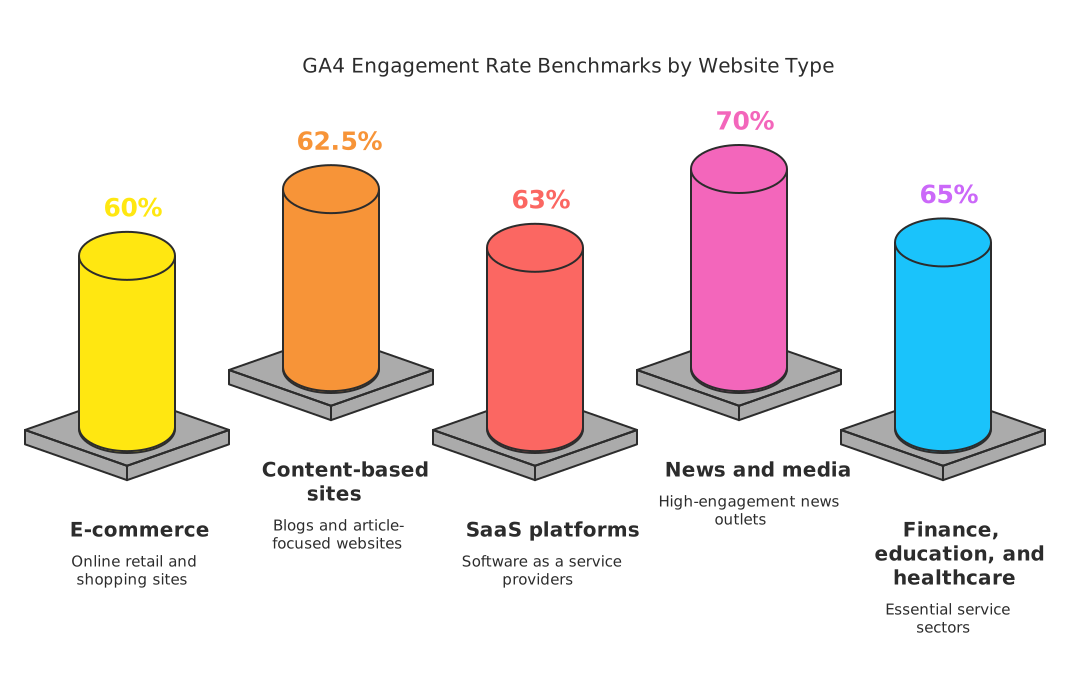
If you ask, what is a good engagement rate in GA4, it depends on your site type. Engagement rate benchmarks by industry show that B2B websites often get around 63%, while B2C sites can reach about 71%. Your own numbers might be different, so compare with your past data and similar businesses.
Look at GA4 engagement metrics like average engagement time and key events GA4 to see if users are active. Longer session duration GA4 and more engaged sessions per user mean your content is working well. You can find all these metrics where to find engagement rate in GA4 is easy, just check your main reports and the engagement rate report GA4 provides.
Engaged Sessions: The Building Block of Engagement Rate
What Are Engaged Sessions in GA4?
Engaged sessions in GA4 are key for understanding user engagement. Google Analytics 4 defines an engaged session as one where a user stays on your site or app for at least 10 seconds, views at least two screens or pages, or completes a key event. This 10-second engagement threshold is crucial in measuring how users interact with your content. Engaged sessions GA4 tracks help you see who is truly interested in your site and not just visiting for a moment.
Knowing how GA4 defines engagement helps you focus on quality visits. Not every session is equal. If someone quickly visits and leaves, that’s not an engaged session. But if a user meets any of the three criteria, GA4 counts that as engaged. These rules set the foundation for how the GA4 engagement rate is calculated and why it matters for performance metrics.
Calculating Engagement Rate in GA4
The GA4 engagement rate formula is simple. It is the percentage of engaged sessions out of total sessions. If you want to know how to calculate engagement rate in GA4, use this formula:
| Metric | Formula |
|---|---|
| Engagement Rate GA4 | (Engaged Sessions / Total Sessions) x 100 |
| Bounce Rate GA4 | 100% – Engagement Rate |
This makes engagement rate vs bounce rate easy to understand. Engagement rate shows how many users are active and involved. Bounce rate GA4 reveals how many users leave without engaging. The bounce rate GA4 formula is just the opposite of engagement rate. By tracking these, you can compare user engagement GA4 with past performance or industry benchmarks.
Why Engaged Sessions Matter for Your Website
Engaged sessions per user and average engagement time per session show how well your content meets user needs. GA4 benchmarking lets you compare your engagement rate benchmarks by industry or device. For example, engagement rate by device helps spot if users on mobile engage more than desktop users. Key events GA4, like purchases or sign-ups, are also counted in engaged sessions, making conversions vs key events easy to track.
Google Analytics 4 metrics like session duration GA4 and average engagement time help you improve your content. The engagement rate report GA4 can be found in your dashboard, so you always know where to find engagement rate in GA4. Watch these GA4 engagement metrics to spot trends and plan for better user interaction on your site.
The GA4 Engagement Rate Formula (With a Worked Example)
How GA4 Defines Engagement and the Engagement Rate Formula
Google Analytics 4 (GA4) uses a new way to measure how users interact with your website. GA4 engagement rate looks at engaged sessions. An engaged session in GA4 meets one of three conditions: the session lasts over 10 seconds, the user completes a key event (like a conversion or key events GA4), or the user views two or more pages or screens. This is called the 10-second engagement threshold.
The engagement rate formula in GA4 is:
Engagement Rate = (Engaged Sessions / Total Sessions) x 100
This formula shows the percentage of sessions where users did something meaningful. If you want to know how to calculate engagement rate in GA4, just divide engaged sessions by total sessions, then multiply by 100. You can view this in the engagement rate report GA4. Understanding what is engagement rate in GA4 helps you spot trends in user engagement GA4 and compare with GA4 benchmarking or engagement rate benchmarks by industry.
Worked Example: Calculating Engagement Rate and Bounce Rate in GA4
Suppose your website has 1,000 total sessions in one week. Out of those, 600 sessions are engaged sessions GA4. To find your GA4 engagement rate:
- Engaged Sessions: 600
- Total Sessions: 1,000
- Engagement Rate = (600 / 1,000) x 100 = 60%
This means 60% of sessions are meeting the engagement criteria. You can find this number in your GA4 engagement metrics. To find the bounce rate GA4, which is the opposite, use the GA4 bounce rate formula:
Bounce Rate GA4 = 100% – Engagement Rate
So, Bounce Rate = 100% – 60% = 40%. This makes engagement rate vs bounce rate easy to understand. You can use this for GA4 benchmarking or to compare engagement rate by device, session duration GA4, or average engagement time per session.
Interpreting and Using Engagement Metrics in GA4
Knowing what is a good engagement rate in GA4 depends on your industry. Engagement rate benchmarks by industry vary, but a rate above 60% often signals strong user engagement GA4. In GA4, conversions vs key events show deeper user interaction. Use key events GA4 to track actions like sign-ups or downloads.
You can also track engaged sessions per user and average engagement time in GA4. These Google Analytics 4 metrics help you understand how long users stay and interact. Session duration GA4 and engagement rate report GA4 offer insights and help you spot areas to improve. Check your engagement rate in GA4 to measure content quality and user interest.
Engagement Rate vs Bounce Rate in GA4
How GA4 Defines Engagement and Bounce Rate
Understanding GA4 engagement rate starts with knowing how Google Analytics 4 measures user actions. In GA4, an engaged session is one where a user does at least one of these: spends more than 10 seconds on the site, views two or more pages/screens, or completes a key event. Key events in GA4 might include things like signing up, submitting a form, or viewing a product. The 10-second engagement threshold helps GA4 decide if a session was meaningful.
Bounce rate in GA4 is different from the old Google Analytics. Bounce rate GA4 is now the percentage of sessions that are not engaged. If someone visits your website and leaves in less than 10 seconds without another action, it counts as a bounce. The GA4 bounce rate formula is simple: Bounce Rate = 100% – Engagement Rate.
Engagement Rate Formula and Metrics
The engagement rate formula in GA4 is: Engagement Rate = (Engaged Sessions / Total Sessions) x 100. Engaged sessions GA4 are the ones that meet the engagement rule above. Google Analytics 4 metrics like engaged sessions per user and average engagement time per session help you see how people interact with your pages. You can find the engagement rate in GA4 reports under the “Engagement” section.
GA4 engagement metrics include:
- Engaged sessions per user
- Average engagement time
- Engagement rate by device
- Key events GA4 vs. conversions
Tracking engaged sessions and session duration GA4 gives clues to how users move on your site. If the average engagement time per session is low, it may be time to improve your content or site design.
What Is a Good Engagement Rate in GA4?
Many people ask, “What is a good engagement rate in GA4?” Engagement rate benchmarks by industry vary. For B2B websites, a good engagement rate in GA4 is around 63%. For B2C, it’s closer to 71%. These are helpful for GA4 benchmarking and setting goals.
Use the engagement rate report GA4 offers to check your numbers. Compare engagement rate by device to find if mobile or desktop users interact more. Improving user engagement GA4 can lead to more conversions and better site performance. To boost your metrics, focus on clear calls to action, better site speed, and useful content.
Engagement Rate vs Average Engagement Time vs Engaged Sessions Per User
Understanding Key GA4 Engagement Metrics
In Google Analytics 4 (GA4), engagement metrics help show how users interact with your website or app. The three main metrics are GA4 engagement rate, average engagement time, and engaged sessions per user. Each metric gives a different view of user activity and helps answer common questions, such as what is engagement rate in GA4 and how GA4 defines engagement. The engagement rate formula uses the number of engaged sessions GA4 logs versus total sessions. Engaged sessions are visits where the user stays at least 10 seconds, views two or more pages, or triggers a key event.
GA4 engagement rate is a percentage. It shows how many sessions are considered engaged. For example, an engagement rate benchmark by industry might help compare your results to others. The bounce rate GA4 uses is simply 100% minus the engagement rate. This makes understanding engagement rate vs bounce rate in GA4 more straightforward. If you want to know how to calculate engagement rate in GA4, just divide engaged sessions by total sessions.
Comparing Average Engagement Time and Engaged Sessions Per User
Average engagement time per session tells us how long users stay active on your site or app. GA4 calculates this metric as the average time a user spends interacting during a session. This metric is important for understanding session duration GA4 and shows how interested users are. Higher average engagement time can often mean your content or offers are keeping users interested. Engagement rate by device can also affect this metric, as users on desktops might engage differently than those on mobile devices.
Engaged sessions per user is another key metric in GA4 engagement metrics. It shows how many engaged sessions each user has on average. This helps spot if users are coming back and finding value, or if they visit only once. Using the engagement rate report GA4 provides, you can track these numbers over time and compare them across different audiences or channels. GA4 benchmarking tools can help you see how your numbers stack up to others in your industry.
Using Metrics Together for Insights
All three metrics, GA4 engagement rate, average engagement time, and engaged sessions per user, work together to give a full picture of user engagement GA4. Check engagement rate report GA4 for a quick look at how well your site keeps users interested. Use average engagement time to find out if users stay long enough to read your content or complete key events GA4 tracks. Engaged sessions per user shows if people come back after their first visit, helping with retention strategies.
Here’s a table to compare the three metrics:
| Metric | What It Measures | GA4 Formula/Definition |
|---|---|---|
| Engagement Rate | % of sessions meeting engagement criteria | Engaged Sessions / Total Sessions |
| Average Engagement Time | Avg. time users are actively engaged per session | Total Engaged Time / Total Sessions |
| Engaged Sessions Per User | Avg. engaged sessions for each user | Engaged Sessions / Total Users |
How GA4 Engagement Differs from Universal Analytics
How GA4 Defines Engagement vs Universal Analytics
In Universal Analytics, bounce rate was the main metric for user engagement. It counted the number of single-page sessions with no interaction. GA4 changes this by using engagement rate instead. The GA4 engagement rate focuses on engaged sessions. An engaged session is when a user stays for at least 10 seconds, views two or more pages/screens, or completes a key event. This makes user engagement GA4 more accurate than before. The bounce rate GA4 is now the percentage of sessions that do not become engaged sessions.
Engaged sessions GA4 are at the core of how GA4 defines engagement. The new engagement rate formula is: (Engaged Sessions / Total Sessions) x 100. This replaces the old GA4 bounce rate formula. Knowing what is engagement rate in GA4 helps teams see real interaction, not just visits. It’s also easier to compare engagement rate vs bounce rate with these clear definitions.
New GA4 Engagement Metrics and Reports
GA4 engagement metrics offer more details than Universal Analytics. Metrics like engaged sessions per user, average engagement time, and session duration GA4 are easy to monitor. Key events GA4, which are like conversions, are tracked as part of engagement. You can now see how many users trigger key events or spend more time on your site.
To find these numbers, look for the engagement rate report GA4 in your dashboard. It shows the engagement rate by device, traffic source, or page. You can also review engagement rate benchmarks by industry using GA4 benchmarking tools. This helps answer questions like what is a good engagement rate in GA4 for your business type. The average engagement rate GA4 for B2B sites is about 63%, while for B2C it’s closer to 71%.
Comparing Engagement and Bounce Rates: Practical Differences
The shift from bounce rate to engagement rate means you measure success by real actions, not just a lack of bounces. The engagement rate GA4 formula rewards meaningful visits. It’s possible to have a higher engagement rate even if users only see one page, as long as they interact or stay longer than 10 seconds.
This change helps teams set better goals and use more accurate GA4 benchmarking. With the new metrics, you can track how GA4 engagement rate changes over time, and compare it across devices, channels, or content. Understanding how to calculate engagement rate in GA4 gives a clearer picture of user satisfaction and site performance.
Conversions Are Now “Key Events”: The 2024 Terminology Change
What Changed in Google Analytics 4 Terminology?
In 2024, Google Analytics 4 (GA4) made a big change. What used to be called “conversions” are now called “key events.” This update helps teams focus on important actions users take, rather than just sales or leads. Key events in GA4 include things like signing up for a newsletter, making a purchase, or spending more than the 10-second engagement threshold on a page.
This change affects how you look at user engagement GA4, especially when tracking GA4 engagement rate and analyzing engaged sessions GA4. Key events are now a core part of measuring what is engagement rate in GA4. It is important to update your GA4 engagement metrics to use the new language.
How Key Events Connect to Engagement Rate
Key events GA4 help define which sessions count as engaged. Engaged sessions per user are now tallied if users trigger a key event, stay longer than 10 seconds, or view multiple pages. The engagement rate formula in GA4 is:
- Engagement Rate = Engaged Sessions / Total Sessions
This is different from the bounce rate GA4, which is:
- GA4 Bounce Rate Formula = (Sessions NOT Engaged / Total Sessions) x 100
The switch to key events helps answer questions like “how to calculate engagement rate in GA4” and “what is a good engagement rate in GA4?” Now, if a user triggers a key event, it counts towards the GA4 engagement rate, making this metric more important in GA4 benchmarking. Use the engagement rate report GA4 to spot trends across campaigns and devices using engagement rate by device and other Google Analytics 4 metrics.
Reporting and Benchmarking with Key Events
Finding engagement rate in GA4 is simple. Go to your GA4 dashboard and add engagement rate to your reports. You’ll see average engagement time per session, session duration GA4, and key events GA4. These metrics show how GA4 defines engagement and help teams compare results using engagement rate benchmarks by industry.
For quick reference, here’s a table of new and old terms:
| Old Term | New Term (2024) |
|---|---|
| Conversion | Key Event |
| Bounce Rate | Opposite of Engagement Rate |
| Conversion Event | Key Event |
Tracking key events helps you compare engagement rate vs bounce rate, so you know where users interact and where they drop off. This new focus makes it easier to improve content and meet business goals in Google Analytics 4.
Where to Find Engagement Rate in GA4 (Step by Step)
Understanding GA4 Engagement Rate Metrics
First, it’s important to know what is engagement rate in GA4. Google Analytics 4 (GA4) measures engagement using engaged sessions. Engaged sessions GA4 are those where a user spends more than 10 seconds, completes a key event, or views two or more pages. The GA4 engagement rate formula is: (Engaged Sessions ÷ Total Sessions) × 100. This metric helps you see how many users interact meaningfully with your content. GA4 also tracks average engagement time per session, session duration GA4, and engaged sessions per user. These GA4 engagement metrics help you understand user engagement GA4 and compare performance with engagement rate benchmarks by industry.
The GA4 bounce rate formula is different from old versions. Bounce rate GA4 shows the percentage of sessions that did not become engaged sessions. Engagement rate vs bounce rate is a way to compare how often users interact versus leave quickly. Knowing how GA4 defines engagement helps you see if your website or app is meeting your goals.
Step-by-Step: Where to Find Engagement Rate in GA4
To view your engagement rate report GA4, follow these steps:
- Open your GA4 property in Google Analytics.
- In the left menu, click “Reports.”
- Choose “Life Cycle,” then select “Engagement.”
- Click on “Overview” or “Events.”
Here, you will see GA4 engagement rate displayed as a main metric. You can also find key events GA4 and conversions vs key events. These reports show engagement rate by device, engaged sessions GA4, and average engagement time. If you want to compare to industry standards, use GA4 benchmarking features to view engagement rate benchmarks by industry.
If you want to see more details, click “Customize Report.” With Editor or Administrator access, you can add or remove Google Analytics 4 metrics. Add engagement rate, bounce rate GA4, and other metrics that matter for your business. This helps you track how to calculate engagement rate in GA4 and see session trends.
Tips for Using GA4 Engagement Metrics
GA4 engagement rate shows how well your content keeps people interested. When you look at the engagement rate report GA4, check which pages have low or high engagement. Use average engagement time per session to see how long users stay. Compare conversions vs key events to understand what drives interaction. Engagement rate by device can show if mobile or desktop users are more engaged.
Regularly reviewing these metrics helps improve user engagement GA4. You can adjust your content, test different key events GA4, or change your marketing strategy. Using GA4 engagement metrics is a strong way to track business goals and improve your website or app.
What Is a Good Engagement Rate in GA4? (Benchmarks With Sources)
How GA4 Defines Engagement and Its Metrics
Google Analytics 4 (GA4) uses a new way to measure user engagement. GA4 engagement rate shows the percent of sessions where users actively interact with your site. Engaged sessions GA4 count visits that last over 10 seconds, have at least one key event, or two or more page views. GA4 engagement metrics give you a full view of how users interact, including average engagement time per session and engaged sessions per user.
Key events GA4 can include actions like signing up, clicking a link, or making a purchase. The 10-second engagement threshold means any session longer than 10 seconds counts, even if no events happen. GA4 engagement rate is not just about how many people visit your site, but how many interact with your content. You can view these Google Analytics 4 metrics in the engagement rate report GA4, under “Reports > Engagement.”
Engagement Rate vs Bounce Rate (With Formulas)
GA4 replaced the old bounce rate with engagement rate. The bounce rate GA4 is now calculated as the percentage of sessions that are not engaged. The GA4 bounce rate formula is: Bounce Rate = 100% – Engagement Rate. Learning how to calculate engagement rate in GA4 is easy: Engagement Rate = Engaged Sessions / Total Sessions. This makes the engagement rate formula much more useful for tracking meaningful interactions.
Understanding the difference in engagement rate vs bounce rate helps you see how GA4 defines engagement. Unlike the old session duration GA4 metric, the new approach focuses on actions, not just time spent. You can use these numbers to compare conversions vs key events and see which content drives more interaction. Where to find engagement rate in GA4 is simple: check the engagement rate report in your dashboard.
Engagement Rate Benchmarks by Industry and Device
What is a good engagement rate in GA4? Benchmarks show that for B2B sites, a good engagement rate is about 63%. For B2C sites, it averages around 71%. These numbers come from recent industry studies and GA4 benchmarking reports. Engagement rate by device can also differ. Mobile users may have lower average engagement time because they browse quickly, while desktop users often stay longer. Refer to the table below for typical engagement rate benchmarks.
| Industry | Average Engagement Rate |
|---|---|
| B2B | 63% |
| B2C | 71% |
| Retail | 68% |
| SaaS | 65% |
User engagement GA4 can differ by audience, device, and content type. Use GA4 engagement metrics and session duration GA4 to monitor trends. By tracking how GA4 defines engagement, you can spot areas for improvement and boost conversions.
GA4 Benchmarking: Compare Your Engagement Rate to Peer Groups
Understanding GA4 Engagement Rate Benchmarks
GA4 engagement rate helps you see how much visitors interact with your website. But what is a good engagement rate in GA4? Industry data shows that for B2B sites, a good benchmark is around 63%. For B2C websites, the average is closer to 71%. These numbers are useful for seeing how your site compares to others in your field. You can check engagement rate by device, like mobile or desktop, to spot trends. This is key in GA4 benchmarking. If your engagement rate is much lower than these benchmarks, it may mean visitors are not finding what they need.
GA4 uses the 10-second engagement threshold, key events, or two or more page views to mark a session as engaged. The GA4 engagement metrics include engaged sessions per user, average engagement time, and engaged sessions GA4. These metrics help answer what is engagement rate in GA4 and show how your visitors behave. Compare your rates with industry averages to find strengths and gaps.
How to Find and Calculate Engagement Rate in GA4
To find your engagement rate report GA4, go to the “Reports” section in Google Analytics 4. Engagement rate is shown as the percentage of engaged sessions. The engagement rate formula is:
| Metric | Definition |
|---|---|
| Engagement Rate | (Engaged Sessions / Total Sessions) x 100 |
| Bounce Rate GA4 | 100 – Engagement Rate |
This makes it easy to see engagement rate vs bounce rate. The bounce rate GA4 is the opposite of engaged sessions. GA4 bounce rate formula helps you spot when users leave without real action.
You can also check Google Analytics 4 metrics like average engagement time per session and session duration GA4. These show how long users stay and interact on your site. If you are wondering how to calculate engagement rate in GA4 or where to find engagement rate in GA4, look for the Engagement overview inside GA4. GA4 engagement metrics help you judge if your site content is working well.
Comparing Engagement Across Peer Groups and Devices
GA4 benchmarking lets you compare your engagement rate to other businesses. Use engagement rate benchmarks by industry for a fair comparison. Break down your data by traffic channel, device, or country. Engagement rate by device can reveal if mobile users engage differently than desktop users. For example, mobile users may have shorter session duration GA4 but higher engagement if the site is easy to use.
Key events GA4 and conversions vs key events show which actions matter most to your business. Track engaged sessions per user to see if users return. Google Analytics 4 makes it simple to compare and learn. By knowing how GA4 defines engagement, you can set goals and improve user engagement GA4 for your site.
How to Read Engagement Rate by Segment (Device, Channel, Landing Page)
Understanding GA4 Engagement Rate by Segment
GA4 engagement rate shows how visitors interact with your site or app. You can look at this metric by segments like device type, channel, or landing page. Each segment gives clues about user behavior and reveals where you can improve. To find the engagement rate in GA4, go to Reports. Then, add the engagement rate metric to tables that show device, channel, or landing pages. This will help you compare and see trends.
GA4 engagement rate uses the engaged sessions GA4 metric. An engaged session happens when a session lasts over 10 seconds, has a key event, or includes two or more views. The engagement rate formula is: Engaged Sessions / Total Sessions x 100%. The opposite of engagement rate is bounce rate GA4, which shows the percent of sessions with no meaningful engagement.
Segmenting by Device, Channel, and Landing Page
Looking at GA4 engagement rate by device, you can learn if mobile, tablet, or desktop users interact better. For example, a low engagement rate on mobile may mean the mobile site is hard to use. In the engagement rate report GA4, filter by device to see this data. Comparing engagement rate vs bounce rate by device helps spot issues.
Channel segmentation shows which traffic sources bring the most engaged users. Check how your engagement rate benchmarks by industry compare to your own GA4 benchmarking. If a channel has a low engagement rate, you may need new marketing strategies. Landing page segmentation shows which pages grab attention. Analyze session duration GA4 and average engagement time to see which pages keep users the longest.
Key Metrics to Track and Interpret
Track engaged sessions per user, average engagement time per session, and key events GA4 to get full insights. These Google Analytics 4 metrics give a bigger picture of user engagement GA4. Find out how GA4 defines engagement by looking at how many users meet the 10-second engagement threshold or trigger conversions vs key events.
Use tables to compare:
| Segment | Engagement Rate (%) | Bounce Rate (%) | Avg Engagement Time |
|---|---|---|---|
| Mobile | 60 | 40 | 00:45 |
| Desktop | 75 | 25 | 01:10 |
| Social | 68 | 32 | 00:55 |
| Landing Page A | 80 | 20 | 01:30 |
Follow these steps to see what is a good engagement rate in GA4 for each area. Improve pages or channels with low scores. This will help boost your GA4 engagement metrics and user satisfaction.
How to Improve Your GA4 Engagement Rate (Tactical Playbook)
Understand What Drives Engagement in GA4
Before boosting the GA4 engagement rate, it’s important to know what engagement means. In GA4, an engaged session is a visit that lasts more than 10 seconds, has a key event, or includes two or more page views. The engagement rate formula is: engaged sessions divided by total sessions, shown as a percentage. These Google Analytics 4 metrics help spot how well users interact with your site. The bounce rate GA4 shows the opposite: sessions that don’t meet engagement rules. Comparing engagement rate vs bounce rate helps you understand what’s working and what needs work. Use the engagement rate report GA4 to find these numbers.
Tactical Steps to Boost Engagement Rate
Start by checking where to find engagement rate in GA4. Go to the “Reports” section, then look under “Engagement” to see the engagement rate, engaged sessions GA4, and average engagement time per session. Use the GA4 bounce rate formula to spot problem areas. Next, focus on content. Make pages load fast, add useful images, and use clear calls to action. Personalize content for your visitors. If session duration GA4 is low, add videos or interactive tools. Set up key events GA4, like downloads or form fills, and track conversions vs key events to see which actions matter most. Analyze engagement rate by device to check if mobile or desktop users engage more.
Benchmark and Improve with Data
Knowing what is a good engagement rate in GA4 helps set goals. Check GA4 benchmarking to compare your site to others in your industry. For example, engagement rate benchmarks by industry show that B2B sites may average 63%, while B2C can reach 71%. Track engaged sessions per user and average engagement time to spot trends. If numbers drop, review user engagement GA4 to find weak spots. Adjust marketing, update old content, and test new designs to improve. Use Dataflo’s dashboard to see all GA4 engagement metrics in one place and make faster decisions.
Troubleshooting Unexpected Engagement Rate Numbers
Common Causes of Unusual GA4 Engagement Rate Values
Sudden spikes or drops in GA4 Engagement Rate can be puzzling. A sharp change might signal a technical issue or a change in user behavior. Measurement errors are often the culprit when numbers deviate from expectations. Incorrect implementation of Google Analytics 4 code or tags can result in missed or duplicated events. It’s important to check if GA4 tags are firing on all intended pages and screens, especially after website updates.
Another source of error comes from misconfigured events. If you mark too many events as key events, sessions may be counted as engaged even if there was little real interaction. Review your event settings in GA4 to ensure only meaningful actions trigger engagement. Also, verify your session timeout settings, as these affect how long a user needs to stay active for the session to count as engaged.
Steps to Diagnose and Resolve Issues
Begin by reviewing your GA4 account setup. Confirm that Google Tag Manager or gtag.js is correctly installed. Check that each page or screen triggers tags without error. Use the DebugView tool in GA4 to monitor real-time activity and spot where engagement data may be missing. Compare different segments, such as device type or landing page, to identify patterns in the engagement rate.
Next, audit your events. Make sure the most important actions, like form submissions or button clicks, are tracked as key events. Remove low-value events from the engaged session criteria. Ensure your marketing channels are tagged correctly so that referral data is accurate. Incorrect UTM parameters or missing source information can skew engagement metrics. If you’re using an app, confirm the SDK is implemented and updated across all platforms.
Best Practices for Reliable GA4 Engagement Rate Data
To maintain accurate GA4 Engagement Rate tracking, test regularly after making changes to your site or app. Keep documentation for all events and tags. Schedule routine reviews to ensure your GA4 property reflects current business goals. Standardize your definitions for engaged sessions so all team members are aligned.
Use GA4’s customization features to tailor reports with relevant metrics. Segment engagement rate data by channel, page, or campaign to spot underperforming areas. Address technical or content gaps quickly to keep engagement rate numbers trustworthy and actionable.
Limitations and Gotchas of the Engagement Rate Metric
Engagement Rate: What It Misses
GA4 Engagement Rate offers a useful snapshot of user interaction, but it has gaps. The metric only counts sessions that last over 10 seconds, have key events, or involve multiple page views. This excludes sessions where users quickly find what they want and leave satisfied. It also overlooks sessions with meaningful interaction that happen quickly. User intent is not always aligned with session length, so engagement can be underreported.
Context is also missing when looking solely at engagement rate. Different industries and sites have varying standards for what counts as engagement. A high engagement rate for one business may be low for another. Without comparing against industry benchmarks, the GA4 Engagement Rate can be misleading.
Data Collection and Technical Pitfalls
GA4 Engagement Rate relies on accurate tracking. If your implementation is incomplete or tags are missing, the metric loses value. Misconfigured events or untagged pages do not count toward engaged sessions. Mobile apps with an incomplete SDK setup may also show lower engagement than reality. Technical errors can skew reports and hide real user behavior.
Another limitation is that the GA4 Engagement Rate cannot distinguish between types of engagement. Watching a video for 11 seconds counts the same as viewing three pages. All engaged sessions are treated equally, even though the quality of engagement can vary. This makes it hard to prioritize which types of user activity are most valuable.
Comparability and Interpretation Challenges
GA4 Engagement Rate is not directly comparable with the bounce rate used in Universal Analytics. The two metrics use different definitions and thresholds. Comparing them can lead to confusion and incorrect conclusions about performance trends.
Changes in site structure or event tagging can also impact engagement rate data. If you add more interactive elements or new tracking, results may shift. Comparing engagement rates over time requires careful attention to these updates. Using the GA4 Engagement Rate metric without context, or as a standalone figure, can result in misleading insights.
Engagement Rate and SEO: Does It Affect Rankings?
Understanding GA4 Engagement Rate and Its Role
GA4 Engagement Rate measures the percentage of user sessions that are truly engaged. In Google Analytics 4, an engaged session lasts longer than 10 seconds, includes a conversion event, or has at least two page views. This metric highlights how users interact with your website. High engagement rates signal that visitors find value in your content.
Search engines, like Google, aim to deliver the best results to users. While GA4 Engagement Rate is not a direct ranking factor, it reflects user satisfaction. If a page keeps visitors active, it is likely to perform well in other important SEO metrics. These include lower bounce rates, longer session durations, and more page views per visit. All of these signal to search engines that your content meets user intent.
Does GA4 Engagement Rate Directly Influence Rankings?
Google has not confirmed that engagement rate is a direct part of its ranking algorithm. However, engagement metrics still play a key role in SEO strategies. Pages with high GA4 Engagement Rate often have content that matches user expectations. This can lead to higher dwell time and more social shares, both of which support SEO efforts indirectly.
Here’s a quick comparison to clarify the relationship:
| Metric | Direct Ranking Factor? | Impact on SEO |
|---|---|---|
| GA4 Engagement Rate | No | Indicates content value |
| Bounce Rate | No | Suggests user issues |
| Dwell Time | Not confirmed | Signals user interest |
Although GA4 Engagement Rate itself is not a ranking factor, it often correlates with positive SEO outcomes. When users stay engaged, they are more likely to take valuable actions, share your page, or return in the future.
Using GA4 Engagement Rate to Enhance SEO Performance
To leverage GA4 Engagement Rate for SEO, focus on creating quality content and optimizing user experience. Identify pages with low engagement rates using your GA4 dashboard. Analyze possible causes, such as slow load times, poor layout, or irrelevant information.
Improving these factors can boost your GA4 Engagement Rate and help your site align better with SEO best practices. Monitor changes over time to see how user behavior and engagement respond to your updates. Use insights from GA4 Engagement Rate to inform future content and design decisions.
GA4 vs Other Analytics Tools for Measuring Engagement
How GA4 Engagement Rate Works
The GA4 Engagement Rate offers a new way to measure user interaction. Unlike older versions of Google Analytics, GA4 focuses on session quality instead of simple page visits. It tracks engaged sessions, which are those that last over 10 seconds, have multiple page views, or include key conversions. This rate gives a clearer picture of how users interact with content. It helps teams see if website visitors are truly interested or just passing through.
In GA4, the engagement rate is shown as a straightforward percentage. This makes it easy to compare different campaigns or landing pages. Marketing and product teams can use this metric to refine site design or content strategy. By focusing on engagement instead of bounce rates, teams get a better sense of true involvement.
Comparing GA4 Engagement Rate to Other Analytics Metrics
Other analytics tools often rely on bounce rate or average session duration. Bounce rate shows the percentage of users who leave after viewing one page. This metric can be misleading, especially on single-page sites or blogs. Average session duration sometimes includes passive time, which may not reflect real user interest.
Platforms like Adobe Analytics or Mixpanel measure engagement through custom events or active time. These tools are flexible but can require complex setups. GA4 Engagement Rate is more standardized. It allows for easier benchmarking across properties. The table below highlights key differences:
| Metric | GA4 Engagement Rate | Bounce Rate | Custom Events (Other Tools) |
|---|---|---|---|
| Definition | Engaged sessions (%) | Non-engaged sessions (%) | User-defined actions |
| Ease of Use | High | High | Medium |
| Benchmarking | Standardized | Standardized | Varies |
| Setup Complexity | Low | Low | High |
Benefits of Using GA4 Engagement Rate
GA4 Engagement Rate offers several advantages for teams. It captures more dimensions of user behavior, moving beyond just page views. This helps businesses better understand how specific content drives interest. The metric is available in real time, so teams can react quickly.
With GA4, adding engagement metrics to reports is simple. Users can track engagement across devices, marketing channels, and campaigns. This supports more accurate KPI tracking and goal setting. Integrations with other tools, such as HubSpot and Slack, help automate reporting and foster collaboration.
Frequently Asked Questions
What Is GA4 Engagement Rate and How Is It Calculated?
GA4 Engagement Rate measures the percentage of sessions that qualify as “engaged.” A session is considered engaged if it lasts longer than ten seconds, includes one or more conversion events, or results in two or more screen or page views. The formula for GA4 Engagement Rate is: (Number of engaged sessions ÷ Total sessions) × 100%. For example, if your website has 1,000 total sessions and 650 of those are engaged, the engagement rate is 65%.
This metric provides a clearer picture of user interaction than the old bounce rate metric. It focuses on positive actions rather than just tracking who leaves quickly. GA4 Engagement Rate is now the standard for analyzing how users interact with your site content or app features.
How Is GA4 Engagement Rate Different from Bounce Rate?
In GA4, Engagement Rate and Bounce Rate are related but highlight different behaviors. Engagement Rate tracks sessions where users interact meaningfully with your site. Bounce Rate, on the other hand, identifies the percentage of sessions that do not meet engagement criteria.
Bounce Rate is now calculated as 100% minus the GA4 Engagement Rate. This makes it easy to see both engaged and non-engaged session percentages side by side. Focusing on Engagement Rate helps teams understand what is working and what needs improvement in terms of content and site experience.
How Can I Improve My GA4 Engagement Rate?
To increase your GA4 Engagement Rate, focus on creating valuable and relevant content that attracts your target audience. Optimize your website’s design for easy navigation and quick loading times. Encourage user interactions with features like polls, forms, or comment sections.
Use multimedia elements such as videos, infographics, and interactive content to boost engagement. Personalizing content based on user behavior or preferences can also improve engagement. Regularly review your GA4 reports to identify underperforming pages and test different strategies to improve those areas.
| Action Item | Impact on Engagement Rate |
|---|---|
| Improve page speed | Reduces drop-offs, increases time |
| Add interactive elements | Boosts session length and activity |
| Personalize content | Increases relevance and engagement |
| Optimize for mobile | Ensures broader audience retention |
Key Takeaways
Understanding GA4 Engagement Rate
GA4 Engagement Rate is a critical metric in Google Analytics 4. It measures the percentage of sessions labeled as “engaged sessions.” Engaged sessions occur when a user stays on a page for more than 10 seconds, has at least one conversion event, or views at least two pages or screens. This metric provides a clearer picture of how users interact with website content, moving beyond traditional bounce rate measurements.
The GA4 Engagement Rate helps identify the quality of user interactions. It shows whether visitors find value in the content or take meaningful actions. This focus on positive interaction gives marketing and analytics teams actionable insights for improving website and app performance.
Comparing Engagement Rate and Bounce Rate
Bounce rate in GA4 is now defined as the inverse of the engagement rate. While engagement rate highlights successful user interactions, bounce rate identifies sessions with no significant engagement. This shift helps teams focus on optimizing for user activity rather than just session length or single-page visits.
In GA4, both metrics can be customized in reports for deeper analysis. Having Editor or Administrator rights is necessary to add and analyze these metrics in report settings. Teams can use these insights to compare against industry benchmarks or track performance over time.
Practical Steps to Improve GA4 Engagement Rate
Improving GA4 Engagement Rate requires targeted actions. Creating high-quality, relevant content increases the likelihood of user interaction. Optimizing website design and navigation also plays a key role in keeping users engaged. Interactive elements like multimedia, clear CTAs, and personalized experiences drive higher engagement.
GA4 offers detailed reporting features to monitor engagement rate by channel, device, or page. Teams should analyze these insights regularly to pinpoint areas for improvement. Integrations with platforms like Dataflo, HubSpot, or Slack further streamline reporting and collaboration, making it easier to act on engagement data.
| Metric | Definition |
|---|---|
| GA4 Engagement Rate | % of sessions with meaningful interactions |
| Bounce Rate | % of sessions without engagement |
| Engaged Session | Session with >10s, conversion, or 2+ pageviews |