

Are YouTube Ads Targeted? The Short Answer (and Why They Feel So Precise)
Are YouTube Ads Targeted?
The short answer is yes. YouTube ads are targeted. This means that ads are not random. They try to show ads that match your interests. You might notice ads for things you have searched for before. Sometimes, ads even match videos you like to watch. YouTube uses information about you to pick which ads to show. This helps make ads feel more personal and relevant.
Here are some ways ads get targeted on YouTube:
- They use your search history.
- They look at what videos you watch.
- They pay attention to your location.
- They check your age and gender (if you share that info).
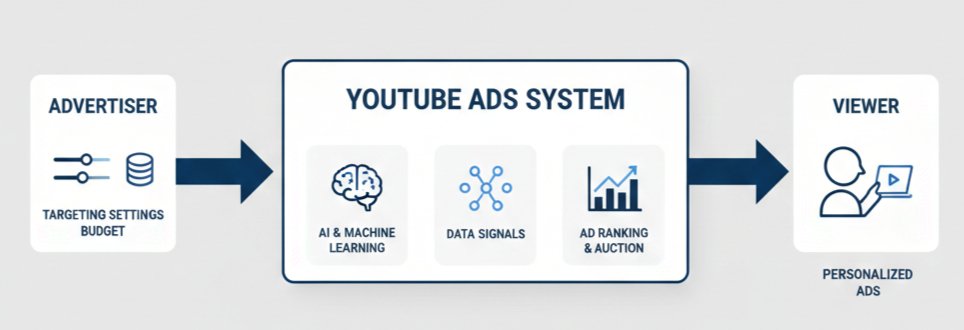
Why Do YouTube Ads Feel So Precise?
Are YouTube Ads Targeted? Yes, and that is why they seem to know what you like. YouTube collects data when you use their site. They notice the topics you enjoy and the things you click. If you watch a lot of sports videos, you might see ads for shoes or energy drinks. If you search for a new toy, an ad for that toy may pop up later.
Ads also feel precise because many websites share data. If you look for a backpack on another site, you might see ads for backpacks on YouTube later. This sharing of data is called “retargeting.” It helps ads follow you from site to site.
How Does YouTube Use Data to Target Ads?
YouTube uses data in several ways. Below is a table showing some kinds of data and how they are used:
| Type of Data | How It’s Used |
|---|---|
| Search History | Shows ads for things you searched |
| Watch History | Matches ads to videos you like |
| Location | Gives local store or event ads |
| Device Type | Shows mobile or desktop ads |
Are YouTube Ads Targeted? Yes, and they use different tools to do this. By using your data, YouTube tries to make the ads you see more useful to you. This is why ads can feel like they read your mind.
How YouTube Decides Which Ad to Show You: The Signals Behind the Scenes
What Signals Does YouTube Use?
Are YouTube Ads Targeted? Yes, they use many signals to decide which ad you see. YouTube watches what videos you click on and how long you watch them. It remembers what channels you follow and what you have searched for in the past.
If you watch a lot of sports videos, you start to see ads about shoes or workout gear. When you search for toys, you may get toy ads. YouTube also looks at your age and where you live. For example, if you are in a snowy place, you could see ads for winter coats.
YouTube uses this information to group viewers into different groups. These are called audiences. Advertisers pick which group they want to show their ads to. That is why some ads repeat if you match what the advertiser wants.
Types of Targeting Signals
There are several main ways YouTube chooses which ad to show:
- Demographics: Age, gender, and sometimes family status.
- Location: City, state, or country where you watch videos.
- Interests: What you watch over and over again.
- Device: Are you on a phone, tablet, or computer?
- Search History: The things you look up on Google and YouTube.
All these signals help answer, “Are YouTube Ads Targeted?” The answer is yes, using many details about what you like and do online. YouTube uses this so ads are more interesting to you.
Example: How Signals Work Together
Let’s look at an example. A teenager in California watches a lot of skateboard videos. They use a phone to watch YouTube. Their search history shows searches for skateboard tricks and shoes. YouTube puts these signals together:
- Teenager (age)
- Lives in California (location)
- Loves skateboarding (interest)
- Uses a phone (device)
An advertiser selling skateboards chooses to target teenagers in California who like skateboarding. YouTube matches the signals and shows this ad. This is how YouTube answers the question, “Are YouTube Ads Targeted?” by using your signals to match ads with your interests.
Audience Targeting vs Content Targeting: The Two Core Methods
What Is Audience Targeting?
When asking, “Are YouTube Ads Targeted?” one of the main ways is through audience targeting. Audience targeting means ads reach people based on who they are. YouTube collects information like age, gender, and interests. Advertisers use this data to match ads to viewers who are most likely to care.
For example, if someone watches a lot of sports videos, YouTube may decide they like sports. Brands can then show ads for shoes or sports gear to those viewers. This method helps make sure ads are not random. Audience targeting aims to show each person ads that fit their life and interests.
What Is Content Targeting?
Content targeting is another answer to the question, “Are YouTube Ads Targeted?” This method focuses on what viewers are watching at that moment. Instead of looking at who the viewer is, it looks at the video topic or keywords. Advertisers pick certain topics, channels, or even keywords to match their ads.
For example, a company selling guitar lessons may want their ad to show only on videos about playing guitar. Content targeting helps brands reach people when they are interested in related content. It can make ads more useful to viewers because the ad matches what they are watching.
Comparing Audience and Content Targeting
Both methods help answer, “Are YouTube Ads Targeted?” but they work in different ways. Here is a simple table to see the differences:
| Method | Focus | Example |
|---|---|---|
| Audience Targeting | Who watches | Ads for kids on cartoon videos |
| Content Targeting | What is watched | Ads for shoes on sports videos |
Advertisers can use one or both methods to reach the right viewers. Mixing both can make ads even more relevant. Having both options means YouTube ads can be targeted in many ways, making them effective for different goals.
Who You Reach: Demographic & Detailed Demographic Targeting
Understanding Demographic Targeting
Are YouTube Ads Targeted for age and gender? Yes, demographic targeting allows advertisers to reach people based on these core factors. When setting up a YouTube ad, you can pick age groups like 18-24, 25-34, or older. You can also choose to show ads only to men or women. This helps brands show their message to the right group.
Demographic targeting is good for businesses that know who buys their products. For example, a toy brand may want to reach parents aged 25-44. This targeting makes sure ads are relevant and not shown to people unlikely to buy.
Going Deeper: Detailed Demographic Targeting
Are YouTube Ads Targeted for interests beyond age and gender? Yes, detailed demographic targeting goes deeper. Advertisers can choose life events like being a new parent, student, or recently married. This means ads can speak to people at important moments in their lives.
A college supply brand might target “current students” or a moving company could target “recently moved” users. This helps ads connect with viewers in a more personal way. The more detailed the targeting, the more likely the message will match what the viewer needs.
Advantages of Demographic Targeting
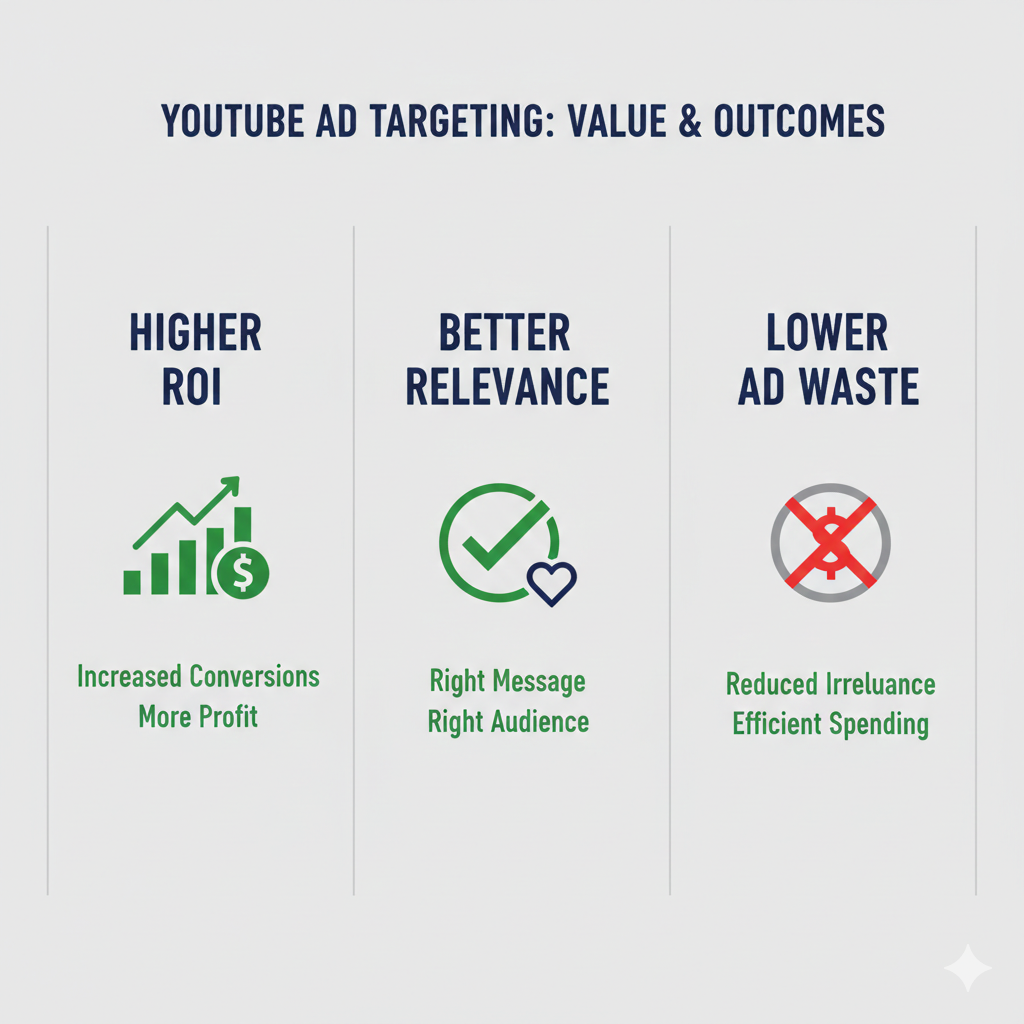
Using these tools, Are YouTube Ads Targeted to specific customers? Absolutely. Demographic and detailed options let advertisers use their budgets wisely. Ads reach those most likely to care, not just anyone watching videos.
Here’s a simple table to show the types of demographic targeting on YouTube:
| Targeting Type | Example Options |
|---|---|
| Age | 18-24, 25-34, 35-44, etc. |
| Gender | Male, Female |
| Parental Status | Parent, Not a Parent |
| Life Events | Recently Married, New Student |
These tools answer the question: Are YouTube Ads Targeted? With the wide range of choices, advertisers can share their message with the right audience, making each ad more effective.
Interest-Based Targeting: Affinity, Custom Affinity & In-Market Audiences
What is Interest-Based Targeting?
Interest-based targeting lets advertisers reach people who like certain topics. Are YouTube Ads Targeted? Yes, with this method, ads match viewer interests. It helps brands show ads to the right people at the right time. Ads feel more personal. Users are more likely to watch or click when ads match their likes.
This type of targeting uses data from search history, videos watched, and channel subscriptions. The system sorts users into groups based on what they enjoy online. It is a common way to boost ad results on YouTube. Most users do not even notice the matching process.
Affinity and Custom Affinity Audiences
Affinity audiences are broad groups with shared interests, like sports fans or food lovers. Are YouTube Ads Targeted to these groups? Yes. Advertisers choose from many of these interest groups to show their ads. It helps brands reach people who care about a topic, even if they have not searched for a product yet.
Custom affinity audiences let advertisers create their own groups. They can pick interests, websites, or keywords. For example, a brand can target people who like skateboarding and visit certain websites. This makes targeting more specific and useful for brands with special products.
Below is a sample comparison of Affinity and Custom Affinity:
| Type | How It Works | Example Target |
|---|---|---|
| Affinity | Targets large broad interest groups | Sports Fans |
| Custom Affinity | Targets custom chosen interests | Skateboard Fans |
In-Market Audiences
In-market audiences focus on users ready to buy. These users have searched for products or services recently. Are YouTube Ads Targeted to buyers? Yes. Brands can show ads to people looking for things like new phones or travel plans.
This type of audience helps boost sales. It targets users who are closer to making a purchase. Advertisers like in-market audiences because they show ads to people with real buying intent. The system picks up shopping signals, like comparing products or reading reviews.
Intent & Search-Based Targeting: Custom Segments
What is Intent and Search-Based Targeting?
Intent and search-based targeting means YouTube ads can reach people based on what they are searching for online. Are YouTube Ads Targeted? Yes, they use what users look for on Google and YouTube. This helps advertisers show their ads to people who are interested in certain topics, products, or services.
For example, if someone searches for “best running shoes,” they may see ads for athletic brands on YouTube. This makes ads more useful and more focused. Are YouTube Ads Targeted in this way? Yes, because ads follow the interests shown by search activity.
How Custom Segments Work
Custom segments let advertisers create groups of people based on their search habits. Are YouTube Ads Targeted using these groups? Yes, advertisers pick keywords, websites, and apps their audience might use.
Here are some ways custom segments work:
- Advertisers add keywords that people search
- They choose websites that match their audience’s interests
- They pick apps that their ideal customer might download
A table makes it easy to understand:
| Custom Segment Element | Example |
|---|---|
| Keyword | “how to bake bread” |
| Website | www.recipes.com |
| App | Cooking Helper App |
This helps ads reach people who are more likely to care about what is offered. Are YouTube Ads Targeted? Yes, with these custom options.
Benefits of Search-Based Targeting
When ads are based on search intent, they feel more personal. Are YouTube Ads Targeted to people’s needs? Yes, because the ads match what users are already looking for.
Benefits include:
- Higher chance that people will click the ad
- Ads are less likely to be ignored
- Advertisers reach the right audience
With intent and search-based targeting, ads are smarter and more effective. Are YouTube Ads Targeted? The answer is yes, especially with these strategies.
Content Targeting: Keywords, Topics & Placements
Keywords: The Building Blocks of Targeting
Are YouTube Ads Targeted? The answer starts with keywords. Advertisers pick certain words that match what viewers search for. These keywords help ads show up in videos related to those words. For example, if someone searches for cooking tips, ads for kitchen tools might appear. Using the right keywords helps brands reach people who are interested in their products.
Keywords make sure ads reach the right people. When someone watches a video about pets, ads for pet food may show. This makes ads helpful to viewers and useful to businesses. Choosing the best keywords is an important step in getting ads seen by the right audience.
Topics: Reaching People Based on Interests
Are YouTube Ads Targeted by topics? Yes, they are. Advertisers can pick topics so their ads appear on videos about certain subjects. For example, a toy company might target videos about kids’ games and family activities. This way, ads only show up when people are watching related content.
Topics allow advertisers to focus on broad interests. A person interested in sports may see ads for running shoes or workout gear. This method helps brands reach people who share the same interests. Picking the right topics makes ads more likely to be noticed and remembered.
Placements: Choosing Where Ads Appear
Are YouTube Ads Targeted by placements? Advertisers can select specific YouTube channels or videos to show their ads. This is called placement targeting. It is useful when brands want their ads to be seen next to certain content. For example, a makeup brand can choose beauty channels for its ads.
Placement targeting gives advertisers more control. They can make sure their ads appear where their target audience spends time. This increases the chances that people will click and learn more. Placement targeting also helps brands avoid channels that are not a good fit for their message.
The table below shows the main targeting methods:
| Targeting Type | What It Targets | Example |
|---|---|---|
| Keywords | Search terms, content | “Are YouTube Ads Targeted?” videos |
| Topics | Video subjects | Sports, cooking, gaming videos |
| Placements | Channels or specific videos | Favorite influencer’s channel |
Your Own Data: Remarketing, Customer Match & Lookalike Audiences
Using Remarketing for Better Targeting
Are YouTube Ads Targeted? One way they become more targeted is by using remarketing. Remarketing lets advertisers show ads to people who already visited their website or watched their videos. For example, if someone looks at a product but leaves, they might see a YouTube ad for that item later. This keeps your brand in their mind. Remarketing uses your own data, so it is more precise than broad targeting. It can help bring back interested viewers and turn them into customers.
Remarketing lists are easy to set up. Advertisers can use Google Ads to build lists of previous visitors. These lists can be grouped by actions, like watched a video or added something to a cart. Are YouTube Ads Targeted? With these lists, the answer is yes—remarketing makes ads more personal and useful.
Customer Match: Using Your Own Lists
Customer Match is another way to make YouTube ads more targeted. It works by letting businesses upload their own customer data, like email addresses. Google then matches these with signed-in users on YouTube. This means ads can go directly to people who already know your business. For example, a store can send special offers to loyal customers by showing them ads on YouTube. This makes the ads more relevant and more likely to catch attention.
Here are some ways Customer Match can be used:
- Share new products with current customers.
- Offer discounts to repeat buyers.
- Remind users about upcoming events or sales.
Are YouTube Ads Targeted? Customer Match helps make sure ads reach the right people at the right time.
Lookalike Audiences: Finding New Viewers
Lookalike Audiences, also called Similar Audiences, use your own data to find new people. Google takes your remarketing or customer lists and finds users with similar interests and behaviors. This helps you reach people who are likely to be interested in your service or product. For example, if your current customers like adventure travel, Google will find YouTube users who watch travel videos.
Below is a table showing how these three strategies use your data:
| Strategy | Uses Your Data? | Finds New Users? | Targets Existing Users? |
|---|---|---|---|
| Remarketing | Yes | No | Yes |
| Customer Match | Yes | No | Yes |
| Lookalike Audiences | Yes | Yes | No |
Are YouTube Ads Targeted? Yes, because these tools use real data to make sure ads are shown to people who are most likely to care. This helps businesses spend their money wisely and get better results from their ads.
Lookalike audiences after Similar Audiences’ deprecation
What Happened to Similar Audiences?
YouTube Ads used to offer a feature called Similar Audiences. This tool helped advertisers reach people similar to their current customers. It was easy to use and liked by many marketers. Google, however, decided to remove Similar Audiences from YouTube in 2023. The change was made to improve user privacy and respond to new data rules. Now, many people ask: Are YouTube Ads Targeted in the same way?
What Are Lookalike Audiences?
After the removal of Similar Audiences, advertisers needed a new way to find more viewers like their best customers. Lookalike audiences are the current tool for this job. With lookalike audiences, YouTube Ads can still be targeted. Here’s how it works:
- You upload a list of your current customers.
- YouTube studies this group to find common traits.
- The system looks for new people who share these traits.
This helps advertisers show their ads to people who are likely to be interested in their products. It keeps the answer to Are YouTube Ads Targeted as “yes,” but with a new method.
How Does Targeting Work Now?
Advertisers now have to use first-party data. This means using information collected directly from their own customers. With this data, YouTube can build lookalike audiences that fit the advertiser’s needs. Here’s a table showing some differences:
| Feature | Similar Audiences | Lookalike Audiences |
|---|---|---|
| Data Source | Google/YouTube | Advertiser |
| Privacy Focus | Medium | High |
| Customization Level | Lower | Higher |
Marketers must update their targeting strategies. They need to focus on collecting quality customer data. This shift helps ensure that YouTube Ads remain targeted, even after big changes. Advertisers can still reach people who act like their best customers.
Campaign Types & Formats That Shape Targeting (2026 Update)
Overview of YouTube Campaign Types
Are YouTube Ads Targeted? The answer depends on the campaign type you choose. In 2026, YouTube offers several campaign types to fit different goals. These include Video Reach, Video Action, Brand Awareness, and App Promotion campaigns. Each type uses targeting tools to reach the right people. The right campaign helps ads find viewers more likely to care about your message.
Some campaigns are better for getting views, while others are made for clicks or downloads. For example, Video Action campaigns help drive sales or website visits. Brand Awareness campaigns show ads to many people but still use targeting settings. The key is picking the campaign that matches your goal and audience.
Popular Ad Formats and Their Targeting Features
Are YouTube Ads Targeted with every format? Most ad formats have built-in targeting options. Here is a table showing common ad formats and their targeting features:
| Ad Format | Targeting Options |
|---|---|
| Skippable In-Stream | Demographics, Interests |
| Non-Skippable In-Stream | Devices, Topics |
| Bumper Ads | Locations, Age Groups |
| Discovery Ads | Keywords, Channels |
| Shorts Ads | Interests, Behaviors |
Skippable in-stream ads let you choose who sees your ad, based on age or interests. Non-skippable ads and bumper ads use device or location targeting. Discovery ads appear in search results, letting you target by keywords or channels. Shorts ads reach viewers interested in specific topics or brands.
How Formats Shape Audience Targeting
Ad formats affect how you target your audience on YouTube. For example, bumper ads work well for quick messages and target broad groups. Discovery ads help reach people searching for something specific. Each format lets you select options like age, location, or even device type. This makes it easier to answer the question: Are YouTube Ads Targeted?
Choosing the right ad format and pairing it with strong targeting is important. It can help your ad budget go further and reach the viewers you want. In 2026, advertisers have more tools than ever to fine-tune who sees their ads on YouTube.
Privacy, Cookies & the Post-Privacy-Sandbox Reality
How Privacy Rules Affect Targeting
Are YouTube Ads Targeted? The answer depends on privacy laws and platforms’ rules. Privacy rules like the General Data Protection Regulation (GDPR) in Europe shape how YouTube collects and uses data. They limit what information YouTube can track about you. Advertisers must follow these rules to avoid breaking the law.
When you use YouTube, you might notice privacy notices or cookie banners. These tell you how YouTube uses your data. If you say “no” to cookies, YouTube stores less about your viewing habits. This can change how targeted ads appear for you. In some cases, you may still see ads, but they might be less relevant.
Cookies and Their Changing Role
Cookies are small pieces of data that websites use to remember you. YouTube uses cookies to track which videos you watch and what you like. This helps answer the question: Are YouTube Ads Targeted? Cookies let YouTube show you ads that match your interests.
Here is a table showing how cookies affect ad targeting:
| Type of Cookie | Purpose | How It Affects Ads |
|---|---|---|
| First-party | Tracks activity on site | Makes ads useful |
| Third-party | Follows you online | Shares data for ads |
| No cookies | No tracking | Less personalized |
In recent years, rules have changed how cookies work. Many browsers block third-party cookies by default. YouTube must find new ways to show targeted ads without using these cookies.
Post-Privacy-Sandbox Reality
Google made the Privacy Sandbox to replace third-party cookies. The main goal is to protect privacy while keeping ads effective. Are YouTube Ads Targeted in this new reality? Yes, but differently.
Instead of tracking individuals, new tools group users by interests. This is called cohort-based targeting. YouTube now looks at big trends among many users, not just one person’s clicks.
Advertisers still reach people who like certain topics, but without seeing private details. This changes how YouTube decides which ads to show, while trying to balance privacy and targeting needs.
“Is My Phone Listening to Me?” — Debunking the Targeting Myth
Where Does This Myth Come From?
Many people think their phones listen to their conversations. They believe this is why they see certain YouTube ads. The idea started because users notice ads that match things they talked about. This feels spooky and too accurate.
Are YouTube Ads Targeted based on what you say? There is no proof that phones record your private talks for ads. Tech companies and YouTube have said again and again that they do not do this.
How Are YouTube Ads Targeted?
YouTube ads are targeted in other ways. The platform uses data from your online actions. It looks at your watch history, search history, and websites you visit. This helps YouTube guess what you like.
Here are some ways YouTube targets ads:
- Videos you watch
- Searches you make
- Channels you follow
- Your location
- Your age and gender (if known)
Are YouTube Ads Targeted using conversations? No, they use your clicks, not your voice.
Why Do Ads Seem So Accurate?
Sometimes, ads match things you just talked about. This can happen for several reasons. Maybe you searched for something online after a talk. Maybe your friend talked about it, and you both saw the same ad.
Here is a table to show how ads might seem targeted:
| Situation | Why Ads Appear Relevant |
|---|---|
| You searched for a product | YouTube uses your search data |
| You watched a related video | YouTube uses watch history |
| You follow related channels | YouTube targets those interests |
| You and a friend share devices | Data overlaps between accounts |
Are YouTube Ads Targeted in ways that seem magical? No. It is smart guesses, not spying. Understanding this can help you feel less worried about your phone listening in.
How Viewers Control YouTube Ad Targeting
Managing Your Google Account Settings
Viewers have some control over the ads they see on YouTube. By adjusting Google Account settings, you can influence which ads appear. You can visit Google’s Ad Settings page to review and update your interests. Turn off ad personalization to limit Google’s use of your personal details. If you pause ad personalization, YouTube will not use your activity to target ads. Your settings affect ads across Google services, not just YouTube.
You may also remove or add topics that interest you. Google lets you block certain topics so that ads about them do not appear. If you set your age or gender, that can also change the ads you are shown. These options give some power back to the viewer.
Controlling Ads Through YouTube Tools
YouTube offers tools to help you control ad targeting. On any ad, you can click the “i” icon or the three dots for more options. With these tools, you can stop seeing certain ads. You can also tell YouTube why you do not like an ad. For example, you can mark ads as “irrelevant” or “repetitive.”
If you clear your YouTube watch and search history, this can also change the ads you see. Advertisers use your history to build a profile and choose ads for you. Turning off or deleting your history can make ads less personalized. Use the YouTube privacy page to manage your activity and data.
Summary Table: Ways to Control Ad Targeting
| Method | What You Can Do | Result |
|---|---|---|
| Google Ad Settings | Change interests, demographics | Adjusts ad topics you see |
| Ad Personalization | Turn on/off personalized ads | Less or more tailored ads |
| Ad Feedback Tools | Block or report specific ads | Limits certain ads being shown |
| Clearing Watch/Search History | Remove past activity | Makes ads less targeted |
These controls can help viewers shape their ad experience. They do not remove all ads but give some choice and privacy.
Measuring Whether Your Targeting Works
Key Metrics to Track
To find out if your YouTube ads targeting works, look at important numbers. Watch the click-through rate (CTR). This shows how many people click your ad after seeing it. A high CTR means your targeting could be on point. Also check the view rate. This tells you how many people watched the ad at least part of the way through. If this rate is low, your ad may not match your audience’s interests.
Other numbers can help too. Pay attention to impressions, which show how many people saw your ad. The conversion rate is also useful. It measures how many viewers took a desired action, like signing up or buying a product. Putting these numbers into a table helps you compare results:
| Metric | What It Means |
|---|---|
| CTR | Clicks divided by views |
| View Rate | Percent of viewers who watch |
| Impressions | Total ad views |
| Conversion Rate | Actions after the ad |
Tools for Measuring Success
YouTube offers several tools to track ad success. Use YouTube Analytics for deep insights. It shows you how viewers interact with your videos and ads. Google Ads is another helpful tool. You can review your ad performance and see which audiences respond best.
Set up conversion tracking in Google Ads. This will show you if people take actions after seeing your ad. UTM codes are simple to use. They help you track which ads send visitors to your site. These tools make it easier to see if your targeting works.
Making Improvements Based on Results
Review your results often. If you see low numbers in your key metrics, try changing your audience settings. Test different targeting options, like age, location, or interests. This helps you reach people who care about your message.
Try A/B testing with different ad versions. Change one thing at a time, like the ad image or headline. Watch which version works best. Keep adjusting your approach based on what you learn. This method helps you get better at targeting over time.
Building a Smart YouTube Targeting Strategy (Frameworks & Mistakes)
Key Frameworks for YouTube Ad Targeting
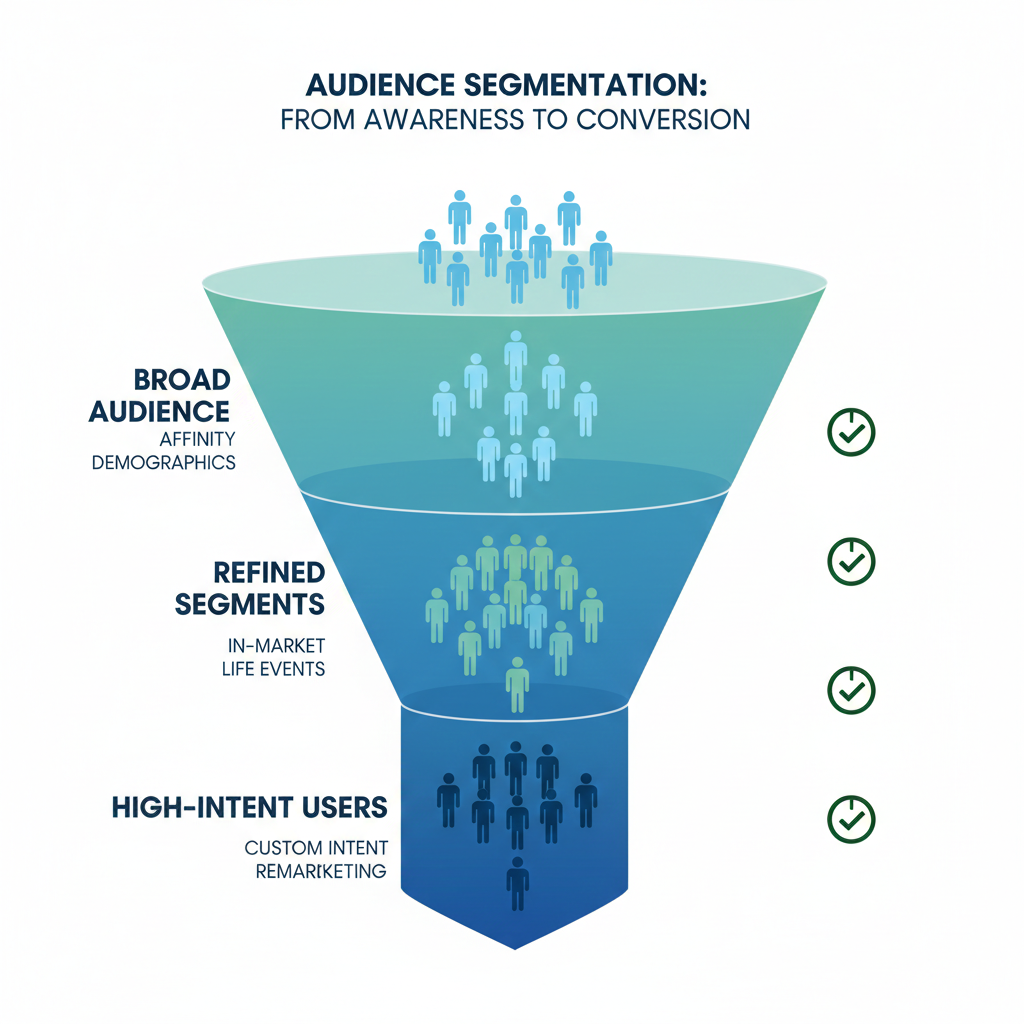
YouTube ads work best when you use clear frameworks for audience targeting. Start by picking your main goal, such as raising brand awareness, getting clicks, or boosting sales. Next, choose your audience. This can include age, gender, location, and interests. YouTube lets you target people based on what they are searching, watching, and even life events like moving or graduating.
Another framework is using remarketing lists. These lists target viewers who have already interacted with your videos or channel. You can also use custom intent audiences. This means reaching people who search for certain terms on Google. Picking the right framework helps your ads show up for people most likely to care about your offer.
Common Mistakes in YouTube Ad Targeting
Many people make simple mistakes when setting up YouTube ads. One mistake is using targeting that is too broad or too narrow. If your audience is too broad, your budget gets spent quickly with little result. If it’s too narrow, your ads may hardly show at all.
Another mistake is not testing different settings. Many skip testing ad groups, placements, or creative messages. This leads to missed chances for better performance. Some advertisers also forget to update their targeting after a campaign starts. Checking in and making changes can make a big difference.
Best Practices to Improve Your Strategy
Successful YouTube targeting means checking campaign data often. Use reports to see which audiences are watching, clicking, or skipping your ads. Change your targeting based on what works best. Try A/B testing with two versions of your ad to see which gets better results.
Below is a table showing helpful strategies and common mistakes:
| Good Strategy | Common Mistake |
|---|---|
| Use layered targeting | Only use one targeting type |
| Update targeting after launch | Never adjust targeting |
| Test ad variations | Stick with one ad version |
| Use remarketing lists | Ignore past viewers |
Frequently Asked Questions
How Are YouTube Ads Targeted?
YouTube ads use data like search history, watch history, and channel subscriptions. This helps advertisers show ads to people who might like their products. Targeting can also use factors such as age, location, interests, and even device type.
Advertisers choose from options like demographic groups or people who have visited their websites. YouTube’s system matches ads to viewers by using this information. Viewers often see ads that relate to their recent searches or video views.
What Audience Targeting Strategies Are Used?
YouTube offers several audience targeting strategies. Some of the main ones include:
- Demographic targeting (age, gender, parental status)
- Interest targeting (hobbies, topics)
- Remarketing (ads to past website visitors)
- Keyword targeting (ads shown on specific search terms)
Advertisers can also use placement targeting. This means their ads show on certain channels or videos. These options help brands reach the right people at the right time.
Can I Control Which Ads I See?
Viewers have some control over the ads they see. YouTube lets users update ad preferences in Google account settings. People can turn off interest-based ads or block ads from certain advertisers. This helps make ads on YouTube a bit more personal.
YouTube also allows skipping some ads after a few seconds. If you see an ad that does not fit your interest, you can use the “Why this ad?” option for more information. This feature helps users learn why certain ads appear and manage their own ad experience.