What Is Branded Search? A Clear Definition (With Examples)
Understanding Branded Search
Branded search means someone types a company or product name into a search engine. These are searches that use your brand’s name or a close match. For example, a person may search for “Nike shoes” or “McDonald’s menu.”
A branded search shows that people already know about your business. They want to learn more or buy something from you. It is different from a non-branded search like “running shoes” or “fast food restaurants.”
Why Branded Search Matters
Branded searches often bring high-quality traffic to your website. People who use branded keywords are usually closer to making a choice or purchase. These visitors trust your brand more than new customers do.
Branded search can help you control how your business looks online. When people search your name, you want them to see your website, social media, and positive reviews. This builds trust and makes it easy for customers to find you.
Examples of Branded Search Queries
You might see many forms of branded search. Here are some examples:
- “Apple iPhone 15”
- “Starbucks rewards program”
- “Nike store near me”
- “Coca-Cola nutrition facts”
These searches show that people are looking for brand-specific details. They want answers about your products, services, or locations. Branded searches can include product names, events, promotions, or even customer service questions.
Below is a table showing the difference between branded and non-branded searches:
| Branded Search | Non-Branded Search |
|---|---|
| “Adidas running shoes” | “Best running shoes” |
| “Subway menu” | “Healthy lunch options” |
| “Samsung TV prices” | “Cheap smart TVs” |
Understanding branded search helps you reach people who already know your business. It guides you to better connect with your audience online.
Branded vs. Non-Branded Search: The Core Difference
What Is Branded Search?
Branded search happens when someone types a business name or a product name into a search engine. For example, “Nike running shoes” counts as a branded search. People who use branded search already know about the brand. They may want to learn more or buy something from the brand’s website. Branded search often brings in people ready to make a purchase. It can show how strong a brand is online. Many websites try to appear high in search results for their own branded terms. This helps them get more visits from interested customers.
What Is Non-Branded Search?
Non-branded search is when someone searches for a general term without a brand name. For example, “running shoes” is a non-branded search. People using non-branded search might not have a brand in mind. They are looking for choices, information, or reviews. Non-branded searches are useful for getting new customers who do not know the brand yet. Websites often use non-branded keywords to reach more people. These searches are very competitive because many brands want to appear in these results.
Main Differences Between Branded and Non-Branded Search
The main difference is the type of keywords used. Branded search uses brand or product names. Non-branded search uses general words or phrases. Here is a simple table to show the difference:
| Search Type | Example Keyword | User Intent |
|---|---|---|
| Branded | Nike running shoes | Buy Nike products |
| Non-Branded | running shoes | Learn or compare |
Branded search usually brings people who are closer to making a purchase. Non-branded search brings people who are still making up their minds. Websites should use both types of keywords to get more visitors. Each type helps connect with different kinds of customers.
Why Branded Search Matters: The Data
Branded Search Drives Quality Traffic
Branded search means people type your business or product name into Google. These searches often show high interest in what you offer. When someone searches for your brand, they already know about you. That means they are more likely to become customers. Studies show that branded search brings in visitors who spend more time on your site. According to a recent report, branded keywords have a 2-3 times higher click-through rate. People trust sites they already know or have heard about. This trust helps turn visits into sales.
Branded search traffic also leads to lower bounce rates. Bounce rate means how many people leave your site after viewing only one page. For branded searches, bounce rates are up to 50% lower compared to generic searches. More engagement means better results for your website.
Impact on Brand Reputation and Sales
Branded search is a sign of strong brand awareness. The more people search for your name, the more popular your brand becomes. Branded search helps control your online image. When someone looks up your brand, your website and social media profiles are likely to show first. This lets you manage what users see about you online. It allows you to highlight positive aspects and respond to questions or feedback.
Branded search terms often lead to higher sales and conversions. People searching for your brand are ready to buy or learn more. Research shows that branded searchers convert up to five times more than non-branded searchers. This shows how important it is for businesses to focus on branded search optimization.
Comparing Branded and Non-Branded Search
It helps to see the difference in numbers. Here is a table comparing branded and non-branded search data:
| Metric | Branded Search | Non-Branded Search |
|---|---|---|
| Click-through Rate | 35% | 10% |
| Bounce Rate | 20% | 40% |
| Conversion Rate | 10% | 2% |
This data shows why branded search is so valuable. A strong branded search strategy can help your website grow. It brings quality traffic and leads to better business results.
Who Is Searching Your Brand? Mapping Branded Search Intent
Types of People Searching Your Brand
Many types of people search for your brand online. Some are current customers looking for more details about your products or services. Others are new visitors who heard about you from a friend or saw an ad. They want to learn more before making a purchase. There are also competitors, partners, or media who search your brand to see how you compare in your industry.
Each group has a different goal when searching for your brand. Customers need support or want to check an order. New visitors seek information. Partners may look for contact details. Knowing these groups helps you understand how to serve them better.
Common Search Intent Behind Branded Queries
There are a few main reasons why people use branded search. Some want to buy a product. Others want to read reviews or find customer support. Some are searching for store locations, while others need news or updates about your brand.
Here are common branded search intents:
- Looking for your website
- Searching for customer support
- Reading reviews
- Checking locations or hours
- Learning about new products
Understanding these reasons helps you meet the needs of searchers. If someone is looking for reviews, make them easy to find. If they want contact info, show it clearly on your site.
How to Use Branded Search Intent to Optimize Your Site
You can improve your website by matching your content to what people search for. Create helpful pages for customer support questions. Make sure your location and contact details are easy to find. Highlight reviews and new products so visitors see them quickly.
A simple table can help you map search intent:
| Search Intent | What To Offer On Site |
|---|---|
| Customer support | FAQ, contact form |
| Reviews | Review page, testimonials |
| Buy products | Product pages, clear CTAs |
| Store locations | Map, address, directions |
| News/updates | News section, blog |
By meeting these needs, you create a better experience for people searching your brand.
How to Find Your Branded Keywords
What Are Branded Keywords?
Branded keywords include your business name and close variations. They can be the name alone, or the name plus products or services you offer. For example, “Acme Shoes” or “Acme Shoes running sneakers” are branded keywords. People use these terms when they already know your brand or want to learn more about it. Knowing your branded keywords helps you understand how customers search for your business. This is the first step to optimizing your website for branded search.
Ways to Discover Your Branded Keywords
Start with a simple search. Go to Google and type your brand name. See what suggestions appear and look at the “People also ask” section. This shows what people type when they look for your business. Next, use Google Search Console. This free tool shows the exact phrases people use to find your website. Look for keywords that include your company name or common misspellings. You can also check your site’s analytics. Google Analytics lets you see what search terms drive traffic to your site.
Here is a table of tools you can use:
| Tool | What It Does |
|---|---|
| Google Search Console | Lists branded searches that show your website |
| Google Analytics | Shows search terms that bring users to you |
| Google Suggest | Offers related search suggestions |
| Social Media | Reveals hashtags and mentions of your brand |
Using Keyword Tools for Deeper Insights
Keyword research tools help you find even more branded keywords. Try tools like SEMrush, Ahrefs, or Moz. Enter your brand name and see what phrases people use. These tools also show how often people search for each keyword. This helps you pick the best ones to focus on. Look for long-tail branded keywords too. These are longer phrases, such as “Acme Shoes store hours” or “Acme Shoes reviews.” Focusing on these terms can help you reach customers with specific needs.
Measuring Branded Search in Google Search Console (2026 Update)
What Is Branded Search in Google Search Console?
Branded search means when people look for your business name or products. It helps see how much people know your brand. Google Search Console shows you when these searches happen. You can spot brand queries by finding patterns in search terms. Look for your company name, website name, or product names.
This helps you understand your site’s visibility. If branded queries rise, your brand is growing. If they drop, it may show lost interest. Google Search Console gives real numbers for these searches. This helps track brand growth over time.
How to Find Branded Search Queries
Go to Performance in Google Search Console. Choose Search Results. Set the date range to see recent and past trends. In the Queries tab, type your brand name in the filter box. This shows all searches with your brand keywords. Common branded search terms include company names, product names, and website URLs.
Create a list of main branded keywords. Some examples:
- CompanyName
- Company Name reviews
- ProductName by Company
- Company website
Track these keywords each month. Use the table below to record key stats for branded queries:
| Keyword | Clicks | Impressions | CTR | Position |
|---|---|---|---|---|
| CompanyName | 250 | 2,000 | 12% | 1.1 |
| ProductName | 90 | 800 | 11% | 1.3 |
Analyzing and Using Branded Search Data
Review the clicks and impressions for branded queries. A high click-through rate (CTR) means people trust your brand. If CTR drops, check if titles or descriptions need work. Watch your position in search results. If branded terms fall to lower spots, improve your website’s SEO.
Use trends from Google Search Console to set goals. For example, set a goal to grow branded search clicks by 10% over the year. Share these numbers with your team. It helps plan better marketing and website updates.
The Anatomy of a Modern Brand SERP
Paid Ads
Location: Top of the page.
Purpose: Your brand’s personal ad space—protect this area by bidding on your name. Be aware: competitors can bid on it too.
AI Overview
Location: “Position Zero” – appears before all other results.
Purpose: AI-generated summary about your brand, compiled from various sources across the web.
Knowledge Panel
Location: Right-hand side on desktop searches.
Includes: Logo, official website, social profiles, address, phone number.
Data Sources: Google Business Profile and structured data on your site.
Organic Result with Rich Sitelinks
Location: Main search results list.
Purpose: Your site ranks #1. Rich Sitelinks below it provide quick access to important pages like “About Us”, “Contact”, and “Login”.
Visual Elements
Image Pack: Related brand photos pulled from your site and other sources.
Video Carousel: Often features content from your YouTube channel or other relevant video platforms.
Social Proof & Third-Party Content
People Also Ask: Common questions about your brand.
Discussions & Forums: Reddit threads, forum posts, and third-party discussions that mention your brand.
Rich Snippets: Customer review stars and ratings shown directly in your result, helping build trust and credibility.
Branded Search Benchmarks and KPIs
What Are Branded Search Benchmarks?
Branded search benchmarks are numbers you can use to check how your website performs with branded search terms. They help you see if people find your site when searching for your brand name or related keywords. These benchmarks are like signposts that show if your brand is gaining attention online. You can compare your numbers to other brands in your industry. This helps you understand if you are above or below the average for branded search performance.
To find the right benchmarks, look at your search volume for branded keywords over time. Track how often your brand shows up in search results. Also check how your click-through rate (CTR) and rankings compare to industry standards. Search engines like Google have tools that can help you get these numbers. Setting clear benchmarks helps you set goals and track progress in branded search.
Key Performance Indicators for Branded Search
Key performance indicators (KPIs) are important numbers that show how well your branded search efforts are working. Some top KPIs to track include:
- Branded search impressions
- Branded keyword rankings
- Click-through rate (CTR) for branded terms
- Conversion rate from branded searches
Branded search impressions tell you how many times your site appeared in search results for branded keywords. Higher impressions mean your brand is visible. Rankings show where your site appears for branded terms. A high ranking means users can find your brand fast.
CTR shows how many people clicked on your site after seeing it in a branded search. A higher CTR suggests your titles and meta descriptions are working well. Conversion rate tells you how many users took an action, like buying a product, after clicking from branded search. This is one of the best ways to measure real success.
Tracking and Analyzing Branded Search Performance
To track your branded search KPIs, use tools like Google Search Console and Google Analytics. These tools show you how your branded keywords perform in search. You can see which pages get the most clicks from branded searches. You can also find out which keywords drive the most traffic.
Set up a table to log your branded search KPIs each month:
| KPI | Month 1 | Month 2 | Month 3 |
|---|---|---|---|
| Impressions | |||
| Keyword Rankings | |||
| Click-Through Rate (CTR) | |||
| Conversion Rate |
Checking your numbers each month helps you spot trends. If your KPIs go up, your branded search strategy is working. If they drop, it is time to make changes and try new ideas.
How to Optimize Your Website for Branded Search
Claim and Optimize Your Brand Profiles
Claim your brand profiles on major platforms. This includes Google Business Profile, Facebook, and LinkedIn. Make sure all your brand information is complete and matches across sites. Add your logo, website link, and contact info everywhere. Consistent data helps search engines trust your brand. It also makes your business easy for users to find.
Encourage your customers to leave reviews on these profiles. Respond to reviews to show you care about feedback. More reviews can boost your brand’s visibility in search results. Make your profiles look professional and updated.
Use Branded Keywords On Your Website
Place your brand name in important spots on your website. Include it in page titles, meta descriptions, and headers. Add your brand name in the first paragraph of your homepage. Use branded keywords in product or service descriptions. This helps search engines connect your brand with your offering.
Create a page that answers common questions about your brand. This page should have your brand name several times. Also, link to this page from other parts of your site. This tells search engines what your brand is about.
Create Quality Content Around Your Brand
Write blog posts that share your brand’s story. Talk about your values, mission, or company news. Share customer stories that mention your brand. Include images with your logo and brand colors. Videos, podcasts, and infographics can show your brand in different ways.
Use a table to track branded search terms:
| Branded Keyword | Page Ranking | Clicks per Month |
|---|---|---|
| YourBrand Shoes | 1 | 400 |
| YourBrand Review | 2 | 250 |
| YourBrand Login | 3 | 100 |
Check which branded keywords are working. Update your content to target new branded search terms. Keep your content fresh so your brand stays at the top of results.
Owning the Entire Branded SERP (Real-Estate Strategy)
What Does It Mean to Own the Branded SERP?
A branded search is when people look for your business name or branded products online. The search engine results page (SERP) shows everything connected to your brand. Owning the branded SERP means that most of the links and information on the first page belong to you or are positive about your brand. This gives you more control over what people see and helps build trust with your audience.
When you control more of the SERP, you keep others from taking up those spots. Competitors or negative news may try to appear on your branded search results. If you fill the SERP with your official website, social profiles, and trusted partners, you lower the risk of negative or confusing results.
Strategies to Own Your Branded Real Estate
Start by making sure your website appears first for your brand name. Use clear page titles and meta descriptions with your brand keywords. Claim and update your social media profiles, such as Facebook, Twitter, LinkedIn, and Instagram. These sites often show up high on branded SERPs.
List your business in directories like Google My Business, Yelp, and industry-specific platforms. Guest posts, interviews, and press releases on other trusted sites can also appear in branded searches. Encourage customers to leave reviews, since review sites are important for branded search results.
Tools and Actions to Improve Your Branded SERP
Keep track of your branded search results with tools like Google Search Console and SEMrush. These show which pages show up for your brand name. If you see something negative or out of place, plan how to push it lower by adding more high-quality content.
Make a table to track which spots in the branded SERP you own. Here is an example:
| SERP Position | Page/Link Owned? | Type |
|---|---|---|
| 1 | Yes | Official Website |
| 2 | Yes | Facebook Page |
| 3 | Yes | Yelp Profile |
| 4 | No | News Article |
| 5 | Yes |
This helps you spot gaps and take action to control more of the SERP. The goal is to fill every spot with links you can trust.
Brand Entity SEO and the Knowledge Graph
What Is a Brand Entity in SEO?
A brand entity is how Google and other search engines see your company as a unique thing. It is not just your name or logo. It includes your products, team, and even your reviews. Search engines collect facts about your brand from many places. These facts help them know what your brand is about and who it serves. Building a strong brand entity helps you show up more in search results.
When people search for your brand, they expect clear, trusted results. They want to see your official site, social media, and maybe news. If your brand entity is strong, Google can show this information in one spot. This makes it easier for customers to find the right details about your brand. You can make your brand entity stronger by sharing the same information everywhere.
The Role of the Knowledge Graph
The Knowledge Graph is like a giant map for search engines. It helps them connect people, places, brands, and things. If your brand is in the Knowledge Graph, you get a big advantage. Your brand may show up in special boxes on search results called “knowledge panels.” These panels can show your logo, website, social links, and more.
Getting into the Knowledge Graph means search engines trust your brand data. They gather details from Wikipedia, your website, and other trusted sites. Keeping your brand info up to date helps a lot. If your brand details are correct, your site can stand out when people do a branded search.
Steps to Optimize for Brand Entity SEO and the Knowledge Graph
You can take simple steps to build your brand entity. Here are some ideas:
- Use the same logo and company name everywhere.
- Add schema markup to your website.
- Get your business listed on trusted sites and directories.
- Share your brand story and details on social media.
- Check and update facts about your brand often.
Schema markup is a special code you add to your website. It tells search engines what your brand is about. This helps you get into the Knowledge Graph. When your facts are correct, your brand looks more official and trustworthy online.
Branded Search in the Age ofAI (GEO)
How AI Is Changing Branded Search
AI tools are changing how people search online. When someone searches for your brand, they may get answers from AI-powered systems and not just a list of links. These systems understand questions, pull out facts, and give short answers. Your brand’s information must be clear and easy for AI to find. People want fast, useful answers, so AI will pick the best details about your brand to show.
AI also uses data from many sources. This means your website, reviews, and social media pages all help shape what AI shows for your branded search. Keeping details up-to-date everywhere is now more important than ever.
GEO and Local Branded Search
GEO, or geographic optimization, helps AI show your brand to people near your location. When someone searches for your brand with “near me,” AI uses GEO data to give them local results. This includes your address, phone number, and business hours.
To help AI show the right details, make sure your Google Business Profile is correct. Check that your name, address, and phone number match on all sites. Add photos, respond to reviews, and update holiday hours. These steps help AI trust your information and show it to more searchers.
Tips to Optimize for AI-Based Branded Search
Here are some steps to help your site appear in AI-powered branded search:
- Use clear, simple language on web pages.
- List all key info like address and contact details.
- Add your business to online directories.
- Encourage happy customers to leave reviews.
- Update your website often with news or offers.
A sample optimization checklist:
| Task | Done |
|---|---|
| Google Business Profile updated | ☐ |
| Contact info matches everywhere | ☐ |
| New reviews added | ☐ |
| Website info refreshed | ☐ |
These actions help AI show your brand in the best way in search results.
Defending Your Branded Search Terms
Why Protect Your Branded Search Terms?
Branded search terms are words or phrases that include your business name or product names. These terms help people find your website directly. If you do not protect them, competitors may use your brand to get your customers. This can confuse people who want to find you. Protecting your branded keywords keeps your website and brand at the top of search results. It makes sure people find your business first.
When your brand shows up first, you get more clicks. This can lead to more sales and help build trust with your audience. Keeping control of your branded search terms is key for growing your business. It is important to check often who is using your brand name online. This way, you can react fast if someone tries to take your spot.
Ways to Defend Your Branded Keywords
There are several ways to keep your branded search terms safe. One way is by running pay-per-click (PPC) ads using your brand name. This lets you appear at the top of search pages even if someone else tries to use your keywords. Another way is by using good SEO on your website. Use your brand name and product names in your website titles, headers, and page text. This helps search engines know which pages belong to you.
You can also set up alerts to track when others use your brand name. Tools like Google Alerts can send you emails if someone mentions your brand online. If you see competitors using your brand, you can ask them to stop. You may also need to talk with the search engine or use legal help if they do not listen.
Monitoring and Responding to Threats
Regularly check search engines for your branded search terms. Make a list of your main branded keywords and search for them every week. Write down if anyone else is using your brand name in their ads or pages. If you find someone, take screenshots and keep records.
If you notice misuse, contact the website owner or advertiser. Often, a simple request can solve the problem. If that does not work, report the misuse to the search engine. Search engines have rules about using someone else’s brand name in ads. Protecting your branded search terms helps keep your website safe and easy to find.
Branded vs. Non-Branded Search
In order to better understand the strategic nature of branded search, you have to view it in the context of unbranded search. Non-branded queries are generic, problem- or solution-oriented searches like “best CRM software” or “how to fix a leaky faucet”. They are carried out by users at the pinnacle of the marketing funnel who are at the awareness or research stage and have not yet made up their mind regarding a particular brand.
Neither of these search methods is a stand-alone strategy, but they are a symbiotic ecosystem that drives your entire customer acquisition funnel. Future demand of branded searches is caused by your non-branded search strategy. When you create helpful content that ranks for a generic query like “best running shoes,” you introduce your brand to new audiences.
As you build awareness and trust through these initial touchpoints, a user’s search behavior naturally evolves. Their next search might be ” running shoes,” and their final search might be “buy shoes.” Thus, powerful non-branded SEO campaign is a direct investment in the increase of the quantity of your most precious resource high-converting branded traffic.
The Branded vs. Non-Branded Keyword Funnel
Top of Funnel: Awareness & Discovery
Keyword Type: Non-Branded Informational Keywords (e.g., “what is content marketing?”)
User Intent: The user has a problem or question but is not yet aware of specific solutions.
Your Goal: Attract new audiences and build initial brand awareness with educational blog posts, guides, and videos.
Middle of Funnel: Interest & Desire
Keyword Type: Non-Branded Investigational & Branded Comparison Keywords (e.g., “best content marketing platforms,” “vs. [Competitor]”)
User Intent: The user is aware of solutions and is actively comparing options.
Your Goal: Build trust and demonstrate value with in-depth comparison pages, case studies, and customer testimonials.
Bottom of Funnel: Action
Keyword Type: Branded Transactional & Navigational Keywords (e.g., “buy subscription,” “login”)
User Intent: The user has made a decision and is ready to convert or engage.
Your Goal: Capture this high-intent demand and provide a seamless conversion path. Branded keywords at this stage have 2-3x higher conversion rates than non-branded keywords.
The Strategic Imperative of Branded Search
Understanding what branded search is lays the groundwork. Now, you have got to understand why it is a business imperative. Far from being a vanity metric, branded search is a direct indicator of your brand’s health and a powerful engine for profitable growth.
Driving High-Intent Traffic and Revenue
Customers who are looking up your brand are not mere window shoppers, but they are on a mission. They have already moved through the research and consideration phases and are now looking to take a specific action, whether it’s making a purchase, logging into an account, or finding contact information. This degree of intent is directly corresponded to the high performance.
The statistics have always revealed that the conversion rate of the branded search traffic is much higher than the non-branded traffic, and it can be 2 to 3 times higher. The financial implications are staggering. A landmark study by Dreamdata analyzing B2B Google Ads campaigns revealed that while branded keywords received only 18% of the total ad budget, they generated an incredible 1299% Return on Ad Spend (ROAS).
Non-branded campaigns, in their turn, had a pathetic ROAS of 68% despite using 82% of the budget. This staggering disparity is important because it highlights one of the most important aspects of branded search: it is where you reap the benefits of all your other marketing.
Competitive Defense and Reputation Management
Your Brand SERP is a competitive arena. Unless you are busy protecting it, your competitors will take advantage. Competitors bidding on your branded keywords in paid search campaigns is a common and good tactic to divert your high-intent customers and get them to click on their ads which are at the top of the page.
Investing in a two-pronged strategy of both branded paid search (PPC) and organic search optimization (SEO) allows you to build a digital moat around your brand. By securing both the top paid ad spot and the #1 organic position, you dominate the SERP real estate, push competitors further down the page, and maintain complete control over your brand’s first impression.
The value of this approach is backed by data: a Google study found that even when you already hold the #1 organic ranking, running a paid ad in the top position provides a 50% incremental lift in total clicks. This implies that you are tapping traffic that would have been lost.
In addition to competitive defense, branded search can be an important proactive reputation management tool. Users today are savvy; they will search for terms like ” reviews” or ask specific questions about your products and policies. Unless you develop and optimise content that answers these questions, you lose control of the message to third-party review sites, forums or even to disgruntled people.
Develop specific pages on reviews, comparisons and frequently asked questions and make sure that when individuals research your brand, they come across your official, authoritative responses first. It is not only SEO but a vital digital public relations.
How Branded Search Boosts All Rankings
The number of queries of your brand name is a strong indicator of authority to Google. When many users actively search you out, it sends a signal to the search engine that you are a credible, popular and relevant player in your field. This recognition creates a virtuous cycle, or what can be described as an “SEO snowball effect”.
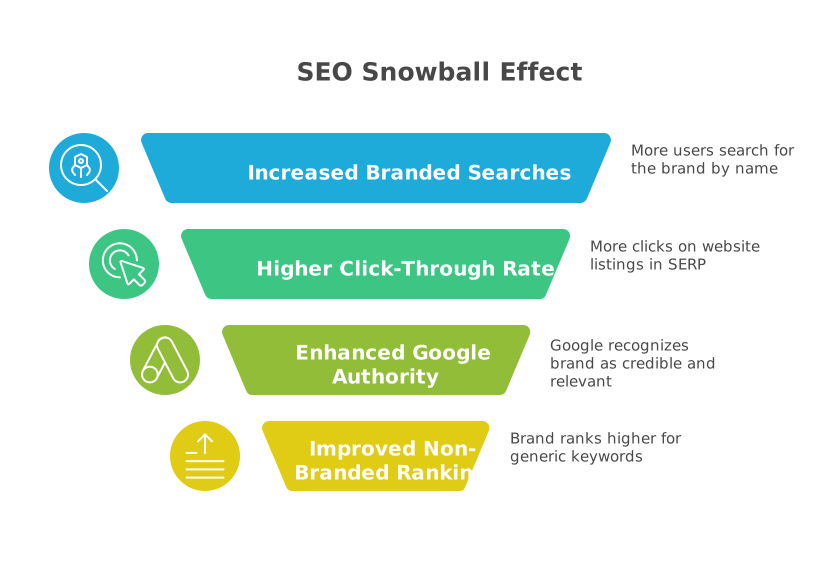
The process works as follows:
- Increased brand-building activities (like PR, social media, or offline ads) lead to more people searching for your brand by name.
- This surge in branded searches results in a higher click-through rate (CTR) on your website’s listings in the SERP.
- A high CTR is a well-known positive signal to Google’s ranking algorithms, indicating that your result is highly relevant to users.
- As your authority grows, Google’s algorithms begin to form stronger associations between your brand name and related non-branded, generic keywords. For example, it learns to associate the brand “Babyletto” with the generic topic “baby crib brands”.
- This increased power can then boost the positions of your non-branded material, putting your brand in front of yet additional individuals at the top of the funnel. This new awareness, in its turn, produces additional branded searches in the future and the snowball keeps on growing.
This feedback loop has become even more critical with Google’s recent emphasis on E-E-A-T (Experience, Expertise, Authoritativeness, and Trustworthiness) and its Helpful Content System. Google’s primary objective is to surface content from recognized, authoritative brands, not anonymous websites.
A key way Google identifies a “recognized brand” is by observing how many people search for it by name. Thus, any marketing effort which creates brand awareness and branded search is now a required, though indirect, SEO strategy. It creates the real-life authority that Google is keen to reward.
Mastering Your Brand’s Digital Territory
To conquer your branded search environment, you need the 360 degree approach. It’s not enough to simply rank for your name; you must control the entire search experience. This includes a plan of action between on-page content, technical seo and off-page reputation management.
On-Page & Content Strategy
Your on-page strategy is all about the content on your website directly talking to the people searching for your brand and saying the right thing.
- Maximize your core pages: The first and most basic thing you can do is to make sure that your brand name is featured prominently and in a natural way on your most important pages, first and foremost your homepage and About Us page, as well as any important landing pages on your products or services. Your About Us page is particularly crucial for establishing trust; it should go beyond a simple description to detail your company’s history, showcase your leadership team with their credentials, and list any awards or accolades you’ve received.
- Aim the full range of branded queries: Not every branded search is equal. You need to divide them into user intent and develop customized content to suit them:
➡️ For Prospective Buyers: These users are in the final stages of evaluation, searching for terms like ” vs. [Competitor],” ” pricing,” or ” reviews.” In order to get this high-value traffic, you must develop specific, transparent content. Create objective comparison pages that give a fair description of your advantages over the competition, offer clear and easy-to-locate pricing guidelines, and develop a landing page that collects genuine customer testimonials.
➡️ For Existing Customers: This group is looking for support and uses queries like ” login,” ” customer service,” or “how to use a feature.” It is crucial to the retention and loyalty of such users to provide them with a seamless experience. Construct a thorough knowledge base, detailed help center, and make contact information readily available to resolve their needs in a timely and efficient manner. - Use Content-First Method: Anticipate all the questions that a user can ask about your brand and answer them. Use tools like Google’s “People Also Ask” feature and keyword research to discover these questions, and then create high-value blog posts, guides, and FAQ pages to answer them. This would make you the ultimate authority on your own brand and you will be trusted and authoritative.
- Create a Coherent Brand Voice: Your tone and style of the content that you are giving should be coherent between the rest of your site. This voice must represent the principles and fundamental concepts your business was based on, and it must form a unified and reliable brand image.
Technical SEO & E-E-A-T
Technical SEO gives the framework on which the search engines can comprehend and believe your site. In the context of branded search, this is intrinsically linked to Google’s E-E-A-T framework.
The E-E-A-T Framework
E-E-A-T stands for Experience, Expertise, Authoritativeness, and Trustworthiness. It is the set of principles Google’s human quality raters use to assess the credibility of a website, and it heavily influences how Google’s algorithms rank content, especially for sensitive “Your Money or Your Life” (YMYL) topics like finance and health. While not a direct ranking factor itself, E-E-A-T signals are what Google’s algorithms look for to identify trustworthy sources. The most important element is trustworthiness and the other three pillars are meant to support it.
By definition, a strong brand is one that consumers feel is experienced, knowledgeable and authoritative. Google’s E-E-A-T framework is an attempt to algorithmically model this human concept of trust. Thus, the technical and content-related cues that you will transmit in order to prove the E-E-A-T are the exact behaviors that will make your readers trust you in the real world, which will, in turn, make them search by your name. The direct method of optimizing E-E-A-T is to maximize branded search traffic and control your Brand SERP.
Implementing Schema Markup
Schema markup is a form of structured data—code added to your website’s HTML—that acts as a translator, helping search engines understand the context and meaning of your content. It is the technical key to unlocking rich results, like star ratings and event listings, and populating your brand’s Knowledge Panel. Google recommends using the JSON-LD format. Following are examples of the most important schema types for branded search.
- Organization Schema: You should put this on your home page or About Us page. It defines your business as a distinct entity to Google, specifying your official name, logo, website URL, and social media profiles (using the sameAs property). This is essential data towards creating a comprehensive and precise Knowledge Panel.
<code>
<script type="application/ld+json">
{
  "@context": "https://schema.org",
  "@type": "Organization",
  "name": "Your Company Name",
  "url": "https://www.yourwebsite.com",
  "logo": "https://www.yourwebsite.com/logo.png",
  "sameAs": [
    "https://www.facebook.com/yourprofile",
    "https://www.twitter.com/yourprofile",
    "https://www.linkedin.com/company/yourprofile"
  ]
}
</script>

</code>- Product Schema: Required for e-commerce sites, this should be on the product individual page. It provides information such as price, availability, brand, SKU and customer ratings so that your products can be eligible for enhanced listings in search results that can greatly increase CTR.
<code>
<script type="application/ld+json">
{
  "@context": "https://schema.org/",
  "@type": "Product",
  "name": "Executive Anvil",
  "image": "https://example.com/photos/anvil.jpg",
  "description": "Sleeker than ACME's Classic Anvil, perfect for the business traveler.",
  "brand": {
    "@type": "Brand",
    "name": "ACME"
  },
  "sku": "0446310786",
  "offers": {
    "@type": "Offer",
    "url": "https://example.com/anvil",
    "priceCurrency": "USD",
    "price": "119.99",
    "availability": "https://schema.org/InStock",
    "itemCondition": "https://schema.org/NewCondition"
  },
  "aggregateRating": {
    "@type": "AggregateRating",
    "ratingValue": "4.4",
    "reviewCount": "89"
  }
}
</script>
</code>- FAQ Schema: This is applicable on pages that have a question and answer section like a blog post or a support page. It marks up each question and its corresponding answer. Although Google has declared in 2023 that FAQ rich results will mostly be restricted to government and health websites of authority, the schema is still a best practice in terms of making your content to be easily understood by search engines and the AI models.
<code>
<script type="application/ld+json">
{
  "@context": "https://schema.org",
  "@type": "FAQPage",
  "mainEntity":
}
</script>
</code>
Off-Page & Reputation Strategy
Your brand’s authority is not just determined by what’s on your site, but also by what the rest of the web says about you.
- Digital PR and Link Building: You want to achieve the mentions and links on the high-authority and reputable websites within your industry. A backlink of a big news source or a reputable blog of the industry is strong vote of confidence. When possible, aim for links that use your brand name as the anchor text (e.g., a link on the words “Your Company Name”), as this is a very strong brand signal. Creating awareness and authoritative links can also be achieved through guest blogging in related, complementary sites.
- Reputation and Review Management: You should actively urge your happy customers to post a review on your Google Business Profile and other applicable websites such as Trustpilot or G2. Good reviews directly indicate trust to both the human and the algorithm. Reply to every review, whether it is positive or negative, in a professional manner to demonstrate that you are interested in what your customers say.
- Become Omnipresent: be involved and present in the places where your target audience is. Being active and consistent across social media channels, industry forums, and even on podcasts will be the most natural way to make people know more about you by typing your brand in the Google search. It is an off-site activity that is one of the factors that drive branded search volume.
A Data-Driven Approach to Branded Search Performance
In order to optimize and control your branded search strategy, it is important that you should be in a position to quantify the performance of your strategy. This involves employment of appropriate tools to monitor the whole user path, starting with the initial query and ending up with conversion.
Setting Up Your Measurement Toolkit: GSC and GA4
Your essential measurement toolkit consists of two free and powerful platforms from Google: Google Search Console (GSC) and Google Analytics 4 (GA4). It is critical that you link these two accounts. GSC provides pre-click data—it tells you what people searched for, how many times your site appeared (impressions), and how often they clicked (CTR). GA4 is post-click-based data- it informs you of what users did after they landed on your site, the pages they visited, the time spent, and whether they converted. The connection gives you a full picture as you can associate particular search queries with on-site user behavior.
How to Isolate Branded Traffic in Google Search Console
Raw search queries that bring traffic to your site can be examined in the best way in GSC. Here’s how to separate branded from non-branded traffic:
- Step 1: Open the Performance Report. In your GSC property, navigate to the Performance > Search results report in the left-hand menu.
- Step 2: Set Your Date Range. For a meaningful analysis, select a long date range, such as the last 12 or 16 months, to identify long-term trends.
- Step 3: Use the Query Filter. Click the + New button at the top of the report and select Query....
- To view branded traffic: Create a filter using Queries containing and enter your brand name. To capture multiple variations, use a regular expression with the pipe symbol (|) as an “OR” operator. For example: YourBrand|Your Brand|UrBrand.
- To view non-branded traffic: Create another filter, this time using Queries not containing with the same brand terms.
- Step 4: Analyze and Compare. GSC’s “Compare” feature is perfect for this. You can set up two filters—one for queries containing your brand and one for queries not containing it—to see two trend lines on the same graph. This allows you to visually compare the growth of branded vs. non-branded impressions and clicks over time.
Tracking Branded Traffic and Conversions in Google Analytics 4
Whereas GSC presents you with the queries, GA4 presents you with the results. Once you have connected GSC to GA4, you will be able to examine on-site behavior of branded search visitors.
- Step 1: Ensure GSC is Linked to GA4. In the GA4 Admin panel, go to Product Links > Search Console Links to connect your properties. This is a prerequisite for the following steps.
- Step 2: Access the GSC Reports in GA4. After being connected, reports in the Search Console will appear in GA4. You may need to add the Search Console collection to your reports navigation via the Reports > Library section. Your search term data can be viewed in the Queries report of this collection.
- Step 3: Create a Branded Traffic Comparison. In any standard report (like the Traffic acquisition report), click Add comparison. Create a new condition where Session default channel group exactly matches Organic Search AND Session Google Ads query (this is the field that pulls in GSC data) contains your brand name variations. You then are able to make a counter comparison of non-branded traffic. It will enable you to compare such metrics as Engaged sessions, Average engagement time, and Conversions of each type of traffic.
It’s important to recognize that a truly comprehensive measurement strategy involves this multi-tool approach. GSC offers the most precise query data, GA4 measures the consequent on-site behavior and business performance, and in case the enterprise needs 100 percent unsampled data, the transfer of GSC data to such a data warehouse as BigQuery is the best practice.