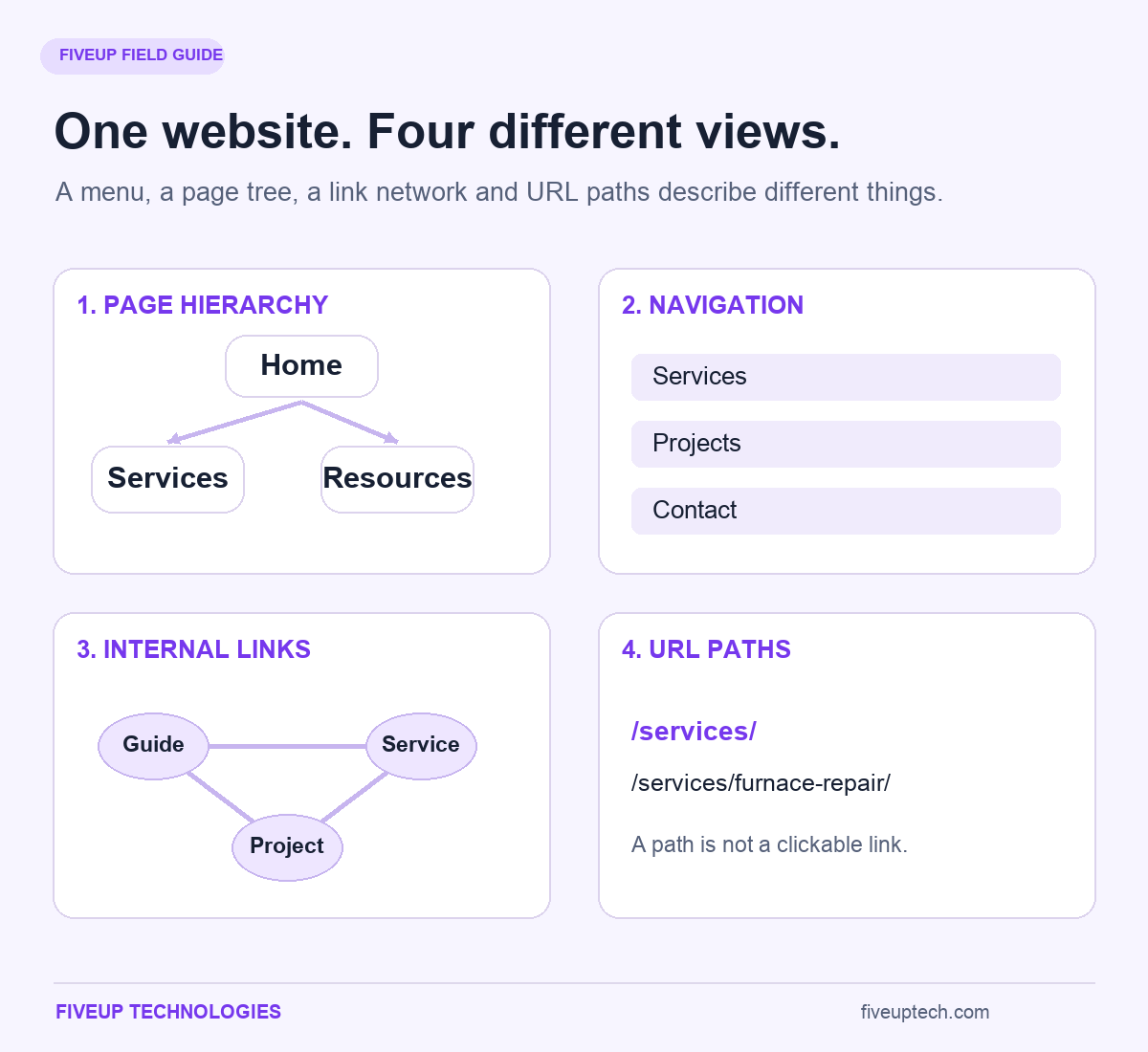
Website structure is the way your pages are grouped, connected and made accessible. It determines where information belongs, how visitors reach it and which paths lead toward an action. A useful website structure brings together page hierarchy, navigation, internal links and consistent URLs. Each part has a different job.
A customer should be able to recognize the right service, understand whether it suits their needs and find a sensible next step. They should not need to understand your company's departments first.
That sounds straightforward until a website grows. A new service gets its own landing page. Several campaigns add more pages. Blog categories multiply. Soon, the menu describes the business you had three years ago, while the content describes the business you run now.
You can fix that without starting every project with a complete rebuild. The work begins with decisions about content and relationships. Design comes after those decisions have enough substance to test.
Throughout this guide, Cedar House Heating is a fictional service business used to illustrate the process. Its page plans and examples are teaching tools, not reported client results. You will also see how the same decisions change for an online store and a resource library.
1. What Is Website Structure? Understand the Pages, Relationships and Paths
A website structure exists even when nobody planned one. The question is whether that website structure helps people find what they need.
Think about a repair service page. It might belong under Services, appear in a mobile menu, receive links from troubleshooting articles and have a short URL. Those relationships describe different views of the same page.
Website Architecture, Information Architecture and Navigation: How They Fit Together
Website architecture often serves as another name for website structure. In a broader technical discussion, it can also include how a website is built and delivered. Here, it means the arrangement and connections between content pages.
Information architecture concerns the decisions behind that arrangement. It deals with grouping information, naming sections, supporting search and making content understandable to its audience.
Navigation turns some of those decisions into controls people can use. A main menu, category listing and related-article link are navigation mechanisms. None shows every relationship across a larger site.
Cedar House Heating might group repair and installation under Services. Its menu can expose those choices directly. A guide about an unreliable furnace can also link to furnace repair. That contextual route belongs in the architecture even though it does not appear as another branch in the menu.
Terminology varies between teams. Agree on what each document represents before the project moves forward.
Whole-Site Structure vs Page Layout, HTML Structure and URL Folders
A page layout describes what appears within one screen or document. A service page might contain an introduction, pricing explanation, project photographs and an enquiry form. That is different from deciding where the page belongs across the whole site.
HTML structure gives those elements meaning in the document. Headings organize sections. A navigation region identifies navigation. Main content and footer regions help describe the page's parts.
URL folders provide another view. The address /services/furnace-repair/ suggests a relationship between services and furnace repair. Yet that folder path does not create a link from the Services page. The link must exist in the implemented content or navigation.
Keep four views of website structure separate when planning: the content hierarchy, the menu, the internal-link network and the URL arrangement. Comparing them often reveals why a site looks organized in a presentation but feels confusing in use.
2. Why Website Structure Matters for Discoverability, Visitors and Business Goals
Website structure affects what people can find and what they understand when they arrive. It also affects how search engines encounter pages and interpret their connections.
Those effects matter, but they do not make website architecture a shortcut around weak content, unavailable pages or an offer that fails to meet customer needs.
Crawlable Connections Help Google Discover Pages and Understand Relationships
Search engines discover many pages by following links. A page listed in a planning document has no discoverable connection until the website implements that connection.
Suppose Cedar House publishes a new heat-pump service page. Linking to it from Services gives it a browsing route. Linking from a relevant equipment guide adds context. Both connections help establish the page’s role in the website structure.
Discovery is one stage. A search engine must still process the page, decide whether to index it and determine when it deserves to appear for a query. An internal link does not guarantee those outcomes.
Useful links also communicate relative importance. A core service reached from prominent, relevant pages has a different structural role from an old campaign page with no current browsing route. Make those priorities intentional instead of leaving them to publishing order.
Clear Paths Help Visitors Compare Services, Find Evidence and Take the Next Step
A visitor considering a repair needs different information from someone researching a replacement system. The first may need availability, service area and booking details. The second may need options, costs and evidence that the company can handle the work.
Build the website structure around these different visitor tasks. A service page can lead to a relevant project example, then an enquiry. A troubleshooting article can offer safe general guidance and explain when professional diagnosis becomes appropriate.
Do not assume every journey begins on the homepage. Search, email and advertising can deliver someone directly to a detailed article or service page. That page must establish its context and offer useful onward links.
Judge the route by whether people complete their task. Extra pageviews can mean interest, but they can also mean confusion. A customer who finds the correct answer quickly may need fewer pages before contacting you.
3. Types of Website Structure: Choose a Model Around the Job It Must Do
The common types of website structure describe patterns, rather than a formal classification every site must follow. Four-model explanations usually cover hierarchy, sequence, matrix and database-driven organization. Some add hybrid as a fifth model.
Use the patterns to choose how content should behave. A business website structure can combine several of these patterns.
| Structure model | Where it fits | Main advantage | Planning concern |
|---|---|---|---|
| Hierarchical | Service sites, catalogues and organized resource libraries | Gives broad topics and detailed pages recognizable places | Excessive nesting can bury important information |
| Linear or sequential | Bookings, onboarding and guided applications | Makes the next step predictable | Forced sequences can obstruct visitors who need to compare options |
| Matrix or webbed | Interconnected knowledge and discovery experiences | Supports several relevant routes through content | Weak labels and poorly chosen links can leave people disoriented |
| Database-driven | Large collections with search, filters or dynamic listings | Lets visitors narrow a substantial collection | Uncontrolled combinations can create duplicate or low-value URLs |
| Hybrid | Sites that combine browsing, learning and transactions | Fits different tasks within one website | The combined patterns still need consistent labels and orientation |
Hierarchical Website Structure and Hybrid Models for Business Websites
A hierarchical website structure organizes pages from broader sections to more specific content. A service business might have Home, Services and individual service pages. A store might use departments, categories and products.
The hierarchy gives each page a recognizable home. It also helps a team decide where new content belongs.
It does not prevent other connections. A furnace repair page can link to a replacement guide when that helps someone compare options. A project example can link to the service it demonstrates.
That combination creates a hybrid website structure. The main content follows a hierarchy, while contextual links support exploration and a booking process follows a sequence. Choose each pattern because it serves a task. You do not need to force every interaction into the same tree.
Linear Website Structure for Booking, Onboarding and Step-by-Step Processes
A linear website structure guides someone through a sequence. It suits tasks where later steps depend on earlier choices.
For example, a booking flow might move from service selection to availability, contact details, review and confirmation. The visitor can see what comes next and correct an earlier answer before submitting.
Problems appear when a sequence controls information that people need to browse freely. Someone comparing repair and installation should not have to complete a repair journey before learning about replacement options.
Keep sequences focused. Explain progress, preserve entered information when possible and provide a clear way to go back. A linear flow can sit within the wider website structure without becoming the model for every page.
Matrix Website Structure vs Database Website Structure for Flexible Discovery
A matrix website structure emphasizes connections across content. A visitor follows related topics, people, products or concepts without one required reading order. An encyclopedia is a familiar example of that browsing pattern.
A database website structure describes an experience organized through records, attributes and queries. Visitors might filter a catalogue by size, material and intended use.
These ideas overlap, but they describe different things. A database concerns how information is stored and retrieved. A matrix describes flexible connections and movement. A database-backed website can still use a hierarchical website structure.
For a large product collection, combine useful category routes with filtering. Search should help people narrow the collection. It should not become the only route to products you want visitors and search engines to discover.
4. Flat vs Deep Website Structure: Balance Click Depth With Clear Choices
The comparison of flat vs deep website structure concerns how many linked steps separate pages. A flatter site offers shorter routes. A deeper site introduces more intermediate levels.
Neither website structure is automatically better. Short routes lose their value when they require visitors to scan a wall of unclear choices.
Click Depth and URL Depth Measure Different Things
Click depth measures the shortest linked route from a chosen starting page to another page. In a homepage-based crawl, the homepage is the starting point. A page linked directly from it is one step away.
URL depth describes the path segments in an address. A page at /services/heating/furnaces/repair/ can still be one click from the homepage if a direct link exists. A page at /repair/ can be several clicks away if the site hides it behind multiple intermediate pages.
When evaluating website structure, record the starting point in each crawl report. A crawl that begins inside a resource section does not describe the same depth as one beginning on the homepage.
Also distinguish the shortest available route from a visitor's real journey. Someone may backtrack, try the wrong category or enter through a different page. A crawl count cannot explain that experience by itself.
The Three-Click Rule Is a Heuristic, Not a Universal Design Requirement
There is no universal usability rule requiring every task to finish within three clicks. People care about whether the next choice makes sense, how much effort it requires and whether they seem to be making progress.
A short route through three confusing screens can be harder than a longer route with obvious choices. Loading time, reading effort and repeated mistakes also affect the experience.
That does not justify burying your most important services. Give common tasks prominent access. Remove unnecessary intermediary pages and label the remaining choices clearly.
For Cedar House, booking a repair deserves a short route. A technical resource explaining several equipment types may need more organization. In a website structure review, use depth as a diagnostic measure, then test whether the route works for its intended task.
5. Start Website Structure Planning With Audience Tasks and a Content Inventory
Website structure planning starts with what people need to accomplish. Drawing boxes before understanding those needs often produces a tidy version of the company's internal organization.
Before planning a new website structure, identify its audiences and tasks. Before changing an existing one, add an inventory of what already exists and how it performs.
Define Visitor Tasks, Entry Pages and Meaningful Conversion Goals
Write tasks in language a visitor might use. “Find out whether you repair my system” is more useful than “increase service-page engagement.” The first tells you what the site must help someone discover.
For each task in your website structure plan, identify the likely entry page, the answer required, the evidence needed and the next action. A person arriving on a repair article may need to understand service availability before seeing a booking prompt.
Different audiences can require different routes. Existing customers may need maintenance information. New customers may need credentials, service areas and a clear explanation of what happens after an enquiry.
Use recurring sales questions, support requests and search behaviour when you have them. When evidence is limited, record your assumptions. A visible assumption can be tested. An assumption disguised as a settled fact tends to survive longer than it should.
Inventory Existing Pages and Give Each Proposed Page a Clear Purpose
Gather known URLs from the content management system, crawl results, sitemaps and relevant performance records. Each method can reveal pages another method misses.
A useful website structure inventory should record:
- The current URL, page type and responsible owner.
- The visitor task and primary search intent the page serves.
- Its current parent, incoming links and important onward links.
- Available evidence of traffic, enquiries, external links or operational value.
- The proposed action, reason and person responsible for completing it.
Do not remove a page because one short reporting period shows no visits. It may support existing customers, seasonal demand or an important process. Investigate its purpose first.
A new page deserves a distinct job. If the proposed content answers the same question for the same audience as an existing page, improving that page may be the better decision.
6. Build Website Hierarchy and Taxonomy Around Topics People Understand
Your website hierarchy establishes broad sections and the content beneath them. Your website taxonomy provides the rules used to group and label that content.
Those rules should keep the website structure manageable as publishing continues. If every new article starts a debate about where it belongs, the taxonomy needs clearer boundaries.
Categories, Subcategories and Tags: Give Each Organizing Layer a Job
Categories give related content recognizable homes within the website structure. Subcategories divide a group when visitors benefit from a more specific choice. Tags can connect content across categories through a shared attribute.
Cedar House might organize resources under Heating, Cooling and Maintenance. A guide about replacing a furnace filter could belong in Maintenance. A carefully used equipment-type tag could connect relevant articles across those groups.
Avoid creating a tag for every phrase in an article. That produces collections with little purpose. Before adding a category, explain what belongs there, what does not and why a visitor would choose it.
There is no universal number of articles that makes a category worthwhile. A small, coherent collection can help readers. A much larger collection can still be confusing if its label hides several unrelated needs.
Map Search Intent to Service Pages, Topic Clusters and Supporting Resources
Topic clusters organize related content around a shared subject. They work best when the individual pages answer distinct questions and connect in helpful ways.
A furnace repair service page explains the offer, coverage, process and booking. An article about repair versus replacement helps someone evaluate a decision. A maintenance guide supports another need. Their vocabulary overlaps, but they serve different roles in the website structure.
Semantic keyword clustering can help identify related requests. Group close keyword variations on one page when they represent the same request. Do not create separate articles for “site hierarchy” and “website hierarchy” merely because the wording changes.
Shared keywords do not prove that pages are competing harmfully. Look at intent, the pages appearing for relevant searches and whether visitors receive different value. Consolidate when the distinction has collapsed, rather than merging every page that mentions the same subject.
7. Website Structure Examples for Service Businesses, Ecommerce and Content Sites
Useful website structure examples explain why pages belong together. A diagram copied from another industry may contain the wrong assumptions about your customers, catalogue or sales process.
Start with the website structure model closest to your needs, then change the relationships to match your content and tasks.
A Service Business or B2B Website: Services, Use Cases, Proof and Contact
Cedar House needs separate repair and installation information because customers face different decisions. The repair page explains eligible equipment, the process and how to request help. The installation page addresses replacement choices and project requirements.
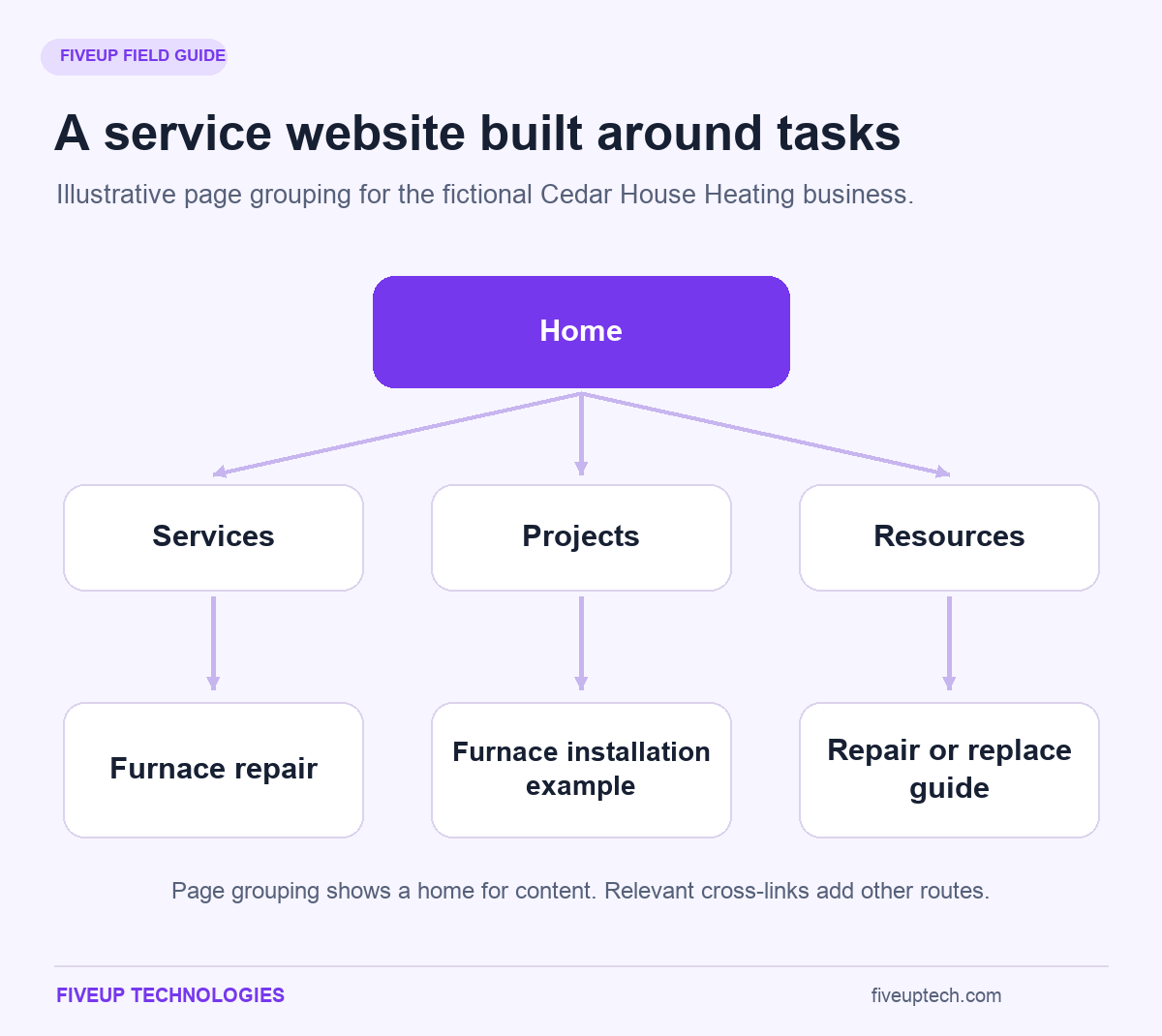
Project pages give this website structure a home for relevant work examples. Resources answer questions that arise before or after a service enquiry. About and Contact provide business information and a route to speak with someone.
The service page should connect to a relevant project. The project should explain which service it demonstrates. A repair-versus-replacement guide can connect to both offers where that helps the reader evaluate options.
A B2B software site adapts the same logic. Product pages explain capability. Use-case pages explain fit. Pricing supports evaluation. Customer examples provide evidence. A demo route supports a more detailed discussion. Create a separate use-case page when it contains a distinct problem and answer, rather than a new headline over identical content.
Ecommerce Website Structure: Categories, Products and Buying Guidance
Ecommerce website structure must support both broad browsing and specific product discovery. A visitor may know the exact product they want. Another may only know the problem they need to solve.
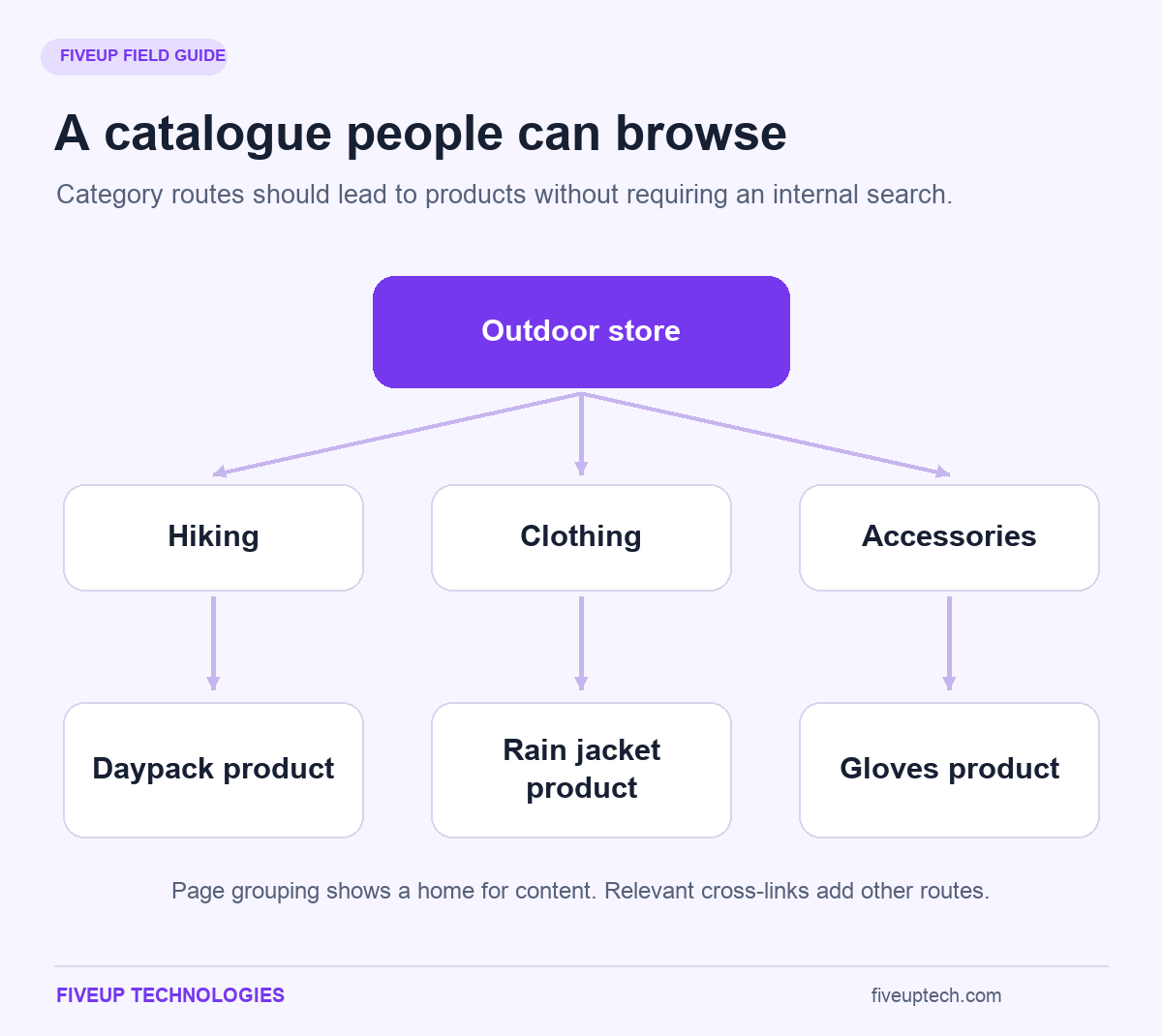
An outdoor store might group products under Hiking, Clothing and Accessories. Hiking can lead to backpacks and poles. A product page can also appear in a useful collection such as Lightweight Equipment.
Several browsing routes do not require several copies of the product. Links from different collections can lead to the same product destination. Where a platform produces alternate URLs, the site needs a consistent approach to its preferred version.
Buying guidance belongs close to these decisions. A backpack-capacity guide can lead readers to relevant products. The product page can link back to the guide when shoppers need help choosing. Keep essential comparisons available before checkout, rather than forcing visitors to leave the buying journey and search elsewhere.
A Blog or Resource Library: Topic Hubs, Supporting Articles and Useful Next Steps
A reverse-chronological blog makes recent content easy to find. It becomes less helpful when a valuable older guide sits behind many listing pages.
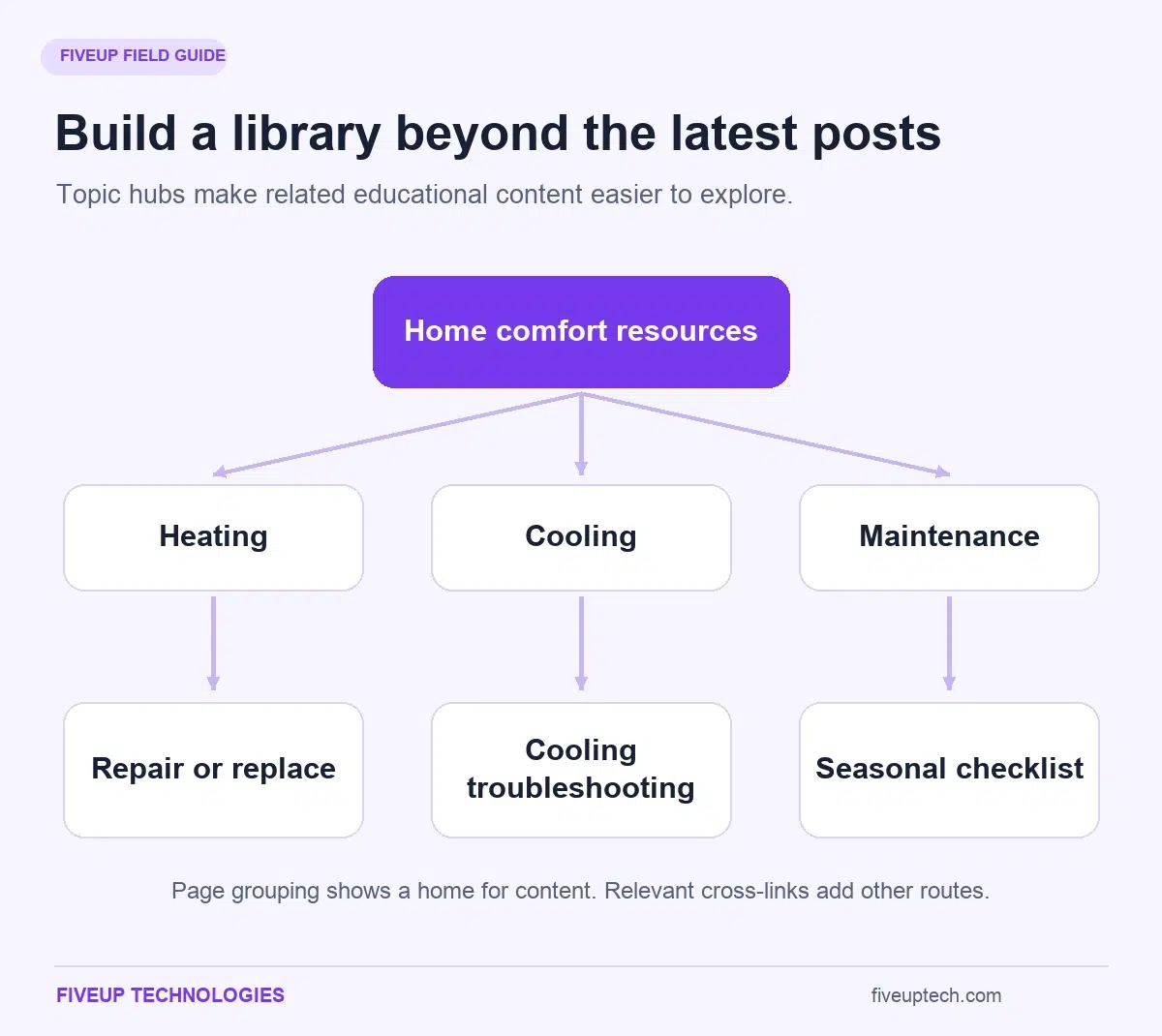
In a blog website structure, use topic hubs to organize material by need. Cedar House could offer Heating, Cooling and Maintenance collections. A reader interested in heating can then choose between troubleshooting, operating costs and replacement decisions.
The hub should explain what the collection helps readers do. A short introduction, useful groupings and a few well-chosen starting points provide more direction than a list of titles alone.
Case studies can remain in a separate project collection while receiving links from relevant guides. Services remain commercial pages. These connections let readers move between learning, evaluating and contacting the business without making every article serve as a sales page.
8. Create a Website Structure Diagram and a Template Your Team Can Implement
A website structure diagram makes relationships easier to discuss. A website structure template records the decisions needed to build those relationships.
Use both when several people contribute to the project. The diagram communicates the website structure at a glance. The page specification prevents details from disappearing during handoff.
Draw the Hierarchy, Then Label Navigation and Contextual Links Separately
Begin your website structure map with the homepage and broad sections. Place detailed pages beneath the section that gives them the clearest context. Give every page a short identifier so that similar titles do not create confusion.
Define what your connectors mean. A solid line can represent the proposed parent relationship. A labeled arrow can indicate a planned contextual link. A small navigation label can identify pages intended for the main menu.
Do not depend on color alone to communicate those differences. Labels and line styles make the plan easier to interpret and share.
Include the plan's version, review date and approval status. Also distinguish existing pages from proposed ones. A diagram that silently combines current and future content creates avoidable implementation errors.
Keep a text-based version available. It helps reviewers inspect details and gives the team a usable alternative when a large diagram becomes difficult to read.
Build a Page Specification in a Spreadsheet, FigJam or Sitemap Planning Tool
A spreadsheet is enough for many smaller projects. A whiteboard suits early grouping and discussion. A dedicated planning tool can help when reviewers need shared diagrams, page notes, comments and version control.
Choose around collaboration and handoff needs. An attractive interface cannot compensate for missing website structure decisions.
Copy this record for each important page:
Page ID:
Page title and type:
Primary visitor task:
Primary search intent:
Proposed parent or collection:
Current URL, if any:
URL decision and reason:
Required content and page template:
Important incoming links:
Useful onward links:
Owner and review date:
Acceptance checks:
For Cedar House's furnace repair page, the visitor task is checking whether the company offers suitable help. Its parent is Services. Incoming links include the service listing and relevant troubleshooting content. Onward links include a relevant project and the booking route.
The acceptance check should describe a result: a visitor can identify service coverage, understand the process and send the correct enquiry. “Page built” does not provide that level of assurance.
9. Website Navigation and Breadcrumbs: Help People Find the Right Next Page
Website navigation exposes the choices visitors can make. Its labels and controls should communicate what lies behind each choice.
Website navigation does not need to expose every page in one menu. It needs to provide understandable routes to the sections and tasks that matter, with other navigation supporting the detail.
Main Menus, Section Menus and Footer Links Should Serve Different Tasks
Primary website navigation introduces the site’s major choices. Cedar House might use Services, Service Areas, Projects, Resources, About and Contact. Specific services can appear within an appropriately designed submenu or a clearly organized Services page.
Section navigation helps people stay within a subject. A resource hub can offer links to its main topic groups. A service section can make related offers easy to compare.
Footer links provide another place for business details and supporting destinations. Contact information, privacy information and secondary navigation often belong there.
There is no fixed menu-item count that fits every business. Evaluate the labels, grouping and interaction. Six vague choices can be harder than eight clear ones. When the menu becomes difficult to scan, investigate competing categories and low-value links before simply shrinking the type.
Breadcrumb Navigation Should Show Location, Not Merely Browsing History
Breadcrumb navigation identifies a page's place within a useful hierarchy. A trail such as Home → Services → Furnace Repair helps someone understand the page after arriving directly from search.
It is different from a record of every page the visitor previously opened. A hierarchy-based trail should remain meaningful even when the person has never visited its parent pages.
When content belongs to several collections, choose a coherent trail or a consistent context rule. Avoid letting unpredictable URL variations create conflicting breadcrumb labels.
Link the higher levels so visitors can move to a broader section. Indicate the current page clearly. Breadcrumbs explain location within the website structure, but they do not replace the main menu or contextual links within content. Structured markup can describe a breadcrumb trail without guaranteeing how a search result will display it.
Accessible Mobile Navigation Needs Clear Controls, Consistent Labels and Keyboard Access
Mobile website navigation must do more than fit on a phone. Controls must be understandable and operable.
Use recognizable buttons for expanding menus and communicate their open or closed state. Provide a visible focus indicator. Keyboard users should be able to reach links, open relevant controls and leave the navigation without becoming trapped.
Do not rely on hover alone. Touchscreens do not provide the same interaction, and precise pointer movement can be difficult for many visitors.
Maintain consistent wording and destinations across screen sizes. Collapsing a section can change how it appears without changing what its labels mean.
Test with enlarged text as well as a narrow viewport. Check whether long service names wrap, whether controls overlap and whether the current location remains understandable. Appearance, keyboard operation and screen-reader communication require separate checks.
10. Use Internal Linking, Pillar Pages and Topic Clusters to Connect the Structure
Internal linking connects the planned sections to the pages people use. A link can explain a relationship, answer a follow-up question or provide a route toward a task.
Use internal linking to support those specific purposes. Adding the same collection of links everywhere rarely provides the same help as connecting the right pages in context.
Link Useful Pillar Pages to Supporting Articles and Back Where Relevant
Pillar pages provide a strong starting point for a broad subject. They can explain the topic, help readers choose a direction and connect more detailed resources.
A home-heating hub might introduce repair, replacement and running costs. Supporting articles handle the questions that need a fuller answer. The hub helps readers select an appropriate resource instead of trying to contain every detail itself.
Keep a simple link matrix alongside the page plan. For the repair-versus-replacement guide, record a link to the repair service when discussing professional diagnosis. Record a link to installation when explaining replacement planning. Write down why each destination helps.
Related pages can cross between groups when the connection is useful. A heating guide may need a maintenance resource. Preventing that link merely to preserve a rigid silo would make the website structure less helpful.
Write Descriptive Anchors and Use Crawlable Links Without Repetitive Linking
The clickable words should explain the destination. “Furnace repair process” gives more context than “click here.” It also helps readers decide whether the page answers their next question.
Avoid turning a sentence into an awkward exact-keyword anchor. Read it aloud. If the link text sounds like a search query inserted into unrelated prose, rewrite the sentence.
For reliable crawlability, navigation links should use an anchor element with an href pointing to a real web address. JavaScript can insert a valid link. A visual element that navigates only through a script event is a different implementation and can be harder for crawlers to extract.
There is no useful universal quota for internal linking per page. Link enough to support the content and its next steps. Repeating the same destination in every paragraph adds noise without improving the reader's decision.
11. Plan Website URL Structure Without Unnecessary URL Changes
Website URL structure should be readable, consistent and stable. Clear addresses help people recognize and share a destination.
A new site gives you room to choose sensible conventions. An established site requires another consideration: whether changing a working address brings enough value to justify a migration.
Use Descriptive, Stable Paths and Make Existing-URL Decisions Explicit
A path such as /services/furnace-repair/ communicates its subject clearly. A shorter path can also work when it fits the site's conventions. Folder nesting does not need to reproduce every intermediate menu choice.
Use consistent capitalization and word separation. Avoid adding dates, campaign labels or temporary attributes to permanent addresses without a reason.
For an existing page, ask what problem a proposed URL change solves. Renaming it solely to add another keyword can introduce work and risk while leaving the visitor's main problem untouched.
Many website structure improvements need no address changes. You can make a service easier to reach, add a useful hub, improve a label or connect related articles while keeping their URLs.
Record the choice. When the decision is to keep the address, the project team should know that its familiar path is deliberate rather than an overlooked task.
Multiple Browsing Paths Need Consistent Destinations and Canonical Decisions
One product can belong in several collections. One article can be relevant to multiple topics. Visitors can reach that content through different links without receiving a separate copy for every route.
Problems arise when those routes generate alternate URLs showing the same or nearly identical content. A canonical declaration indicates the preferred version for indexing. It is a signal, rather than a command that search engines must always follow.
Keep the preferred destination consistent in internal links, canonical declarations and sitemap entries. Conflicting signals make the intended choice harder to interpret.
Redirects and indexing controls serve other purposes. A redirect moves a visitor to another address. A noindex instruction asks for exclusion from search results when processed. Neither should be applied blindly as a substitute for understanding a duplication problem. Decide whether you are handling an alternate version, a moved page or content that should not appear in search.
12. XML Sitemaps and HTML Sitemaps: Support Discovery Without Replacing Navigation
The word sitemap covers different artifacts. A visual sitemap is a planning representation. An XML sitemap supplies machine-readable information about URLs. An HTML sitemap provides a browsable directory for people.
Treat them as different tools for supporting the website structure. None automatically repairs a confusing menu or a missing link between important pages.
XML Sitemaps Help Search Engines Discover Preferred URLs
Include the preferred, indexable URLs you want considered for search. Keep the file aligned with the site's current content rather than treating it as a permanent record of every address ever created.
Redirected URLs, pages deliberately excluded from indexing and duplicate variants should not compete with preferred destinations in the current sitemap.
In Google Search Console, the Sitemaps report helps check whether a submitted file has been processed and whether problems were detected. Sitemap submission assists discovery. It does not guarantee that every URL will be crawled or indexed.
Smaller sites with comprehensive internal links may already make their important pages easy to discover. Large collections, frequently changing content and complex sites can benefit more from an additional discovery file. In either case, maintain the links people need rather than relying on the XML file to compensate for missing browsing routes.
HTML Sitemaps Provide a Human-Readable Directory When Visitors Need One
A user-facing directory can make a large website structure easier to scan. Grouped links let the visitor compare destinations without opening several menus.
For a small service business, a well-designed menu and Services page may already provide that overview. Adding another directory is useful only if it solves a remaining problem.
When you do create one, organize it around recognizable sections. Avoid dumping thousands of ungrouped links onto a page. The directory should help someone make a choice.
Maintain it when sections change. A broken or outdated directory undermines the purpose it was built to serve. It also deserves the same link checks as the rest of the site.
13. Scale the Structure for Ecommerce, Multiple Locations and Multiple Languages
Growth changes what the website structure must support. A few service pages can be reviewed manually. Thousands of products, regional variations or filtered collections need explicit rules.
Decide what deserves a distinct destination before the platform creates combinations on your behalf. Otherwise, publishing capacity can outpace the team's ability to maintain useful content.
Product Filters, Pagination and Internal Search Need Deliberate Discovery Rules
Filters help shoppers narrow products by relevant attributes. They can also create many URLs from combinations of color, size, brand and other options. A small set of controls can produce a much larger set of addresses.
Decide which combinations offer a useful independent search destination. A category with meaningful demand, suitable products and distinct buying guidance may deserve a maintained landing page. An arbitrary empty combination does not.
Provide crawlable browsing routes through categories and paginated listings. An internal search box alone is an unreliable discovery route because search crawlers generally do not submit site-search queries.
Also separate crawl control from indexing decisions. Canonical declarations can help indicate a preferred version, but they do not provide complete control over crawling. Blocking a URL from crawling can prevent a crawler from reading instructions on that page. These controls need a coordinated plan, especially on larger catalogues.
Location and Language Sections Need Distinct Content and Predictable Switching
A separate location page should help visitors make a location-specific decision. Useful details might include service availability, local contact information, access instructions, relevant work or genuine differences in the offer.
Changing a city name in otherwise identical copy provides little reason to maintain another page. A service-area explanation may be more honest and easier to use when the service is the same across an area.
Language versions need clear identification and a way to reach the equivalent page where one exists. International sites may also need language or regional annotations that identify alternate versions.
Choose folders, subdomains or other arrangements around the site's technical and operational requirements. There is no single website structure that fits every international business. Plan translation ownership, regional differences and update workflows alongside the addresses. A section that nobody can maintain becomes unreliable regardless of how neatly its URLs are organized.
14. Implement the Structure in WordPress Without Confusing Templates With Page Relationships
WordPress provides content types, categories, menus and templates. Those features help implement a plan, but they do not make the underlying decisions for you.
For a WordPress website design, start by identifying what each piece of content represents. Then implement the website structure and check the resulting pages as a visitor would.
Assign Pages, Parent Relationships, Blog Categories and Archives Intentionally
In a standard WordPress setup, Pages suit information that lives outside the normal blog chronology. Posts support entries that can be organized through categories and tags.
Cedar House's Services, About and Contact content can be Pages. Its educational articles can be Posts. A resource category can collect related articles and provide another browsing route.
Pages can have parent and child relationships. Categories can also have their own hierarchy. These are separate systems, so document which one represents each part of the plan.
Check the effect of a parent or permalink change before saving it on an established site. Organizational changes can affect addresses, depending on the configuration.
Default archives also deserve attention. A category, tag, author listing and date archive may surface overlapping collections. Review which ones help visitors and how they are exposed. Avoid creating extra archives simply because the platform makes it easy to do so.
Connect Menus, Reusable Templates, Breadcrumbs and Contextual Content Links
A reusable template controls presentation. It can display a title, content, related information and other shared elements. It does not prove that every page has the right parent, menu placement or contextual links.
The same distinction applies when using Divi or another page builder. Shared styling and reusable layouts are valuable. The website structure still needs deliberate configuration and testing.
After implementation, open an article from its topic collection. Follow its relevant service link. Use the mobile menu to return to the broader section. Check the breadcrumb trail and confirm that labels match the content.
Inspect related-content modules too. A module that selects unrelated recent posts may look complete while offering little help. The component should support the intended next step, whether its links are selected manually or through consistent content rules.
15. Validate Information Architecture With Card Sorting and Tree Testing
A website structure can feel obvious to the people who created it. They already know where everything belongs.
Validation asks whether the intended audience can make sense of the same choices. It can expose problems before visual design and development make those choices expensive to change.
Use Card Sorting to Understand Grouping and Label Expectations
Card sorting helps reveal how people group information. In an open sort, participants organize topics and propose labels. In a closed sort, they place topics within categories you provide.
For Cedar House, cards might describe annual maintenance, furnace repair, installation costs and emergency availability. Participants could group those subjects differently from the company's internal teams.
Treat disagreement as information. A topic repeatedly placed in two groups may need a better label, clearer framing or useful access from both places. It does not always require duplicate pages.
Recruit people who resemble the intended audience. Staff can provide context, but they usually know the business terminology better than prospective customers.
Record who participated and what changed after the exercise. A small study can reveal confusion without proving that one website structure works for everyone. Test the revised choices rather than treating the first grouping as final.
Use Tree Testing and Mobile Task Checks to Find Confusing Paths
Tree testing checks whether people can locate information within a proposed hierarchy, without relying on a finished visual design. Present a realistic task and observe where the person goes.
For the fictional service business, three useful tasks are:
- “Your furnace keeps stopping. Find out whether this company offers the type of help you need.”
- “You are considering replacement. Find information that helps you understand the process and request an estimate.”
- “You want to see an example of similar work before contacting the company. Where would you look?”
Avoid putting the expected menu label into the task. “Open the Projects section” measures whether someone can follow an instruction, rather than whether they know where relevant evidence belongs.
Record the first choice, destination, backtracking, completion and comments. Look for repeated confusion rather than imposing an unsupported universal pass rate.
After changing the labels, test again. Then test the built navigation on a phone and with a keyboard. A successful text-tree exercise cannot verify the usability of the implemented controls.
16. Run a Website Structure Audit and Prioritize Fixes to Important Pages
A website structure audit compares the intended organization with the routes and pages that exist. It should identify problems, explain their impact and provide an action that can be checked.
This focused review can complement a full SEO audit. A long list of website structure warnings is only a starting point. The business needs to know which issues interfere with important tasks and what a successful repair will look like.
Inspect Crawl Paths With Screaming Frog and Verify Pages in Search Console
In Screaming Frog, crawl visualizations and directory-tree visualizations offer different perspectives. Crawl views help examine routes discovered during the crawl. Directory views organize addresses by their URL paths.
Neither view captures the whole experience. A shortest-path visualization does not necessarily show every internal link. A directory tree does not tell you whether customers understand the menu labels.
Use Google Search Console to investigate specific indexing concerns. URL Inspection can provide information about an inspected address. Page-indexing and sitemap reports help identify broader patterns. These tools support diagnosis; they are not a complete map of every relationship across the site.
Record the crawl settings and starting URL. Authentication, crawling restrictions and rendering settings can change what a crawler sees. A different result may reflect different collection conditions rather than a changed website.
Find Orphan Pages, Broken Internal Links and Important Pages Buried Too Deep
Orphan pages have no internal incoming links connecting them to other pages on the site. They can still contain outgoing links. The problem is the missing route into the page.
A normal crawl beginning at the homepage can miss them for that reason. Compare discovered URLs with other known-address lists, such as CMS exports and sitemaps. Investigate pages present in those records but absent from linked browsing routes.
Some isolated pages are intentional. A campaign or private process can have different access requirements from public educational content. Confirm the page's purpose before adding sitewide links or changing indexing rules.
Also inspect broken links and relevant pages with unnecessarily long routes. A broken enquiry destination deserves attention even when most of the site crawls cleanly. The same applies to a high-value service that customers can reach only through an outdated article.
Rank Fixes by User Impact, Business Value, Risk and Effort
Prioritization should explain the decision, rather than hide it behind an unexplained score. Consider the affected task, the importance of the page, implementation risk and the effort required.
The examples below are planning examples. Their priority depends on the circumstances of the site being reviewed.
| Finding | Why it matters | Appropriate first action | Acceptance check |
|---|---|---|---|
| A repair-page button reaches an error page | A customer cannot complete a valuable enquiry task | Correct the destination and check the form | The intended enquiry can be completed and received |
| A core service has no useful incoming route | Visitors may not discover an important offer | Add relevant links from the service section and suitable content | The page is reachable through the approved browsing paths |
| A menu label causes repeated wrong turns | Visitors misunderstand where information belongs | Test a clearer label or grouping | Participants can locate the target without the same confusion |
| Two guides answer the same request with little distinction | Publishing effort is split across redundant content | Review performance and content before updating or merging | The retained pages have clear purposes and relevant links |
| Filters generate many low-value URL combinations | Crawling and maintenance become harder to control | Define a filter and indexing policy | Valuable collections remain accessible without uncontrolled URL growth |
| An old archive has little purpose or ownership | Visitors encounter stale or poorly organized material | Review its role before changing links or availability | The chosen action preserves useful content and removes misleading routes |
Give each action an owner and a review date. Technical issues tend to remain open when several people assume someone else will handle them.
17. Restructure an Existing Website Safely and Measure the Result
Improving an existing website structure is a controlled change project. Before a website redesign, record which structural problems the project must solve. Some decisions affect labels and links. Others affect content, addresses or access.
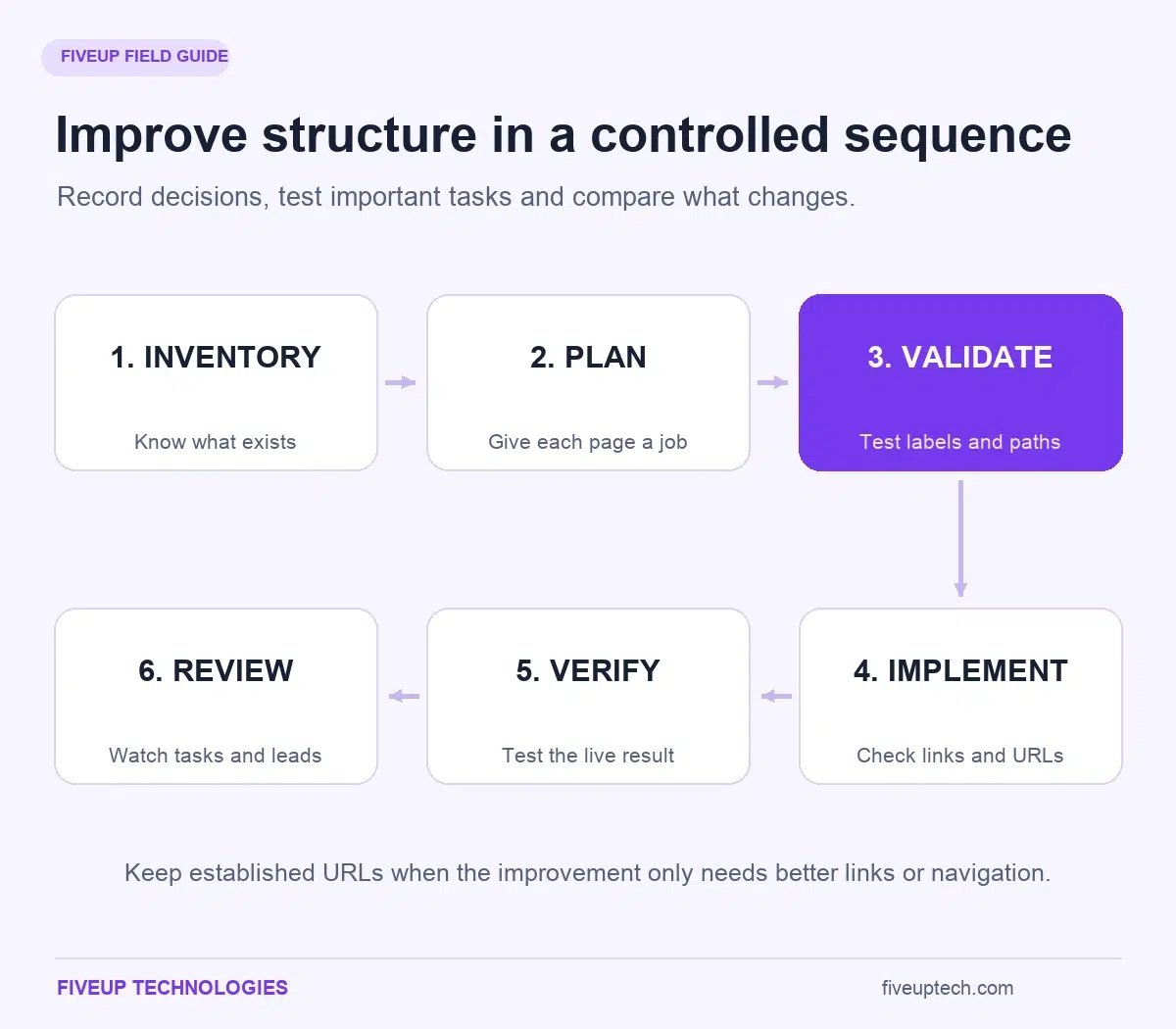
Separate those decisions before launch. It becomes easier to test the result and understand any problems when the team knows what changed and why.
Preserve Working URLs Where Possible and Map Necessary Changes to Relevant Destinations
Keep established addresses when the improvement only needs better organization or links. A navigation redesign does not require a new URL for every page.
When a move is justified, map the old address to the corresponding new destination. Update internal links so they point directly to the current page instead of depending on a redirect.
Merging two overlapping guides requires a content decision as well as a redirect. The retained destination should contain the useful material needed to serve the old pages' purpose.
Retiring a page is different. If there is no relevant replacement, an appropriate unavailable response can be more honest than sending visitors to an unrelated homepage. Do not use one generic destination for every removed address.
Keep the mapping, redirect behaviour, canonical declarations and sitemap consistent. Expect search visibility to fluctuate during significant URL changes while pages are recrawled and reprocessed. The timing varies with the site and the change.
Verify the Implemented Structure Before and After Launch
Test against the approved page specifications. Confirm that important destinations exist, menus reach them and contextual links lead to the intended content.
Check redirects for wrong destinations and unnecessary chains. Inspect canonical declarations and any indexing or crawling restrictions that were used during development. A site can look ready while a staging instruction still limits its search availability.
Complete the important customer tasks too. Submit a test enquiry through an appropriate testing process and confirm receipt. Check mobile menus, keyboard operation, breadcrumbs and relevant downloads.
Take a baseline crawl and record the original task results before launch. Repeat comparable checks afterward. Keep a change log that separates architecture work from new content, pricing changes and visual redesign. That record becomes valuable when a result needs explanation.
Monitor Findability, Search Performance and Qualified Leads and Assign Ongoing Ownership
Choose review dates that fit the project. Thirty- and sixty-day reviews can provide useful checkpoints, but they are management dates rather than promises about search recovery or ranking improvements.
Choose SEO KPIs for your small business that support the decisions you need to make. Watch important pages and tasks. Can customers find the correct offer? Are enquiries reaching the intended team? Do those enquiries match the service and area the business supports?
Compare search impressions, clicks and indexing information for affected pages. Interpret the changes alongside seasonality, demand, advertising and other website work. A rise or fall after launch does not establish that website structure alone caused it.
Assign ongoing owners. New services need a place in the hierarchy. New guides need relevant connections. Retired offers need an agreed content and URL decision. A short review during publishing is easier than repeatedly rebuilding a neglected architecture.
18. Choose Your Next Step: Use the Planning Template or Get Help With a Complex Site
The immediate goal is a website structure plan someone can build and test. A smaller website may need a short page specification and a few deliberate links. A complex catalogue or migration needs more control.
Start with the smallest set of documents that makes the important decisions clear. Add detail when the site's needs justify it.
Use a Page Map, Link Matrix and Launch Checklist to Plan a Smaller Website
Copy the page-specification record in section 8 into your preferred document or spreadsheet. Complete one record for each core page before expanding into lower-priority content.
Then record the important links in plain language. For example: the Services page links to furnace repair so visitors can assess the offer. The repair-versus-replacement guide links to relevant repair and installation information so readers can compare their next options.
Turn each acceptance condition into a launch check. If the plan says a customer can identify the service area and request an estimate, verify both actions on the finished site.
You now have three connected working documents: the page map, the link plan and the checks. Adapt them to the business rather than copying every branch of an example. An unnecessary page creates another writing, maintenance and navigation responsibility.
Evaluate Professional Help by the Decisions, Evidence and Handoff You Receive
Professional help becomes more valuable when the site has several audiences, complex filtering, multiple regions or a risky migration. It also helps when nobody internally has time to own the plan and verify the implementation.
Ask what the project will deliver. A useful engagement should explain the current problems, proposed page relationships, content responsibilities, navigation changes and URL decisions. It should include validation and a way to check that the built site follows the plan.
Avoid judging the proposal by the size of its diagram or a promised ranking position. Look for reasoning that connects a visitor's need to a page, a route and a verifiable result.
If you want help applying that process to your own website, discuss your planning or restructuring needs with FiveUp Technologies. Bring your existing pages, business priorities and recurring customer questions. Those inputs provide a stronger starting point than a list of features alone.