Headless WordPress is a way of using WordPress for content management while replacing its normal theme-based website with a separate frontend application.
Editors still log in to WordPress. They still create posts, upload images, organise categories, manage users, and schedule content. The difference appears when a visitor opens the website. Instead of WordPress using a PHP theme to build the page, a separate application retrieves the content through an API and presents it to the visitor.
That separate presentation layer might be built with Next.js, React, Astro, Nuxt, SvelteKit, a mobile application, or even software running on a digital display. WordPress becomes the content source rather than the complete website.
This architecture can offer greater frontend freedom, faster static delivery, independent scaling, and content reuse across multiple platforms. It can also create more work. Development becomes more specialised. Previews must be designed. SEO features may need to be recreated. Plugins that depend on a WordPress theme may stop affecting the public website.
The right question is not whether headless WordPress is modern or powerful. The right question is whether separating content management from presentation solves a real problem for your organisation.
This guide explains how the architecture works, where its advantages come from, what can go wrong, how much it costs, and how to decide whether it suits your website.
What Is Headless WordPress, and Why Is It Called a Headless CMS?
A normal WordPress installation manages both sides of a website.
The backend is where editors create content and administrators configure the site. The frontend is what visitors see. WordPress themes, PHP templates, blocks, and plugins turn stored content into finished web pages.
A headless WordPress CMS keeps the backend but replaces the WordPress-rendered frontend.
The word “head” refers to the presentation layer. Removing the head does not remove WordPress itself. WordPress still stores content, manages users, handles media, supports editorial roles, and exposes data. A separate frontend becomes responsible for page layouts, navigation, interactions, and visual design.
This makes WordPress a type of headless CMS. A headless content management system stores and manages content without requiring that content to appear through one built-in website theme.
The connection between WordPress and the frontend is usually an API. WordPress includes a REST API that lets applications send and receive site data as JSON. WPGraphQL can add a GraphQL API with a typed and extendable schema.
Traditional WordPress: One Coupled Backend and Frontend
In traditional WordPress, the content system and presentation system are closely connected.
A visitor requests a URL. WordPress determines which content matches that request. It loads the relevant theme template, processes PHP, retrieves information from the database, runs active plugin logic, and returns the completed page.
This arrangement is often called monolithic or coupled architecture. That does not mean it is poor architecture. For many websites, close integration is useful.
Editors can use previews that resemble the live page. Page builders can control frontend layouts. SEO plugins can add metadata directly to HTML. Form plugins can display forms through shortcodes or blocks. Theme templates can change automatically when WordPress settings are updated.
A traditional site also requires fewer separate systems. WordPress, the theme, and most frontend features can be deployed and managed together.
Headless WordPress CMS: WordPress Becomes the Content Backend
In a headless setup, WordPress no longer produces the main public-facing interface.
An editor might publish an article in WordPress. The separate frontend requests that article through an API. The frontend then decides how to render the title, body, author, image, categories, related posts, metadata, and navigation.
The frontend may request content when a page is opened. It may retrieve the content during a deployment and create static HTML files. It may regenerate selected pages after receiving a publishing webhook. It may combine WordPress content with product data, account information, search services, or other APIs.
This separation gives developers control over the public experience. It also means that features formerly provided by a theme must now exist somewhere else.
Headless vs Decoupled WordPress: Is There a Difference?
The phrases headless WordPress and decoupled WordPress are often used interchangeably. In practice, decoupling can exist at different levels.
A fully headless website uses WordPress only as a content and administration system. Every visitor-facing page is produced by another application.
A partially decoupled site might keep the normal WordPress frontend for the main website while sending selected content to a mobile app, customer portal, or digital display.
A hybrid site may use WordPress themes for most pages but rely on a separate application for an interactive product tool, account area, or high-traffic content section.
These distinctions matter because a company does not always need to replace its entire frontend. Sometimes the best answer is to decouple only the part that benefits from it.
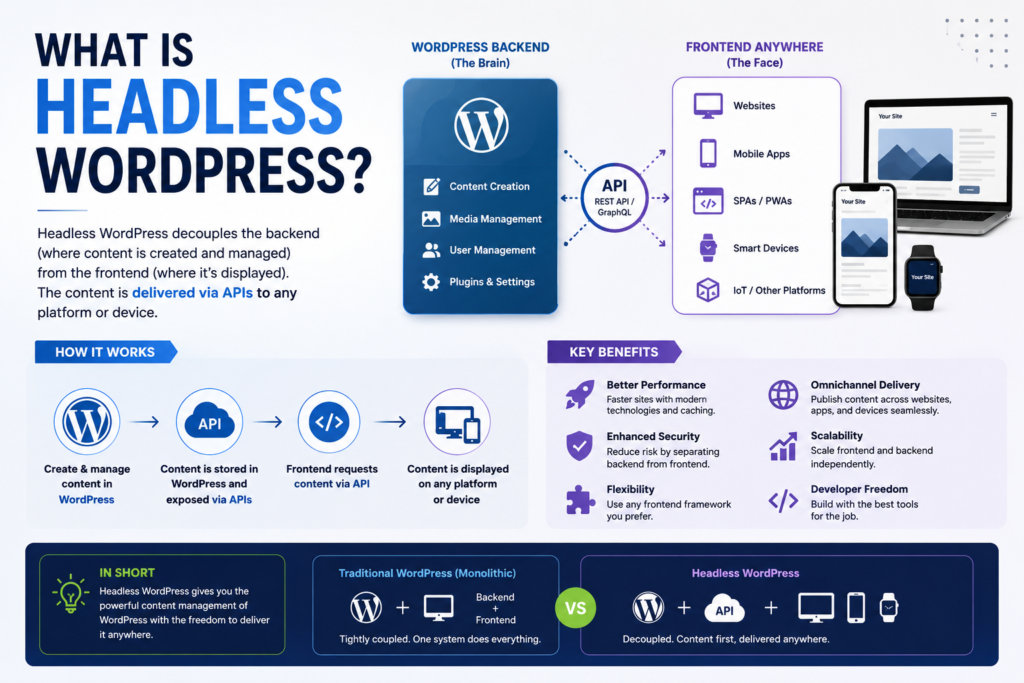
How Headless WordPress Architecture Works from Editor to Visitor
A complete headless WordPress architecture has more than two parts. It usually includes the WordPress backend, an API layer, a frontend application, a rendering strategy, hosting infrastructure, caching, deployment automation, and monitoring.
A simplified publishing flow looks like this:
An editor creates content in WordPress. WordPress stores it in the database. The API exposes approved fields. The frontend retrieves those fields. The frontend renders the page. A content delivery network caches the finished result. Visitors receive the cached or dynamically generated page.
Each stage creates decisions that a traditional WordPress theme often handles automatically.
The Content Layer: Posts, Pages, Media, Taxonomies and Custom Post Types
WordPress remains the source of content.
Standard content may include posts, pages, categories, tags, authors, menus, comments, and media. More complex websites use structured content and custom post types.
A property website might store price, address, number of bedrooms, location, availability, agent, floor plan, and amenities as separate fields. A recipe website might store preparation time, ingredients, calories, difficulty, and cooking method. A university site might store courses, departments, staff profiles, campuses, entry requirements, and application deadlines.
This structure is more useful than putting everything into one large text editor. The frontend can request only the data it needs and display the same information in several formats.
Advanced Custom Fields can expose custom field data through the REST API. Its headless guidance also recommends mapping structured fields to frontend components instead of relying on unstructured WYSIWYG content.
The API Layer: WordPress REST API or WPGraphQL
The API acts as the bridge between WordPress and the frontend.
The built-in WordPress REST API exposes content through endpoint-based requests. A frontend might request a collection of posts, one page, a media item, or a custom post type.
The response is usually JSON. The frontend reads that data and turns it into components.
WPGraphQL takes a different approach. It adds a GraphQL schema to WordPress. A frontend can ask for specific fields and related objects in one structured query. WPGraphQL describes itself as a free, open-source plugin that provides an extendable GraphQL schema and API for WordPress.
Neither API makes architecture decisions for you. The team still needs to decide which content is public, which fields are exposed, how drafts are protected, how queries are cached, and what happens when data changes.
The Presentation Layer: Custom Frontend, Rendering Engine and CDN
The custom frontend is the public application.
It controls URLs, layouts, components, navigation, images, interactions, accessibility, metadata, and browser behaviour. It may run on a Node.js server, serverless platform, edge network, static host, or a mixture of these.
The rendering engine decides when HTML is created. Some pages are created during a build. Some are generated for every request. Some are created once and refreshed later. Some rely heavily on the browser.
A content delivery network can cache finished HTML, images, scripts, and API responses close to visitors. This may reduce load on WordPress and improve response times, but the caching rules must match the publishing workflow.
Traditional WordPress vs Headless WordPress vs a Native Headless CMS
The debate is often framed as traditional WordPress vs headless WordPress, but organisations have more than two choices.
They can use integrated WordPress, fully headless WordPress, a hybrid WordPress model, or a CMS designed from the beginning as an API-first platform.
The strongest choice depends on the product, team, publishing volume, frontend requirements, integrations, budget, and expected lifespan.
| Area | Traditional WordPress | Hybrid WordPress | Fully Headless WordPress | Native Headless CMS |
|---|---|---|---|---|
| Public frontend | WordPress theme | WordPress plus selected external applications | Separate frontend application | Separate frontend application |
| Editor preview | Usually built in | Available for WordPress-rendered areas | Must be designed and connected | Depends on platform and integration |
| Plugin compatibility | Highest | High for native sections | Limited for theme-dependent features | WordPress plugins are not available |
| Frontend freedom | Moderate to high | High where decoupled | Very high | Very high |
| Content reuse | Possible through APIs | Strong | Strong | Strong |
| Development complexity | Lowest | Medium | High | Medium to high |
| SEO implementation | Themes and plugins handle much of it | Mixed responsibility | Frontend team owns implementation | Frontend team owns implementation |
| Hosting model | One main application | One or more applications | Separate backend and frontend | Separate CMS and frontend |
| Best fit | Marketing sites, blogs, small businesses | Organisations needing selective decoupling | App-like products and true multichannel systems | Teams wanting API-first content operations |
Traditional WordPress vs Headless WordPress Comparison
Traditional WordPress works well when the website is the main publishing channel and editors need direct control over layouts.
A marketing team can install an SEO plugin, create landing pages, add forms, update menus, and preview changes without building a custom integration for each feature.
Headless WordPress works better when the public experience cannot be expressed cleanly through a WordPress theme, or when the same content must reach several independent products.
The trade is straightforward. The organisation gains frontend independence but accepts more engineering responsibility.
WordPress as a Headless CMS vs a Native Headless CMS
WordPress has a mature editorial environment, familiar administration interface, extensive plugin ecosystem, role management, media tools, and a large developer community.
A native headless CMS may offer cleaner content modeling, API-first workflows, hosted infrastructure, visual content relationships, localisation tools, or built-in preview services. It may also lack the WordPress editing experience that a team already knows.
The right choice depends on existing content, editor preferences, integration requirements, and migration cost. A company with ten years of WordPress content may gain more from decoupling WordPress than from moving every record into a new CMS.
A new software product with no legacy content may find an API-first system easier to shape around its data model.
Hybrid and Partially Decoupled WordPress
Hybrid architecture keeps a native WordPress presentation layer while exposing content to other channels.
The main marketing site may remain theme-based. A mobile app can consume the same articles through the API. A React application can power a logged-in dashboard. A separate frontend can handle a campaign microsite.
This approach preserves WordPress previews and plugin compatibility where they matter while allowing custom application development where it creates value.
Recent WordPress VIP guidance argues that hybrid architecture can reduce the “complexity tax” of complete decoupling when marketing teams need live previews and rapid publishing.
The Main Benefits of Headless WordPress
Headless architecture can solve problems that are difficult to handle inside one theme. Its value usually comes from four areas:
- Omnichannel content delivery from one managed source to websites, mobile apps, displays, portals, and other interfaces.
- Independent frontend design and development without relying on WordPress theme conventions.
- Flexible rendering and caching strategies for different types of pages.
- Separate scaling and release cycles for content management and public delivery.
These benefits are meaningful only when the organisation needs them. A small brochure website does not become better simply because it uses more infrastructure.
Custom Frontend Freedom and Modern Developer Experience
A headless build lets frontend developers work in the framework and component system that fits the product.
They can create reusable interface components, use TypeScript, run automated tests, manage changes through Git, create preview deployments, and release the frontend independently from WordPress.
This is helpful for interactive websites that behave more like software products than collections of pages.
It also allows a design system to serve several applications. The same buttons, cards, navigation patterns, and accessibility rules can be shared across a website, app, customer portal, and internal system.
Omnichannel Content Delivery from One Source of Truth
A traditional website often ties content to a particular page layout. Headless architecture encourages teams to model content as reusable information.
A product description can appear on a website, mobile app, digital catalogue, partner portal, and in-store screen. Editors update it once. Each channel decides how to present it.
This is especially valuable for publishers, universities, multinational brands, sports organisations, public bodies, and companies running several digital products.
WordPress VIP describes omnichannel headless architecture as a way to distribute centrally managed content across websites, apps, devices, and other experiences.
Independent Scalability, Resilience and Release Cycles
The frontend and backend can scale separately.
A public site may receive millions of cached page views while the WordPress backend serves a much smaller group of editors. Static pages can remain accessible even if WordPress experiences a temporary interruption, provided the frontend does not require a live API request for each visit.
Separate release cycles can also reduce conflicts. Editors can publish content without waiting for a software deployment. Developers can release frontend changes without modifying WordPress core files or theme templates.
This separation must be designed carefully. A frontend that depends on live API calls for every request may still fail when WordPress is unavailable.
The Disadvantages and Hidden Complexity of Headless WordPress
Headless WordPress often looks simple in an architecture diagram. WordPress sits on one side, a frontend framework sits on the other, and an API connects them.
The operational reality is more demanding.
The team must maintain two applications, two deployment processes, several cache layers, API contracts, preview logic, frontend dependencies, and a reliable publishing connection.
Automattic’s guidance notes that headless projects commonly involve more complex setup, separate platforms and languages, longer update cycles, weaker live-preview support, and higher costs.
Two Applications, Two Hosting Environments and More Failure Points
A traditional WordPress website can fail because of hosting, plugins, themes, database problems, or configuration errors.
A headless site keeps those risks and adds new ones.
The WordPress backend may be healthy while the frontend deployment fails. The frontend may work while an API query breaks. A publishing webhook may stop firing. A cached page may remain stale. A schema change may remove a field expected by the frontend. A framework update may introduce a rendering problem.
These issues are manageable, but they require ownership and monitoring.
Loss of Theme Features and Headless WordPress Plugin Compatibility
Many headless WordPress plugins continue working if they manage backend data or editorial processes.
A custom-fields plugin can still define content. A workflow plugin may still manage approvals. A media plugin may still optimise uploaded files. A security plugin may still protect the administration system.
Plugins that depend on the theme layer are more difficult.
A page builder may store layout data, but the separate frontend does not automatically know how to display it. A form plugin may generate a shortcode that means nothing to a Next.js application. A related-posts plugin may alter theme output that the headless frontend never uses.
ACF’s current headless guidance warns that plugins relying on the WordPress theme layer, including many page builders and forms, require custom frontend replacements.
Greater Dependence on Developers
Headless architecture can improve developer speed while reducing marketing independence.
A content editor can update text and images easily, but creating a new page pattern may require a frontend component. Adding a marketing script may require a deployment. Changing how cards appear across the site may enter the engineering backlog.
This does not make headless unsuitable. It means teams must design a controlled component library and clear editing boundaries before launch.
The editor should know which page structures can be assembled without code and which changes require development.
Headless WordPress Performance and Core Web Vitals
Headless WordPress performance is one of the most discussed benefits of decoupling. It is also one of the most overstated.
A headless site can be fast because it can serve pre-rendered HTML from a CDN, minimise PHP work during visits, optimise assets through a modern framework, and cache data aggressively.
It can also be slow because it can ship too much JavaScript, make repeated API requests, delay content until browser rendering, load unoptimised third-party scripts, or regenerate pages inefficiently.
Architecture creates options. Implementation determines results.
Google uses Core Web Vitals as part of its ranking systems, but it also states that good scores alone do not guarantee top rankings. The wider page experience and content quality still matter.
Static Site Generation, Server-Side Rendering and Incremental Static Regeneration
A headless frontend needs a rendering strategy. The correct choice may vary by page.
| Rendering method | When HTML is created | Best suited to | Main trade-off |
|---|---|---|---|
| Static site generation | During the build process | Articles, documentation, landing pages, stable content | Large sites may face long builds and delayed updates |
| Server-side rendering | For each request or uncached request | Personalised pages, live data, request-dependent content | More server work and possible backend dependency |
| Incremental static regeneration | Statically at first, then refreshed according to revalidation rules | Large publishing sites needing speed and controlled freshness | Requires reliable invalidation and freshness logic |
| Client-side rendering | In the visitor’s browser | Logged-in tools and highly interactive interfaces | Initial content and SEO can become harder to manage |
Next.js documentation states that static generation creates HTML at build time and allows it to be reused and cached by a CDN. Its ISR documentation explains that static content can be updated without rebuilding the entire site.
Server-side rendering is useful when content changes on every request or depends on cookies, account status, location, or other live information.
Static site generation works well when pages can be produced before visitors request them.
Incremental static regeneration sits between those approaches. It keeps static delivery while allowing selected pages to refresh after a defined period or publishing event.
CDN Caching, API Caching and Cache Invalidation
Headless caching can exist at several layers.
WordPress may cache database queries or API responses. A GraphQL layer may cache resolved queries. The frontend framework may cache fetched data. The hosting platform may cache HTML. A CDN may store files close to visitors.
The difficult part is not adding caches. It is clearing the right cache when content changes.
Publishing a post may affect the article page, homepage, category archive, author archive, search index, related-content blocks, sitemap, navigation, and app feed.
A strong invalidation system maps content changes to affected outputs. It should refresh only what needs refreshing without leaving important pages stale.
Why a Headless Website Can Still Be Slow
A visually simple headless website can ship a large JavaScript bundle. Components may request data separately and create API waterfalls. Images may load at their original dimensions. Analytics, chat widgets, advertising scripts, testing platforms, and consent tools may block the main thread.
Poor server rendering can also add latency. A page may wait for WordPress, a search service, an ecommerce platform, and a personalisation API before returning HTML.
Before migrating for performance alone, measure the current bottleneck. A better host, full-page caching, image optimisation, database work, script reduction, or a lighter theme may solve the problem for far less money.
Headless WordPress SEO: What Must Be Rebuilt on the Frontend
Headless WordPress SEO can be excellent. It can also fail quietly.
WordPress stores the content, but search engines evaluate the public frontend. The frontend must produce crawlable pages, correct status codes, internal links, metadata, canonical tags, structured data, sitemaps, redirects, and accessible content.
An SEO plugin may still store titles and descriptions in WordPress. It cannot guarantee that the separate frontend prints them correctly.
Crawlable HTML, Metadata, Structured Data and Social Tags
Important page content should be available in the rendered HTML that search engines and users receive.
Google can process JavaScript, but its guidance still asks developers to follow JavaScript SEO practices and make content, links, metadata, and rendering accessible to crawlers.
Every indexable page should have a meaningful title, meta description, robots directive, heading structure, language declaration, and social-sharing metadata.
Structured data can also be generated by the frontend. Google uses structured data to understand page entities and may use valid markup for eligible rich results.
The frontend team must decide how WordPress fields map to JSON-LD, Open Graph tags, article dates, author information, products, breadcrumbs, organisations, and other structured entities.
URLs, Canonicals, XML Sitemaps, Pagination and Redirects
URL ownership must be clear before development begins.
WordPress may store a post slug, but the frontend determines the public route. Problems appear when WordPress thinks the article lives at one address while the frontend publishes it somewhere else.
The system needs rules for slugs, parent pages, category structures, localisation, trailing slashes, pagination, query parameters, and duplicate paths.
Canonical tags should be present in the HTML and remain consistent. Google advises placing canonical information in the HTML source and avoiding JavaScript changes that create ambiguity.
Sitemaps must contain the real public URLs, not hidden backend addresses. Redirects must survive migration and future slug changes. Deleted pages need intentional status codes rather than generic client-side error screens.
SEO Plugin Data, Validation and Monitoring
SEO plugins can still help manage editorial data.
For example, a plugin may store a custom title, description, canonical selection, robots setting, or schema information. WPGraphQL extensions can expose some of that information to a frontend. The frontend must then render and test it.
A reliable release process should inspect the final HTML, not just WordPress fields.
Teams should test indexability, canonical tags, schema, status codes, internal links, sitemap coverage, redirects, JavaScript errors, page speed, mobile layouts, and accidental noindex rules.
Preview and staging environments must remain blocked from indexing. Production pages must not inherit those restrictions.
Headless WordPress Security and Authentication
Headless WordPress security has real advantages, but separation is not the same as protection.
A static frontend may hide the WordPress login URL from normal visitors. It can reduce direct traffic to PHP templates and prevent some public requests from reaching WordPress.
The backend still needs updates, secure hosting, limited administrator access, strong passwords, multifactor authentication, backups, plugin review, and monitoring.
The frontend adds its own dependency chain, build service, hosting credentials, environment variables, API permissions, and browser security concerns.
Reduced Public Exposure Does Not Eliminate Security Risk
A public static page has a smaller attack surface than a dynamic page that runs WordPress for every visitor.
Yet the WordPress administration area remains connected to the internet unless it is restricted. Plugins can still contain vulnerabilities. API endpoints may expose more data than intended. Frontend packages can introduce supply-chain risks. Build logs can reveal secrets. Poorly configured cross-origin rules can allow unwanted requests.
Security responsibility is distributed rather than removed.
The team should document where credentials live, who can deploy, which endpoints are public, how dependencies are updated, and how compromised access is revoked.
Headless WordPress Authentication for Drafts, Users and Private Content
Headless WordPress authentication is needed when a frontend must access drafts, private posts, account information, protected downloads, membership content, or write operations.
WordPress supports cookie-based authentication for requests made within a logged-in WordPress session. It also includes application passwords for API access. WordPress documents application passwords as revocable credentials for programmatic access and recommends sending them over HTTPS.
WPGraphQL can work with several authentication approaches, but its documentation notes that authentication is handled through surrounding methods or extension plugins rather than being included as one universal built-in login system.
The correct approach depends on the use case. A server-to-server publishing integration has different requirements from a customer login system.
API Permissions, CORS, Rate Limiting and Secret Management
Public content endpoints may not require authentication. Drafts and write operations do.
The principle of least privilege should guide access. An integration that only reads published posts should not have permission to edit users or delete content.
Secrets should remain on the server. They should not be included in browser bundles or public repositories.
Cross-origin rules should allow known applications rather than every possible origin. Rate limits can reduce abuse. Logs should record unusual request patterns, authentication failures, and unexpected access to sensitive endpoints.
WordPress REST API vs WPGraphQL
The GraphQL vs REST API WordPress decision is often presented as a contest with one winner. In real projects, both can work well.
The right choice depends on content relationships, team knowledge, caching strategy, plugin support, query complexity, and the number of applications consuming the data.
WordPress REST API: Built In, Familiar and Endpoint-Based
The REST API is part of WordPress core. It provides endpoint-based access to site data in JSON format and is also used by WordPress’s own block editor.
It is often enough for straightforward content websites.
A frontend can request posts, pages, users, media, taxonomies, and supported custom post types. Developers can register custom endpoints or extend existing responses.
REST is easy to inspect with normal HTTP tools. Standard CDN and browser caching concepts are familiar. The main limitation appears when one page needs several related resources. The frontend may make several requests or receive more data than it needs.
WPGraphQL: Typed Queries and Precise Data Selection
WPGraphQL provides one GraphQL endpoint backed by a typed schema.
A frontend can ask for a post and include its featured image, author, categories, custom fields, and related data in a structured query. It can select only the fields required by the component.
This is useful for deeply related content and component-driven interfaces. The schema also provides discoverability through GraphiQL and related developer tools.
GraphQL does not remove complexity. Large queries can become expensive. Cache behaviour may require special handling. Plugins and custom data types need GraphQL support. Schema changes still need coordination between backend and frontend teams.
REST or GraphQL: How to Choose
REST is a sensible default when the data model is simple, the team already understands WordPress endpoints, and normal HTTP caching fits the application.
WPGraphQL is attractive when pages need nested relationships, precise field selection, strong schema discovery, or a frontend ecosystem built around GraphQL.
Some projects use both. Public content might come from GraphQL while webhooks, media operations, or specialised integrations use REST.
The best API is the one the team can secure, monitor, document, and maintain.
Choosing a Frontend Framework for Headless WordPress
Selecting a frontend framework for WordPress should follow product requirements, not popularity.
The framework must support the required rendering methods, preview workflow, routing, image handling, localisation, accessibility, deployment platform, and developer skills.
It also needs a credible maintenance path. A website may stay online for five or ten years. Framework upgrades, package changes, and hosting decisions will continue long after launch.
Headless WordPress with Next.js
Headless WordPress with Next.js is a common combination because Next.js supports React components, server rendering, static generation, revalidation, routing, server-side code, and several deployment models.
It can produce static articles, server-render account pages, and refresh content through revalidation. Next.js documentation supports several data-fetching and rendering patterns, including static generation, server rendering, and incremental regeneration.
Next.js is not required. It is one option with a large ecosystem.
Teams should still define how previews work, where API requests run, how errors are handled, how routes map to WordPress, and which content can be cached.
Headless WordPress with React, Gatsby, Astro, Nuxt or SvelteKit
Headless WordPress with React can mean many things. React is a UI library. A production website usually needs additional decisions for routing, server rendering, data loading, metadata, images, caching, and deployment.
Gatsby became known for statically generated content sites and a GraphQL-oriented data layer. Astro focuses on content-driven sites and can ship less client-side JavaScript when pages do not need heavy interactivity.
Nuxt is a strong option for Vue teams. SvelteKit fits teams that prefer Svelte’s component model. Other frameworks may be suitable depending on internal expertise and product constraints.
Framework choice should consider the whole lifecycle, including recruitment, onboarding, testing, observability, security updates, and migration options.
A Practical Framework Selection Scorecard
Start with the required user experience.
Does the site need personalisation? How often does content change? How large is the page count? Will editors need instant previews? Does the frontend include account areas, search, checkout, maps, or real-time data?
Then evaluate team fit. A technically impressive framework is a poor choice when no one can maintain it.
The hosting model matters too. Some frameworks work easily as static output. Others expect server or edge execution. The team should understand the resulting cost and operational model before committing.
Structured Content, Custom Post Types, Gutenberg and ACF
Headless projects succeed or fail at the content-modeling stage.
A frontend cannot reuse content cleanly when important information is buried inside long HTML strings, copied between pages, or tied to one visual layout.
The CMS should describe what the content means. The frontend should decide how it looks.
Modeling Structured Content and Custom Post Types
A content model should identify stable entities.
An event may have a title, start time, end time, venue, speakers, registration link, capacity, and status. A staff profile may have a name, role, department, biography, qualifications, contact details, and photograph.
Those are data fields, not formatting choices.
Custom post types can separate events, products, locations, case studies, team members, or resources from normal blog posts. Taxonomies can organise relationships. Custom fields can store structured attributes.
ACF’s guidance gives examples such as property, recipe, and product data that become easier to search and reuse when stored as structured fields.
Mapping Gutenberg Blocks and ACF Fields to Frontend Components
Gutenberg blocks can be handled in two broad ways.
The frontend can render HTML produced by WordPress. This is faster to implement and may preserve familiar editing, but frontend control is weaker.
The frontend can also map block types to custom components. A testimonial block in WordPress becomes a testimonial component in the frontend. This creates stronger visual consistency and cleaner component logic, but every supported block needs a rendering contract.
WPGraphQL has documented the challenges of using Gutenberg in decoupled applications. Block content, attributes, nested structures, and rendering expectations all need deliberate handling.
ACF fields can create a more explicit contract. WPGraphQL for ACF can expose field groups as structured GraphQL types for nested and flexible content.
Media, Relationships, Localisation and Content Portability
Media needs more planning than storing an image URL.
The frontend should know the image’s dimensions, alternative text, focal point, caption, crop options, and available sizes. Image URLs may need rewriting if the backend uses a private domain or a separate media CDN.
Relationships should avoid circular or unpredictable queries. Localisation needs fields and routes that work across languages. Global settings, menus, and shared content must also be exposed consistently.
The goal is not to model every possible future use. It is to avoid tying important information to one current page design.
WordPress Preview Workflow and Editorial Operations
A reliable WordPress preview workflow is one of the hardest parts of a polished headless build.
Traditional WordPress knows how to render its own draft. A headless frontend needs permission to retrieve unpublished content, a route that understands the draft, and a secure way to show it only to authorised users.
The preview should represent the real frontend, not an approximate WordPress editor screen.
Draft Previews and Secure Preview URLs
A preview request may start inside WordPress. The editor clicks Preview. WordPress generates a secure URL or token. The frontend validates it, retrieves the draft, and displays the unpublished version.
The system must handle revisions, scheduled posts, private content, expired tokens, and user permissions.
Preview pages should not be indexed. They should not expose unpublished information through public caches. Tokens should expire or be revocable.
A preview that works only for developers is not a finished editorial workflow.
Publishing Webhooks, Revalidation and Build Triggers
Publishing should trigger the correct frontend update.
Small static sites may rebuild completely. Larger sites usually need selective regeneration. A webhook can tell the frontend which content changed. The frontend can refresh the article and any archives or components affected by it.
Next.js ISR supports updating static content without rebuilding the entire application. This makes it useful for content-heavy sites, provided the revalidation rules cover every affected page.
Failed webhooks need retries and alerts. Editors should not have to guess whether the public site received their update.
Roles, Approvals, Scheduling and Editorial Governance
WordPress can still manage roles, approvals, revisions, and scheduled publishing.
The frontend must respect those states. Drafts must stay private. Scheduled content should not appear early. Expired content should be removed or updated at the correct time.
Global organisations may also need audit logs, legal approval, translation workflows, embargoes, and region-specific publishing.
These requirements should be documented before choosing the stack. They are not small features to add at the end.
Headless WordPress Plugins and Dynamic Website Features
A plugin inventory is one of the most useful planning documents for a headless project.
Each existing feature should be classified by what it does:
- Keep it in WordPress when it manages content, media, users, workflow, or backend operations.
- Expose its data when the frontend needs information the plugin stores.
- Rebuild the interface when the plugin depends on WordPress theme output.
- Replace it with an external service when that service offers a cleaner API and lower maintenance burden.
This process prevents teams from discovering late in development that a critical feature depended on PHP templates or shortcodes.
Forms, Search, Comments, Memberships and Personalisation
Forms can submit to WordPress, a customer platform, an email service, or a dedicated form provider. The implementation must cover validation, spam protection, consent, file uploads, confirmation messages, notifications, and analytics.
Search may use WordPress queries for a small site. Larger applications may send structured content to a dedicated search index.
Comments require moderation, authentication, spam filtering, notification, and frontend display.
Memberships and personalisation introduce session handling, permissions, private caching rules, and user data. These systems need more care than public content retrieval.
Headless WooCommerce: Products, Cart, Checkout and Customer Accounts
Headless WooCommerce separates the storefront interface from WooCommerce while keeping WooCommerce responsible for products, orders, payments, inventory, taxes, and related commerce data.
WooCommerce provides a Store API for customer-facing product, cart, checkout, and order interactions. It is designed to support client-side functionality, including custom blocks and headless stores.
Displaying product information is the easy part.
Cart state, checkout validation, shipping, taxes, coupons, payment gateways, customer accounts, order status, subscription plugins, product add-ons, and regional rules create more complexity.
A traditional WooCommerce extension that prints content into a PHP checkout template will not automatically affect a separate React checkout.
Headless commerce is most suitable when the storefront experience justifies that integration work.
Headless WordPress Hosting, Deployment and Monitoring
Headless WordPress hosting usually involves at least two environments.
The backend needs PHP, a database, media storage, WordPress security, backups, and editor access. The frontend may require static hosting, Node.js execution, serverless functions, edge rendering, or a content delivery network.
Hosting the two applications with one provider may simplify support. Hosting them separately may give each system a better-fit platform.
Hosting the WordPress Backend and Frontend Separately
The backend should be optimised for editorial reliability and API performance.
It may receive little public traffic but still handle publishing, media processing, scheduled tasks, API requests, and admin activity.
The frontend should be sized according to its rendering model. A static site may need little runtime computing. A server-rendered application may require predictable capacity. A personalised site may need sessions, server functions, and low-latency data access.
Media hosting must also be considered. Images should remain available even when the WordPress backend is protected from direct public access.
CI/CD, Staging, Environment Variables and Deployment Workflows
A professional setup should have separate development, staging, preview, and production environments.
Code changes should pass automated checks before deployment. Content-schema changes should be tested against the frontend. Environment variables should be managed securely.
The team needs a process for changes that span both systems. Removing a GraphQL field before the frontend stops requesting it can break production. A safer process adds the replacement, updates the frontend, verifies usage, and removes the old field later.
Observability, Backups and Disaster Recovery
Monitoring should answer more than “is the homepage online?”
It should detect failed builds, API errors, stale content, broken webhooks, slow queries, authentication failures, frontend exceptions, unusual traffic, and failed scheduled publishing.
Backups should cover the database, media library, WordPress configuration, frontend code, environment configuration, redirects, and infrastructure settings.
The recovery plan should explain how to restore each system and how to serve stable pages while the backend is being repaired.
When Should You Use Headless WordPress?
Headless architecture is a strong fit when the frontend is a product in its own right.
It is also useful when content must serve several channels, when teams need independent frontend releases, or when the public experience cannot be built efficiently through a WordPress theme.
It is a weak fit when the main goal is to follow a trend, solve vague performance concerns, or replace features that WordPress already provides well.
Projects That Are Strong Candidates
Strong candidates include large publishers, complex corporate platforms, digital products, mobile-connected services, interactive applications, and organisations operating several websites or devices from one content source.
The project should have a capable development team, clear frontend requirements, mature deployment practices, and enough budget for long-term maintenance.
True multichannel demand is a stronger reason than speed alone. A company publishing the same structured content to a website, mobile app, customer portal, and partner system has a clear architectural case.
Projects That Should Usually Remain Traditional
A local business website, portfolio, small blog, basic company site, or simple lead-generation site often gains little from complete decoupling.
Traditional WordPress may deliver the required performance with page caching, a CDN, good hosting, image optimisation, a lightweight theme, and disciplined plugin use.
Businesses that depend heavily on page builders and rapid marketer-led layout changes should also be careful. A headless migration can turn visual changes into development tasks.
When a Hybrid Architecture Is the Better Choice
Hybrid WordPress is often the practical middle ground.
Keep the main marketing website inside WordPress. Use APIs for a mobile application, interactive feature, content syndication feed, or specialised frontend.
This preserves native previews, theme features, and marketing speed while creating a path for decoupled products.
WordPress VIP’s 2026 comparison recommends evaluating team velocity and operational maturity rather than choosing full decoupling for engineering prestige.
Headless WordPress Cost, Team Requirements and ROI
Headless WordPress cost is higher than the price of two hosting plans.
The main expense is specialised work across content architecture, backend development, frontend engineering, infrastructure, testing, SEO, security, editorial experience, and ongoing support.
A project may save money in one area while increasing it elsewhere. Reusable content may reduce duplication. A shared design system may speed product development. Static delivery may reduce runtime load. At the same time, previews, forms, redirects, metadata, and plugin features may require custom development.
Initial Development and Migration Costs
The initial budget may include a content audit, information architecture, custom post types, API configuration, frontend design, component development, preview tools, search, forms, analytics, accessibility testing, migration scripts, redirects, deployment pipelines, and staff training.
Existing websites also carry hidden migration work.
Shortcodes need replacements. Page-builder content may need transformation. Media URLs may change. Custom plugin output may need a new API. Old tracking scripts must be audited rather than copied blindly.
Ongoing Total Cost of Ownership
Ongoing cost includes backend hosting, frontend hosting, monitoring, security updates, WordPress maintenance, JavaScript dependency upgrades, testing, support, framework upgrades, API changes, and content-model changes.
Two systems need coordinated releases. Specialist developers may cost more than general WordPress support.
The total should be compared with the cost of improving the current site or choosing a hybrid model.
Team Roles, Ownership and ROI Metrics
A serious project needs clear ownership.
Someone must own WordPress. Someone must own the frontend. API contracts, hosting, deployment, security, SEO, analytics, and editorial support need named responsibility.
Return on investment should be linked to a business result. Useful goals might include faster product releases, consistent publishing across five channels, lower infrastructure load during traffic spikes, improved conversion, reduced duplicate content work, or shorter campaign production time.
“Using a modern stack” is not an ROI metric.
Headless WordPress Migration Roadmap
A safe headless WordPress migration begins with an audit, not a framework installation.
The team needs to understand the existing website before replacing its presentation layer.
That includes content types, templates, traffic-driving pages, plugins, forms, redirects, search behaviour, integrations, tracking, editorial roles, and publishing schedules.
Audit the Existing Website Before Choosing the Architecture
Document every public template and important feature.
Identify where data is stored. Check whether content lives in standard fields, custom fields, shortcodes, page-builder JSON, widgets, theme settings, or custom database tables.
Review SEO data and current rankings. Export redirects. Record analytics events. Map forms and their destinations. List third-party scripts. Identify pages that depend on logged-in state or personalisation.
This audit often reveals whether complete decoupling is justified.
Build a Pilot and Migrate in Controlled Phases
A pilot should test the hardest assumptions.
Choose a representative content type. Build its content model, API query, frontend component, metadata, preview, publishing trigger, cache invalidation, redirects, and analytics.
Let real editors use it.
A pilot that proves only that React can display a WordPress post has not tested the architecture. The important questions concern publishing speed, reliability, maintenance, SEO, and team ownership.
Launch, Rollback and Post-Migration Verification
Before launch, verify the parts that commonly fail:
- Test every important URL, redirect, canonical tag, sitemap entry, metadata field, structured-data object, form, analytics event, and status code.
- Confirm that drafts remain private, scheduled content appears on time, changed pages revalidate, and removed content behaves correctly.
- Compare performance, crawlability, traffic, conversions, error rates, publishing time, and infrastructure cost with the pre-launch baseline.
Keep a rollback plan. It should define which system can be restored, how DNS or routing will change, what happens to content published during the incident, and who can authorise the rollback.
Practical Example: Headless WordPress with Next.js and WPGraphQL
A common implementation uses WordPress for editing, WPGraphQL for data, Next.js for the frontend, and a CDN-backed hosting platform for delivery.
This is not the only valid stack, but it shows how the pieces connect.
Prepare WordPress and Install WPGraphQL
WordPress is installed on a secure backend domain.
The team defines posts, pages, taxonomies, custom post types, and custom fields. Public content types are exposed through WPGraphQL. Private fields remain protected.
The schema is tested through GraphiQL. Developers confirm that each frontend component can retrieve the fields it needs without exposing confidential information.
A minimal or private-facing WordPress theme may be used because the normal theme is no longer the public presentation system. WPGraphQL’s compatibility guidance notes that it can work with any theme and is commonly paired with headless frontends such as Next.js.
Build the Next.js Frontend and Fetch WordPress Content
The Next.js application defines routes for posts, pages, categories, authors, and other content.
A page query requests the required fields from WPGraphQL. The response is mapped to React components. Images are handled through an approved media configuration. SEO fields are printed into the page metadata. Structured data is generated from the content model.
Stable pages can use static generation. Frequently updated content can use ISR. Personalised areas can use server rendering or protected client-side interactions.
The decision is made page by page rather than applying one rendering method to the whole site.
Add Preview, Revalidation and Deployment
The team creates a secure preview connection between WordPress and Next.js.
When an editor previews a draft, the frontend enters preview mode, authenticates the request, retrieves unpublished data, and prevents the result from being cached publicly.
When content is published, WordPress sends a webhook. The frontend validates the webhook and revalidates affected routes.
Vercel’s WordPress guide demonstrates a WordPress, WPGraphQL, and Next.js workflow that uses incremental regeneration to update content without requiring a complete redeployment.
Production monitoring confirms that the webhook arrived and the new version is live.
How to Measure Whether a Headless WordPress Project Succeeded
A headless project should be judged against the problem it was meant to solve.
Before development, record a baseline. Measure loading performance, uptime, conversion rate, publishing time, content duplication, developer release frequency, infrastructure cost, support requests, and editor satisfaction.
After launch, compare the same measures.
Establish a Pre-Migration Baseline
Performance testing should include real-user data when possible, not only one laboratory report.
Editorial measurement should record how long it takes to create, preview, approve, publish, correct, and remove content.
Engineering measurement should include deployment frequency, failure rate, recovery time, bug volume, and maintenance effort.
Business measurement should match the product. That may include subscriptions, leads, revenue, engagement, app usage, content reuse, or regional publishing speed.
Measure Technical and Editorial Outcomes
A faster homepage does not prove the whole project succeeded.
The frontend may be fast while editors wait days for new components. Publishing may become less reliable. Infrastructure cost may rise. SEO features may be harder to test.
The opposite can also happen. The organisation may gain one structured content source, faster product releases, stable traffic handling, and a consistent experience across several platforms.
Measure both sides.
Review the Architecture After Launch
Architecture is not permanent.
A feature that was built in the frontend may be easier to return to WordPress. A live API route may work better as static output. A complete rebuild trigger may need selective revalidation. An external search tool may no longer justify its cost.
A six-month and twelve-month review can identify which assumptions were correct and which need adjustment.
Frequently Asked Questions About Headless WordPress
Is WordPress a headless CMS?
WordPress is traditionally a coupled CMS, but it can operate as a headless CMS. Its REST API can expose site data as JSON, and plugins such as WPGraphQL can provide an extendable GraphQL API.
Can WordPress be used without a theme?
WordPress still needs an active theme in many standard configurations, but that theme does not need to power the public website. Headless projects often use a minimal theme while the separate frontend handles the visitor experience.
Do editors still use the WordPress dashboard?
Yes. Editors can continue using wp-admin to create content, upload media, manage taxonomies, schedule posts, and work with revisions. Their public preview experience may change because the separate frontend must support drafts.
Does headless WordPress require coding?
A production-quality headless site usually requires development work. The team needs to build or configure the frontend, API integration, routing, rendering, metadata, previews, deployments, caching, and dynamic features.
Starter templates can reduce setup time, but they do not remove architectural responsibility.
Is headless WordPress faster than normal WordPress?
It can be faster, especially when pages are pre-rendered and delivered through a CDN. It is not automatically faster.
A well-optimised traditional WordPress site can outperform a poorly designed headless site. Performance depends on rendering, caching, JavaScript, images, third-party scripts, APIs, and hosting.
Is headless WordPress good for SEO?
Yes, when the frontend produces crawlable HTML, correct metadata, structured data, internal links, canonical tags, sitemaps, redirects, and strong page performance.
SEO does not come automatically from the architecture. Developers must implement features that a WordPress theme and SEO plugin may have handled before.
Is headless WordPress more secure?
It can reduce direct public exposure to the WordPress frontend. Static delivery may also limit some request-based risks.
The WordPress backend, APIs, frontend dependencies, credentials, hosting, and deployment pipeline still require security controls. Separation changes the attack surface rather than removing it.
Do WordPress plugins work in a headless setup?
Backend-focused plugins often continue to work.
Plugins that depend on theme templates, shortcodes, widgets, or frontend PHP output may not affect the separate frontend. Their data must be exposed, their interface must be rebuilt, or the feature must be replaced.
Should I use the WordPress REST API or WPGraphQL?
Use REST when the data model is straightforward, endpoint-based access is convenient, and the team prefers standard HTTP patterns.
Use WPGraphQL when the frontend needs precise fields, nested relationships, schema discovery, or GraphQL-based tooling.
The decision should consider security, caching, plugin support, and team experience.
Is Next.js required for headless WordPress?
No. Next.js is popular because it supports several rendering methods and has a mature React ecosystem.
WordPress can also work with Astro, Gatsby, Nuxt, SvelteKit, native mobile applications, custom server frameworks, and other frontend technologies.
Can Gutenberg work with headless WordPress?
Yes, but the implementation needs a rendering strategy.
The frontend can display WordPress-generated block HTML, parse blocks, or map block data to custom components. Custom component mapping gives more control but requires development for every supported block.
How do previews work?
A secure preview link connects WordPress to the frontend.
The frontend authenticates the preview request, retrieves unpublished content, renders it through production components, and prevents it from entering public caches or search indexes.
How are content updates published?
The update method depends on rendering.
Server-rendered pages may retrieve current content on the next request. Static pages may require a build, webhook, cache purge, or route revalidation. ISR can refresh selected static pages without rebuilding the entire site.
Can headless WordPress power a mobile app?
Yes. A mobile application can retrieve WordPress content through REST or GraphQL.
The same backend can serve a website, mobile apps, partner portals, and other interfaces when the content is modeled for reuse.
Is headless WordPress suitable for small businesses?
It is usually unnecessary for a simple small-business site.
A traditional or hybrid WordPress setup is often cheaper, easier to maintain, and more flexible for non-technical marketers. Headless becomes reasonable when the business has a custom digital product, several delivery channels, or unusual frontend requirements.
How much does headless WordPress cost?
There is no fixed price.
Cost depends on the number of content types, templates, integrations, dynamic features, migration requirements, frontend complexity, hosting, preview needs, SEO work, and support model.
The ongoing cost is often more important than the initial build because the organisation must maintain both WordPress and the separate frontend.
Is headless WooCommerce a good idea?
It can be a good choice for a highly customised storefront or a commerce experience shared across several channels.
It is more complex than displaying products. Cart sessions, checkout, payments, taxes, shipping, accounts, subscriptions, and extension compatibility all need careful integration.
What is the biggest disadvantage of headless WordPress?
The biggest disadvantage is the increase in responsibility.
The team gains control over the frontend but must own previews, SEO rendering, plugin replacements, caching, deployment, monitoring, authentication, and long-term framework maintenance.
When is headless WordPress worth it?
It is worth considering when at least one of these needs is central to the product: true multichannel delivery, a highly customised application interface, independent frontend teams, complex integrations, or a frontend that must scale and release separately from the CMS.
When the main need is a fast, editable website, traditional or hybrid WordPress is often the better investment.
Final Verdict: Should You Choose Headless WordPress?
Headless WordPress is neither an automatic upgrade nor an unnecessary complication in every case.
It is an architectural option.
It works best when WordPress provides a strong editorial backend and the organisation has a clear reason to build a separate presentation system. That reason may be a mobile app, several digital channels, an app-like website, a shared design system, complex integrations, or independent frontend releases.
It works poorly when the project has no defined need for decoupling, when editors depend on page builders, when the development team is small, or when the organisation expects plugins to behave exactly as they did in a traditional theme.
Start with the user experience and operational requirements. Map the content. Audit the plugins. Compare traditional, hybrid, and fully headless options. Measure the current problems before proposing a new stack.
Choose headless WordPress when its flexibility solves a valuable problem and your team is prepared to own the added complexity. Otherwise, keep the architecture simpler.