Instagram can give you attention. Email gives you control.
That is the real reason smart creators, ecommerce brands, coaches, consultants, local businesses, and media brands are trying to grow email list with Instagram instead of chasing followers alone.
A follower may see your Reel today and miss your next five posts. A subscriber gives you permission to reach them in a place where the algorithm does not decide whether your message appears. That does not mean Instagram is weak. It means Instagram should not be the final destination.
The best strategy is to use Instagram as a discovery and relationship channel, then move the right people into a simple email system. That system should capture consent, deliver value, segment subscribers, and build trust after the first signup.
This guide shows you how to build email list on Instagram in a way that feels natural, earns trust, and creates subscribers who want to hear from you.
Why Your Instagram Followers Should Become Email Subscribers
An Instagram email list is not just a backup plan. It is one of the strongest assets you can build from your social audience.
Instagram is built for discovery, entertainment, and interaction. It helps people find you through Reels, Stories, carousels, Lives, comments, collaborations, hashtags, shares, and profile visits. But reach changes. A post that performs well today may not reach the same audience tomorrow.
Email works differently. Once someone joins your list, you can send them your best ideas, offers, product updates, launch news, discounts, event invites, or newsletter issues directly.
The goal is not to leave Instagram. The goal is to stop depending on Instagram for every touchpoint.
Think of the relationship this way:
Instagram is where people notice you.
Email is where they remember you.
Instagram builds familiarity.
Email builds commitment.
This matters because most followers are not ready to buy or take action the first time they see you. They may like your post, save your carousel, watch your Story, or comment on a Reel. Then life gets busy. Your next post may never reach them.
When you move someone from follower to subscriber, you give the relationship a second channel.
That is the foundation of Instagram lead generation. You are not collecting emails for the sake of numbers. You are giving interested people a clear next step.
What Makes Instagram Good for Email List Growth
Instagram has several advantages for email growth.
People already engage through comments, DMs, Story replies, poll responses, link clicks, profile visits, and saves. These actions reveal intent. Someone who comments “guide” on a Reel is showing more interest than someone who silently scrolls past. Someone who watches your Stories for weeks may be warmer than a cold website visitor.
That is why Instagram email marketing works best when you connect engagement to permission.
Instagram also lets you test ideas quickly. Before you create a lead magnet, you can see what content gets saved, shared, and commented on. If your audience keeps asking the same question, that question can become a checklist, template, mini-course, webinar, quiz, buyer guide, recipe pack, style guide, discount, or resource library.
The mistake many people make is asking followers to “join my newsletter” without a strong reason. That rarely works unless your audience already trusts you deeply.
People are busy. Their inboxes are full. They need a clear benefit.
A better approach is to offer something useful enough that the email exchange feels fair.
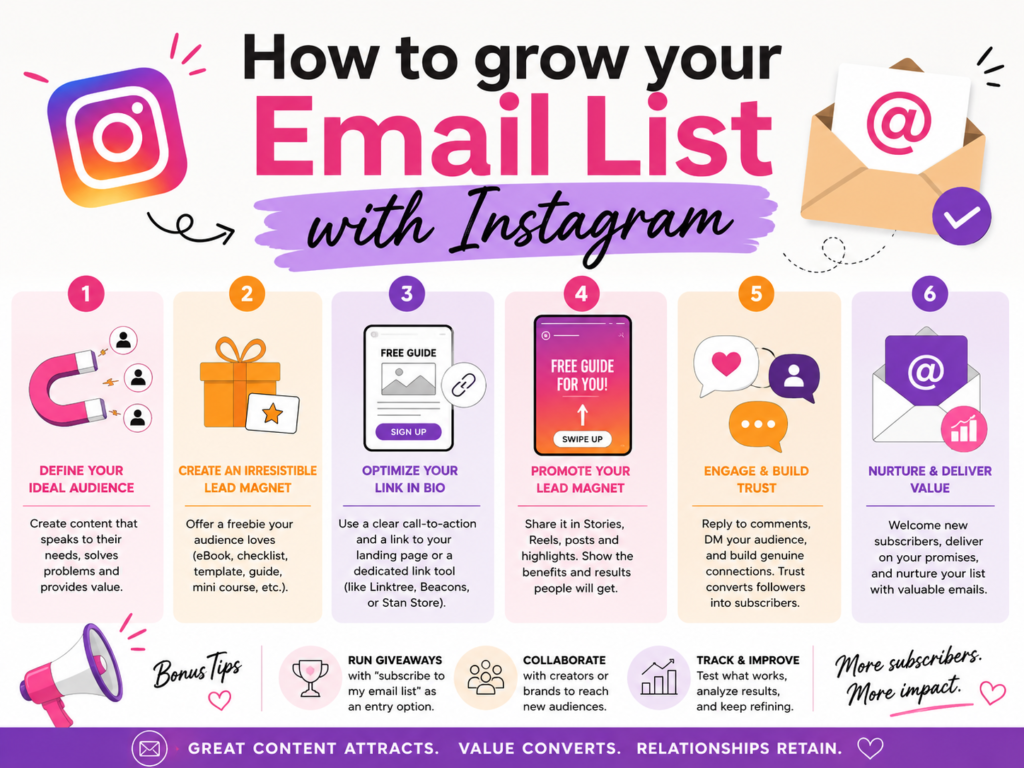
Build an Instagram-to-Email Funnel Before You Promote Anything
A strong Instagram to email funnel has a simple job. It turns attention into permission.
Here is the basic flow:
Instagram content creates interest.
A call to action gives people a next step.
A DM, link, or form captures the email.
The lead magnet or offer is delivered.
A welcome sequence builds trust.
Segmentation keeps future emails relevant.
That flow matters because list growth is not one action. It is a chain. If one link is weak, the whole funnel leaks.
For example, a Reel may get 50,000 views, but if the CTA is vague, few people act. A Story may get link clicks, but if the signup page loads slowly, people leave. A giveaway may collect many addresses, but if the prize attracts the wrong audience, unsubscribes rise later.
Before you post your first email CTA, set up the basics:
- A clear offer or lead magnet
- A mobile-friendly opt-in page or DM capture flow
- A thank-you message or confirmation step
- A delivery email
- A short welcome sequence
- Tags or segments showing where the subscriber came from
This is what separates a real funnel from a random signup link.
Create a Lead Magnet Your Instagram Audience Wants
An Instagram lead magnet is a free or low-friction offer you give in exchange for an email address. It works because it solves a problem your audience already feels.
The best lead magnets are specific, quick to consume, and directly tied to your content.
A weak lead magnet says: “Join my newsletter for updates.”
A stronger lead magnet says: “Get the 7-day meal plan I used to prep healthy lunches in under 20 minutes.”
The second option works because the value is clear. The audience knows what they get. They know why it matters. They can picture themselves using it.
When researching Instagram lead magnet ideas, start with your own content. Look at the posts that bring saves, shares, DMs, comments, and repeat questions. Those are signals. Your audience is already telling you what they want.
If you sell skincare, your lead magnet might be a skin type quiz or routine builder.
If you are a fitness coach, it might be a 5-day workout plan.
If you sell digital templates, it might be a free starter template.
If you run a local café, it might be a birthday club or seasonal tasting invite.
If you teach marketing, it might be a caption swipe file or content calendar.
The lead magnet should connect to the next step you want subscribers to take. Do not offer a random freebie only because it sounds popular. A free iPad giveaway may collect emails, but most entrants may not care about your product. A niche-specific checklist may collect fewer emails but produce better leads.
| Business type | Strong Instagram lead magnet | Why it works |
|---|---|---|
| Ecommerce brand | First-order discount, style quiz, size guide, product finder | Connects Instagram interest to purchase intent |
| Coach or consultant | Checklist, mini-training, audit template, workbook | Shows expertise and creates trust before a sales call |
| Creator or newsletter writer | Free issue, resource list, private guide, content vault | Gives followers a reason to join beyond public posts |
| Local business | Birthday reward, event invite, local guide, tasting list | Turns local attention into repeat visits |
| SaaS or service brand | Calculator, benchmark sheet, comparison guide, demo checklist | Helps prospects evaluate a problem before buying |
The best lead magnet feels like the next natural step after your Instagram content.
If your Reels teach productivity tips, offer a planner.
If your carousels explain fashion styling, offer a capsule wardrobe guide.
If your Stories show behind-the-scenes baking, offer a recipe card or early access list.
Do not make the lead magnet too large. A 72-page ebook often feels heavy. A one-page checklist, short video, quiz result, or template can convert better because people believe they will use it.
Optimize Your Profile for Email Signups
Your profile is the first conversion point many followers see. If someone enjoys a Reel, they often visit your profile before taking the next step. That means your bio, pinned posts, Highlights, and link destination should all support the signup path.
Start with the bio.
A strong bio should answer three questions fast:
Who do you help?
What result do you help them get?
What should they do next?
If your goal is Instagram bio link email signup, the CTA should not be hidden. It should be plain.
For example:
Get the free 5-day clean eating plan below.
Download the caption template I use for client posts.
Join the weekly skincare letter and get your routine guide.
DM “START” for the free checklist.
Do not send people to a cluttered page with twelve links unless you have a strong reason. Too many choices slow action. If list growth is the goal, the signup should be the first or most visually obvious option.
A link in bio landing page can work well when it is focused. It should load quickly on mobile. It should repeat the promise from the bio. It should show the benefit of signing up before asking for the email. It should ask only for what you need.
For most Instagram funnels, email address and first name are enough. If you ask for phone number, birthday, company size, job title, or location, make sure there is a clear reason. Every extra field adds friction.
Profile optimization also includes pinned posts. Pin a post that explains your free resource, newsletter, quiz, waitlist, or starter offer. New visitors should not have to search for the next step.
Your Instagram Highlights matter too. A Highlight called “Free Guide,” “Start Here,” “Newsletter,” “Waitlist,” or “Discount” can keep your signup path visible even after Stories disappear.
Use Stories to Move Warm Followers Into Your Email List
Stories are powerful because they reach people who already have some relationship with you. They may not be cold strangers. They are followers, repeat viewers, customers, friends of customers, or people who have interacted with you before.
The Instagram Stories link sticker lets you send viewers to a signup page from a Story. That makes Stories one of the simplest email growth tools on Instagram.
But the link alone is not enough. A single Story that says “sign up here” is easy to skip.
A better Story sequence builds context first.
Story 1: Name the problem.
Story 2: Show the cost of not solving it.
Story 3: Share a quick tip or personal result.
Story 4: Offer the free resource.
Story 5: Add the link sticker with a direct CTA.
For example, a nutrition coach could say:
“Most people do not fail meal prep because they lack discipline. They fail because the plan is too complicated.”
“Here is what I use instead.”
“I made a 5-day plan with meals you can repeat.”
“Want it? Grab the free plan here.”
That sequence gives people a reason before the link appears.
Interactive stickers can also help. A poll, quiz, or question sticker lets your audience raise their hand. You can use an Instagram story poll email list strategy by asking a simple question like:
“Want my free packing checklist?”
“Do you want the template?”
“Should I send you the recipe?”
“Want early access?”
People who respond are easier to message because they already showed interest.
This can be manual or automated. If your account is small, reply personally. If your account is larger, use a compliant automation flow that asks for consent clearly.
Stories also work well for reminders. Many followers need to see an offer more than once before acting. You can promote the same lead magnet in different ways across the week without sounding repetitive.
One day, talk about the problem.
Another day, show a result.
Another day, answer a question.
Another day, share a subscriber reaction.
Another day, remind people that the free resource is still available.
Turn Highlights Into Evergreen Signup Paths
Stories disappear after 24 hours, but Highlights can turn your best signup Stories into a permanent funnel.
An Instagram Highlights newsletter signup strategy works because profile visitors often check Highlights before scrolling your full feed. They want quick context. They want to know who you are, what you offer, and whether you can help them.
Your signup Highlight should be clear. Do not use a clever name that only insiders understand. Use a label that matches the action:
Free Guide
Newsletter
Start Here
Free Class
Waitlist
Discount
Recipes
Templates
Inside the Highlight, keep the path short. Start with the problem, show the promise, explain what they get, then show the signup step.
A good Highlight should not feel like a random collection of old Stories. It should feel intentional.
For example:
Slide 1: “New here? Start with the free guide.”
Slide 2: “It helps you plan 7 days of content in 30 minutes.”
Slide 3: “You will get prompts, examples, and a posting plan.”
Slide 4: “Use the link in bio or DM ‘PLAN’.”
This gives new visitors a path even if you are not actively posting at that moment.
Use Reels to Create Discovery and Drive Email Action
Reels are often the top discovery format for many accounts. A strong Reel can reach people who do not follow you yet. That makes Reels valuable for list growth, but only when the CTA is clear.
An Instagram Reels CTA email list strategy should match the behavior of Reel viewers. Many people watch Reels casually. They may not read a long caption. They may not click your profile unless you give them a reason.
So your Reel needs three parts.
First, the hook must attract the right person.
Second, the content must create enough value to build trust.
Third, the CTA must connect the Reel to the next step.
A vague CTA says: “Follow for more.”
A stronger CTA says: “Comment CHECKLIST and I’ll send you the free version.”
Another strong CTA says: “Grab the full routine from the link in my bio.”
Another says: “DM me GUIDE and I’ll send the template.”
Reels work especially well when the lead magnet completes the idea introduced in the video.
For example:
A Reel gives three mistakes. The lead magnet gives the full checklist.
A Reel shows a before-and-after. The lead magnet gives the process.
A Reel teaches one tip. The lead magnet gives the full template.
A Reel tells a short story. The email gives the full breakdown.
Do not make every Reel a list-growth post. That gets tiring. But build recurring email CTAs into your content calendar. If you post five Reels a week, one or two can point to a free resource.
Use Carousels to Educate Before the Signup
Carousels are excellent for teaching. They let you slow the scroll, build an argument, and move people through a sequence. That makes them useful for list growth.
An Instagram carousel lead magnet strategy works best when the carousel gives useful value but leaves a natural next step.
For example:
Slide 1: “5 reasons your email list is not growing from Instagram.”
Slide 2: “Your bio CTA is vague.”
Slide 3: “Your lead magnet is too broad.”
Slide 4: “Your signup page has too much friction.”
Slide 5: “You are not using Stories to warm people up.”
Slide 6: “You are not following up after signup.”
Slide 7: “Want the full audit checklist? Comment AUDIT.”
This type of post does not hide value. It gives enough value to earn attention, then offers a deeper tool for people who want to act.
Carousels also create saves. Saves are useful because they show intent. If someone saves your post about a problem, they may be ready for a checklist, calculator, template, or guide tied to that problem.
Use the caption to repeat the CTA in plain language. Use the final slide to make the offer clear. If comments trigger your DM automation, use the same keyword in the final slide, caption, and pinned comment.
Use DMs and Automation Without Losing Trust
DMs are one of the most direct ways to turn Instagram followers into email subscribers.
A person who replies to a Story, comments a keyword, or sends you a message is closer than a passive viewer. They have started a conversation. That makes the next step feel natural if you handle it with care.
Instagram DM automation can help you respond quickly when people comment or message at scale. A common flow looks like this:
A Reel says, “Comment GUIDE.”
The user comments “GUIDE.”
An automated DM replies with a friendly message.
The DM asks whether they want the free guide.
The user confirms.
The system asks for an email or sends a signup link.
The email tool adds the subscriber with the right tag.
The lead magnet is delivered.
This is where Instagram comment automation becomes useful. It can turn public engagement into private conversation. But the experience must feel respectful.
Do not trick people. Do not add them to your list just because they commented. A comment shows interest. It is not the same as email consent.
Your DM should be clear.
For example:
“Thanks for asking for the guide. I can send it to your inbox. Drop your email here and I’ll send the free checklist. By sharing your email, you agree to receive this resource and occasional helpful emails from us. You can unsubscribe anytime.”
That type of message is plain. It sets expectations. It avoids the feeling of a hidden subscription.
An Instagram keyword CTA works best when the keyword is short, memorable, and connected to the offer. Good keywords include GUIDE, PLAN, CHECKLIST, RECIPE, AUDIT, START, TEMPLATE, DISCOUNT, CLASS, WAITLIST, or SCORE.
Avoid long keywords. Avoid words people may misspell. Avoid using multiple keywords in the same post.
Manual DMs still work for smaller accounts. In fact, they can convert better because they feel personal. If you receive only a few requests per day, answer by hand. Ask one helpful question. Send the link. Invite them to reply if they need help.
Automation is useful when volume becomes hard to manage. It should improve speed, not remove the human feel.
Should You Capture the Email in DM or Send People to a Signup Page?
Both methods can work.
Capturing the email inside DM is fast. It keeps the user in the conversation. It can feel smooth when the automation is well built.
Sending people to a signup page gives you more space to explain the offer, show trust signals, include privacy language, and add form fields. It can also be easier to manage with most email platforms.
The best choice depends on your audience and offer.
If the offer is simple, such as a discount code or checklist, in-DM capture may work well. If the offer needs more explanation, such as a webinar, course waitlist, quiz, consultation, or product finder, a landing page may be better.
The key is consistency. If the Reel says “comment GUIDE,” the DM should mention the guide. If the landing page headline says something different, users may hesitate.
Your funnel should feel like one conversation, not three disconnected steps.
Use Signup Forms That Convert on Mobile
Most Instagram traffic is mobile. That means your form must be simple, fast, and easy to complete on a phone.
An email opt-in form Instagram funnel should not feel like a desktop form squeezed onto a small screen.
Keep the headline clear. Repeat the lead magnet promise. Use a short explanation. Ask for the minimum information. Make the button copy specific.
Weak button copy says: “Submit.”
Better button copy says:
Send me the checklist
Get the free guide
Join the waitlist
Send the recipe
Get instant access
Your form should also set expectations. Tell people what they will receive and how often you may email them. If you send a weekly newsletter, say that. If they are joining a launch waitlist, say that. If they will receive a discount and future promotions, say that.
Clarity improves trust. It may reduce low-quality signups, but that is good. You do not need people who feel tricked. You need people who want to hear from you.
Your thank-you page also matters. After signup, tell people what to do next. Ask them to check their inbox. If you use double opt-in, explain the confirmation step. If the lead magnet may land in promotions or spam, tell them to search for your sender name.
That first moment shapes the relationship.
Use Giveaways and Contests Carefully
An Instagram giveaway email list campaign can grow subscribers quickly. But speed can hide a quality problem.
Giveaways attract attention because people like free things. That does not always mean they like your brand. If the prize is too broad, you may collect emails from people who will never buy, read, book, visit, or engage.
The prize should qualify the audience.
A skincare brand should give away skincare, not a cash card.
A meal planning creator should give away a recipe bundle, not a random gadget.
A local fitness studio should give away a class pack, not a generic prize.
A consultant should give away an audit, not a mass-market item.
This is also where Instagram contest email capture needs care. If entering the contest requires an email address, the terms should be clear. People should understand whether they are joining your marketing list or only entering the promotion. If they will receive future emails, say so clearly.
Instagram promotions also need official rules, eligibility terms, and platform release language. This is not just a legal formality. It protects your brand and gives participants confidence.
Giveaway subscribers should be tagged separately. They may behave differently from people who joined through a specific lead magnet. If you treat all subscribers the same, your future email performance can suffer.
After the giveaway ends, send a follow-up that respects the context.
Thank them for entering.
Announce the winner or next step.
Give a useful consolation offer or resource.
Invite them to stay subscribed for a clear reason.
Do not switch immediately into aggressive selling. You earned attention through a prize. Now you need to earn trust through value.
Use Challenges, Waitlists, and Launches to Create Urgency
Not every email growth campaign has to be a free PDF. Challenges, waitlists, early access lists, product drops, workshops, webinars, beta invites, and private events can all work well on Instagram.
A challenge works because it creates a shared experience. People sign up because they want daily guidance, accountability, or structure. A 3-day, 5-day, or 7-day challenge can fit well with Instagram content because you can promote it through Reels, Stories, Lives, and countdown stickers.
A waitlist works because it creates anticipation. It is useful for product launches, course launches, memberships, local openings, limited drops, consulting spots, or event registration.
A webinar or live class works well when your offer needs education before purchase. The Instagram content builds interest. The signup page captures the email. The class builds trust. The follow-up sequence makes the offer.
A private newsletter works when your best value is ongoing insight. In that case, the promise should be specific. “Join my newsletter” is weak. “Get one practical Instagram growth teardown every Friday” is much stronger.
That is a newsletter signup Instagram strategy with a real reason to subscribe.
Use Instagram Lead Ads When Organic Growth Is Too Slow
Organic content is powerful, but it takes time. If you already know your lead magnet converts, Instagram lead ads can speed up growth.
Instagram lead ads can use Meta Instant Forms, which let people submit information without leaving the Meta environment. This can reduce friction because the form is built for mobile and may prefill some details.
The tradeoff is lead quality.
Instant Forms can generate more leads because they are easy to complete. A dedicated landing page may create fewer leads but better-informed subscribers because people read more before signing up.
Neither option is always better. Test both when budget allows.
Use Instant Forms for simple offers, discounts, event registrations, local promotions, and short lead magnets. Use landing pages when the offer needs proof, explanation, case studies, pricing context, or a longer promise.
With paid campaigns, do not judge success only by cost per lead. Cheap leads are not useful if they do not open emails, click, buy, book, or stay subscribed.
Track cost per qualified subscriber. That means you should look beyond the form submission.
Did they confirm?
Did they open the welcome email?
Did they click?
Did they buy?
Did they unsubscribe fast?
Did they reply or engage?
Paid list growth should be measured by quality, not volume.
Segment Instagram Subscribers From the Start
Many brands collect subscribers and send everyone the same emails. That is a mistake.
Email subscriber segmentation helps you send more relevant messages based on how someone joined, what they wanted, and what they are likely to need next.
At minimum, tag subscribers by source and offer.
For example:
Source: Instagram
Format: Reel
Offer: Content calendar
Campaign: July launch
Keyword: PLAN
This lets you understand which content produces subscribers. It also helps you personalize the welcome sequence.
Someone who joined from a giveaway should not receive the same first few emails as someone who requested a pricing guide. Someone who joined from a beginner checklist may need education. Someone who joined a waitlist may need launch updates. Someone who requested a discount may be close to buying.
Segmentation also protects your list health. If subscribers from one campaign unsubscribe at a high rate, you can study that campaign instead of blaming the whole email strategy.
The best Instagram email systems are simple but organized. You do not need hundreds of tags. You need enough information to send the right message.
Write a Welcome Sequence for Instagram Subscribers
The signup is not the finish line. It is the start of the relationship.
A welcome email sequence helps new subscribers understand who you are, receive what they asked for, and take the next step.
The first email should arrive quickly. If someone requested a guide, send the guide. If they joined a waitlist, confirm they are on it. If they signed up for a discount, give the code. Do not make them wait.
The first email should do three things:
- Deliver the promised resource
- Remind them why they signed up
- Set expectations for future emails
That is the first bullet list after the setup list, and it matters because welcome emails are where trust either begins or breaks.
The second email can add value related to the lead magnet. If they downloaded a meal plan, send a prep tip. If they requested a content calendar, send examples. If they joined a skincare quiz, explain how to use their result.
The third email can introduce your story, method, product, service, or point of view. This is where you make the relationship feel human. People joined from Instagram, so they may already know your face, voice, or content style. Bring that same energy into the inbox.
The fourth or fifth email can make an offer if it fits. That offer might be a product, consultation, course, event, paid template, membership, or sales call.
Do not rush the sale if the lead magnet was very top-of-funnel. Do not wait too long if the subscriber joined through a high-intent offer. Match the timing to the intent.
Make the First Email Feel Connected to Instagram
A common mistake is sending a generic welcome email that does not mention the source.
If someone came from Instagram, acknowledge it.
For example:
“Thanks for coming over from Instagram. Here is the checklist I promised in the Reel.”
That one sentence creates continuity. It tells the subscriber they are in the right place. It also reminds them of the moment that led to the signup.
This matters because people forget fast. They may sign up while scrolling at night, then open the email the next morning. If the email feels unfamiliar, they may ignore it or unsubscribe.
Use the same language from the post, Story, Reel, or DM. If the CTA said “free content audit checklist,” do not call it “marketing optimization resource” in the email. Keep the promise consistent.
Use Instagram Content to Improve Your Emails
Instagram can teach you what to email.
Look at the posts that get saves. Those topics often deserve deeper email content. Look at Story questions. Those questions can become email subject lines. Look at comments. Those comments show the words your audience uses. Look at DMs. Those DMs reveal objections, fears, goals, and confusion.
This is where Instagram and email support each other.
Your Instagram content creates the conversation. Your email content deepens it.
If followers keep asking, “How do I start?” write an email about the first step.
If they ask, “How much does it cost?” write an email about pricing.
If they say, “I tried this and failed,” write an email about common mistakes.
If they love a behind-the-scenes Story, write an email with the full process.
Do not treat email as a place to dump promotions. Treat it as the next layer of your content strategy.
Measure the Whole Funnel, Not Just Email Signups
List size is easy to measure. It is not enough.
You need to measure your funnel from Instagram impression to email engagement. This helps you find the real bottleneck.
| Funnel stage | Metric to track | What it tells you |
|---|---|---|
| Instagram content | Reach, views, saves, shares, comments | Whether the topic attracts the right attention |
| CTA engagement | Profile visits, keyword comments, Story replies, link taps | Whether people understand the next step |
| Signup page or DM | Form conversion rate, DM completion rate | Whether the opt-in process feels easy and trustworthy |
| Email delivery | Confirmation rate, delivery rate, first email opens | Whether subscribers receive and recognize your emails |
| Nurture quality | Clicks, replies, unsubscribes, purchases, bookings | Whether new subscribers are valuable to the business |
This table is important because most people only look at the middle of the funnel. They ask, “How many subscribers did I get?” A better question is, “Where did the right people drop off?”
If a Reel gets strong views but no comments, the CTA may be weak.
If people comment but do not give email addresses, the DM may feel unclear.
If they click but do not sign up, the landing page may not match the post.
If they subscribe but do not open, the first email may be slow or unfamiliar.
If they open but do not click, the lead magnet or next step may be weak.
Fix one stage at a time. Do not change everything at once or you will not know what worked.
Test Your Lead Magnet Like a Marketer
Your first lead magnet may not be your best one. That is normal.
Instagram gives you fast feedback. Use it.
Test different topics, formats, and CTAs. A checklist may beat a video. A quiz may beat a PDF. A discount may work for ecommerce but fail for a high-ticket service. A keyword comment may beat link in bio for Reels, while link stickers may work better for Stories.
Run small tests before rebuilding the whole funnel.
For example, use the same lead magnet for two CTAs:
“Comment GUIDE” on a Reel.
“Get the guide through the link in bio” on a carousel.
Then compare the results. Which one got more actions? Which one produced better subscribers? Which one led to more email clicks?
You can also test lead magnet angles.
A business coach might test:
Free pricing calculator
Client onboarding checklist
Sales call script
Offer audit worksheet
The audience will show you what feels urgent.
Do not judge only by signup volume. A smaller list of people who buy is better than a large list of people who ignore you.
Keep Consent Clear and Protect Trust
Email list growth depends on permission. If people feel tricked, your list becomes weaker even if it grows faster.
A person who comments on Instagram has not automatically agreed to receive marketing emails. A person who enters a giveaway may not understand they are joining a newsletter unless you say it clearly. A person who sends a DM for a free resource should know what happens when they share their email.
Clear consent protects your brand and improves subscriber quality.
Your opt-in language should say what people are getting. It should also explain that they may receive future emails and can unsubscribe.
Keep it simple.
For example:
“Enter your email to get the free guide and weekly tips from us. You can unsubscribe anytime.”
That is much better than hiding consent in tiny text.
Your emails also need honest subject lines, accurate sender information, and a clear unsubscribe option. If someone opts out, respect that quickly. Do not make the process hard. Do not require extra personal information to unsubscribe.
Trust is a growth strategy. The more honest your signup process feels, the more likely people are to stay.
Stay Careful With Giveaways and Promotions
Giveaways can be useful, but they require more care than a normal lead magnet.
If you run a promotion on Instagram, include official rules and eligibility details. Make it clear who can enter, when the promotion starts and ends, how the winner is chosen, what the prize is, and whether there are location or age restrictions.
Also make it clear that Instagram is not sponsoring or administering the promotion.
If email signup is part of entry, explain that clearly. Do not bury the email consent in a confusing caption.
Giveaways can also attract people who only want the prize. That is why the prize should be connected to your niche. The more relevant the prize, the better the subscribers.
For example, if you sell handmade candles, a candle bundle attracts better prospects than a generic tech gadget. If you run a fitness program, a free coaching session attracts better prospects than a shopping voucher.
The aim is not maximum entries. The aim is relevant entries.
Avoid the Biggest Instagram Email List Growth Mistakes
Many Instagram list-building campaigns fail for the same reasons.
The first mistake is promoting a weak offer. People rarely join because you say, “Subscribe to my updates.” They join because you offer a result they want.
The second mistake is hiding the CTA. A follower should not have to guess what to do. If the next step is to comment, say that. If the next step is to click the link in bio, say that. If the next step is to reply to a Story, say that.
The third mistake is sending people to a confusing page. Instagram traffic is impatient. If the page loads slowly, has too many links, or does not repeat the promise, people leave.
The fourth mistake is using automation with no human warmth. Automated DMs should sound clear and helpful, not robotic or pushy.
The fifth mistake is collecting subscribers without sending a welcome email. If the first email arrives days later, the subscriber may forget who you are.
The sixth mistake is measuring list size but ignoring subscriber quality. A large list with weak engagement is not a win.
This is the third and final bullet list. Use it as a quick audit before launching your next campaign.
Build a 30-Day Instagram Email Growth Plan
You do not need to do everything at once. A focused 30-day plan is enough to build momentum.
In week one, create or refine your lead magnet. Choose one specific audience problem. Build a simple form or DM flow. Write the delivery email. Add tags for source, campaign, and offer. Update your bio and link destination.
In week two, promote the lead magnet through Stories and carousels. Use a Story sequence with a problem, tip, proof, and link sticker. Create one carousel that teaches part of the solution and points to the free resource.
In week three, promote through Reels. Use one direct CTA per Reel. Test comment keyword against link in bio if possible. Repeat the offer more than once, but vary the angle.
In week four, measure the funnel. Look at which content drove action. Check your signup conversion rate. Review welcome email opens, clicks, replies, and unsubscribes. Improve the weakest stage.
This plan works because it gives your audience repeated chances to act without turning your entire account into a pitch.
Example Instagram-to-Email Funnel for a Creator
Imagine a creator who teaches freelancers how to get better clients.
The lead magnet is a “Client Outreach Script Pack.”
The Reel hook says: “Stop sending cold DMs that sound like everyone else.”
The Reel gives three quick fixes. The CTA says: “Comment SCRIPT and I’ll send you my free outreach script pack.”
When someone comments, the DM says: “Want the script pack? I can send it to your inbox. Share your email and I’ll send it over.”
The email delivers the script pack and says: “You came from my Instagram Reel about better outreach. Here are the scripts I promised.”
The next email explains how to personalize the scripts. The next shares a case study. The next invites them to a paid workshop.
That is a complete funnel. It starts with public content and ends with a warmer relationship.
Example Instagram-to-Email Funnel for an Ecommerce Brand
Imagine a skincare brand.
The lead magnet is a “Find Your 3-Step Routine” quiz.
A Story poll asks: “Do you know your skin barrier type?” People who tap “no” receive a DM with the quiz link.
The profile bio says: “Take the free routine quiz before you buy.”
The quiz captures email before showing the full result. Subscribers are tagged by skin concern, such as dryness, oiliness, sensitivity, or acne-prone skin.
The first email delivers the routine. The second explains how to use the products. The third shares reviews from people with similar concerns. The fourth offers a starter kit.
This funnel works because the segmentation is useful. The brand does not send the same message to everyone. It uses the signup reason to personalize the emails.
Example Instagram-to-Email Funnel for a Local Business
Imagine a bakery.
The lead magnet is a birthday club and seasonal menu preview.
The bakery posts Reels showing new flavors. The CTA says: “Want first access to seasonal boxes? Join the list through the link in bio.”
Stories show behind-the-scenes baking and use the link sticker for preorders. Highlights include “Menu,” “Birthday Club,” and “Order.”
The signup form asks for email, first name, birthday month, and nearest location if the bakery has more than one store.
The first email welcomes the subscriber and shares the current seasonal menu. The second explains how preorders work. The birthday automation sends a special offer during their birthday month.
This is simple but effective because local businesses need repeat visits, not just likes.
Example Instagram-to-Email Funnel for a Consultant
Imagine a B2B consultant who helps small companies improve operations.
The lead magnet is a “Workflow Bottleneck Audit.”
A carousel explains five signs a business has an operations problem. The final slide says: “Want the audit sheet? Comment AUDIT.”
The DM sends people to a landing page because the offer needs more explanation. The form asks for name, email, company size, and the biggest workflow challenge.
The first email delivers the audit. The second explains how to score the results. The third shows a before-and-after client example. The fourth invites the subscriber to book a diagnostic call.
This funnel works because the form fields qualify leads. The consultant does not need thousands of subscribers. They need the right subscribers.
Write CTAs That Feel Natural on Instagram
Your CTA should match the content format.
For Reels, make it quick. People are moving fast. Say the CTA in the video if possible, add it to on-screen text, repeat it in the caption, and pin a comment.
For carousels, use the final slide. The reader has already spent time with your content, so the final slide can ask for action.
For Stories, build a short sequence before adding the link. Use the link sticker after interest is created.
For Lives, mention the free resource during the session and repeat it near the end. If you use automation, ask people to comment or DM the keyword.
For bio, keep the CTA always visible.
Good CTAs sound direct:
“Comment PLAN and I’ll send the free planner.”
“DM START for the checklist.”
“Take the free quiz through the link in bio.”
“Join the waitlist before Friday.”
“Get the full template in your inbox.”
Avoid vague CTAs like “check it out,” “learn more,” or “sign up for updates” when you can be more specific.
Use Link in Bio and DM Automation Together
Some marketers treat link in bio and DM automation as separate choices. You can use both.
Your bio link catches profile visitors.
Your DM automation catches active commenters and Story responders.
Your Highlights catch new visitors who want context.
Your pinned posts catch people reviewing your feed.
Your Stories catch warm followers.
Your Reels catch new discovery traffic.
This creates multiple paths to the same email goal.
The key is to avoid confusion. If you have three active lead magnets, make sure each CTA is clear. Do not tell people to comment GUIDE for one thing in one post and another thing in another post unless your automation can handle that cleanly.
A focused funnel usually beats a scattered one.
Make Your Newsletter Worth Staying On
Getting the email is only the first promise. Keeping the subscriber requires ongoing value.
Many people lose subscribers because the emails after the lead magnet feel disconnected. A person signs up for a useful checklist, then receives generic sales emails. That creates regret.
Your newsletter should continue the value that attracted them.
If they joined for recipes, send recipes.
If they joined for marketing templates, send examples and breakdowns.
If they joined for discounts, send clear product updates and offers.
If they joined for a course waitlist, send useful preparation content.
You can still sell. But the sale should fit the relationship.
A strong email list is not built by trapping people. It is built by making them glad they subscribed.
How to Know If Your Instagram List Growth Strategy Is Working
Your strategy is working if more of the right people are joining, staying, and acting.
That does not always mean explosive growth. A small account can build a strong list if the offer is clear and the audience is focused.
Watch for these positive signs:
People comment the keyword without needing extra explanation.
Story viewers reply asking for the resource.
The signup page converts steadily.
The first email gets opens and clicks.
New subscribers reply to emails.
Subscribers buy, book, register, or share.
Unsubscribes stay reasonable after campaigns.
Watch for warning signs too.
High clicks but low signups may mean the page is weak.
High signups but low opens may mean the delivery email is slow or unclear.
High unsubscribes may mean the offer attracted the wrong audience.
High comment volume but low email capture may mean the DM flow is too pushy or confusing.
The best marketers do not guess. They read the funnel.
Final Takeaway
Instagram is one of the best places to find, warm, and engage an audience. But if your whole relationship depends on Instagram reach, you are always renting attention.
Email gives that relationship a stronger base.
To convert Instagram followers into subscribers, start with a useful offer. Make the CTA clear. Use Stories, Reels, carousels, Highlights, DMs, and link-in-bio paths to move people toward the signup. Capture consent honestly. Segment subscribers by source and intent. Send a welcome sequence that delivers value quickly. Measure the full funnel, not only list size.
The accounts that win are not the ones shouting “join my list” the loudest. They are the ones that make the next step feel useful, timely, and trustworthy.
That is how you grow an email list from Instagram without sounding spammy, chasing empty numbers, or building an audience you cannot reach later.